mFusion API
Navigate to ADMIN → General → mFusion API.
mFusion exposes a REST API for integration with third-party and external systems, to automate provisioning, monitoring and hotspot workflows. Access is granted in two levels: first per entity (tenant), then per user of that entity, and each API type is controlled separately:
| API | Used for |
|---|---|
| Monitoring API | Reading device, interface and monitoring data |
| Hotspot API | Hotspot user management, such as creating, updating and deleting users |
Entity Control
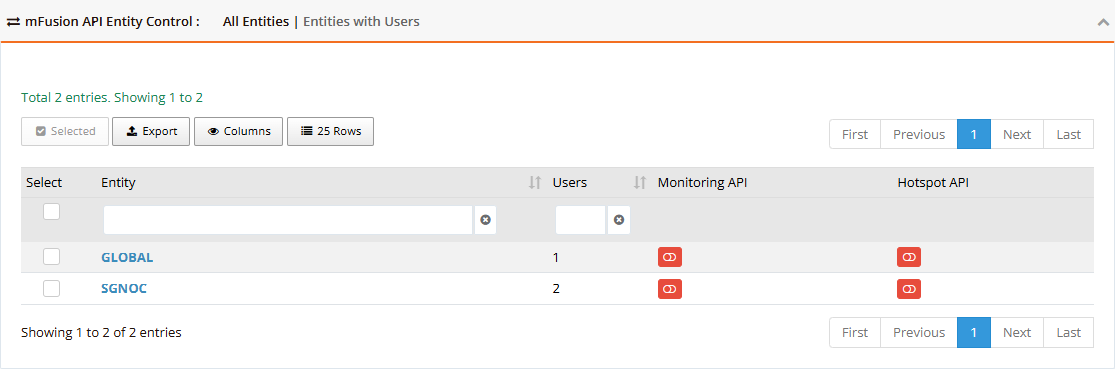
The table lists the entities with their user count and the status of each API. Switch between Entities with Users (default) and All Entities at the top.
| Control | Description |
|---|---|
| Toggle (red = off, green = on) | Enables or disables that API for the entity. Its child entities follow: enabling or disabling a parent applies to every entity below it. |
| Manage API users (shown when the API is on) | Opens the entity's users, to grant the API to individual users |
| Selected | Enables or disables an API for all ticked entities at once |
Access can be granted or revoked per entity without affecting other tenants, which keeps multi-tenant deployments separated.
API Users and Keys
- Turn the API on for the entity, then click Manage API users.
- Enable the API for each user who needs it. Use a dedicated service account for each integration rather than a person's login.
- Click the user's key icon (Manage API access ID and secret) to open its credentials: API ID and API Secret, with Allowed Entities showing which entities the key can reach. Click Request New Access ID and Secret to issue them; requesting again replaces the old pair.
- Give the API ID and secret to the integration, and store them like a password.
Disabling the API for a user, or for the entity, stops its keys at once.
Note
Full API reference documentation will be available at a dedicated URL (to be published).
Security Best Practices
- One user per integration: each system gets its own API user, so one key can be revoked without affecting the others.
- Least privilege: enable only the API type the integration needs, and only on the entity it serves.
- Review regularly: turn off APIs for entities and users that no longer use them; API calls are recorded in the Audit Logs.
- Hotspot API deletes: whether deleting a user through the API also deletes its accounting and quota history is set in Data Maintenance.