TCP Acceleration
TCP Acceleration makes TCP applications (web, file transfer, SaaS, database and API traffic) much faster over long, high-latency links such as satellite, long-distance international circuits and congested cellular. It works transparently: users, servers and applications need no changes, and nothing is installed on end devices.
On a 550 ms satellite-class path, accelerated traffic typically completes about twice as fast, and downloads run up to 3 times faster (see Expected Performance).
Overview
The Problem
TCP was designed for short, low-latency paths. Over a long path, two of its built-in behaviours hold every connection back, no matter how much bandwidth the link has:
- Connection setup — every new connection waits a full round trip for its handshake before the first byte of data moves. At 600 ms, opening a web page with dozens of connections spends most of its time just waiting.
- Slow start and window limits — a TCP sender ramps up its sending rate one round trip at a time, and can never have more data in flight than its window allows. The longer the round trip, the slower the ramp and the lower the ceiling.
The result is a link that tests well on a speed test but feels slow for real applications, especially short transfers.
How TCP Acceleration Works
TCP Acceleration splits each TCP connection into three parts at the two routers on either end of the long path:
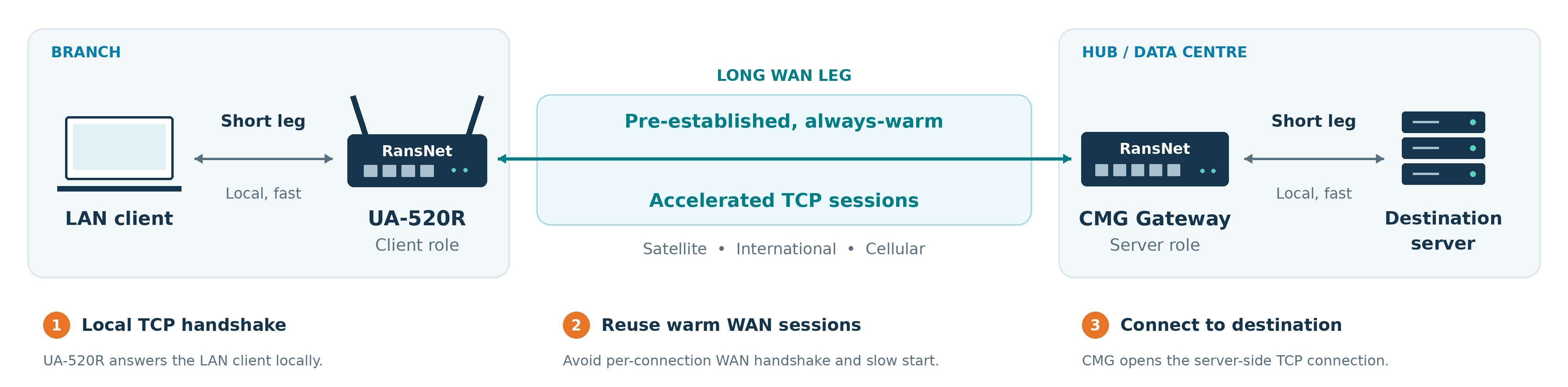
- The branch router (client role) answers the LAN device's connection locally, so the handshake completes in milliseconds instead of a full round trip.
- The data is carried across the long path inside a small pool of pre-established, always-warm sessions between the two routers. These sessions are already up to speed, so a new connection skips both the handshake and slow start on the long leg.
- The hub router (server role) opens the real connection to the destination server and relays the data in both directions.
The routers decide which connections to accelerate by their normal routing decision: any new TCP connection that the branch routes out an accelerated interface is accelerated, including connections steered there by Traffic Steering policies.
If the accelerated sessions are unavailable (hub unreachable, misconfiguration), new connections automatically go direct, unaccelerated — traffic keeps flowing.
The hub connects to servers from its own address
In step 3 the destination server sees the connection coming from the hub's own IP address, not from the original LAN client. The servers' network must route replies for that address back to the hub, and every firewall or allow-list on the way must permit it. If it does not, the hub cannot open the connection and the client's connection fails — this case is not covered by the automatic fallback above. See Hub-to-Server Leg: Source Address, Routes and Firewalls before enabling acceleration.
When TCP Acceleration Helps
The gain depends on two things together: the link's latency and its bandwidth. What matters is how much data must be in flight to keep the link busy — the link speed multiplied by the round-trip time:
- On a fast, high-latency link (for example a 20 Mbit/s satellite service at 550 ms), about 1.4 MB must be in flight. A normal TCP connection needs many slow round trips to grow that far, and every new connection starts again from zero. This is exactly what TCP Acceleration removes, so the gain is large.
- On a slow link (for example a 0.5 Mbit/s VSAT service, even at 550 ms) only about 35 KB is needed. A normal TCP connection reaches that within two or three round trips and already uses the full link, so there is nothing left to gain.
- On a low-latency link (below about 50 ms) TCP ramps up within milliseconds at any speed, so there is also nothing to gain — only extra router CPU.
| Link | Example | Expected result |
|---|---|---|
| High latency, high bandwidth | Satellite or long-haul at 2 Mbit/s and above, 300–700 ms | Large gain — about 2x for typical traffic, up to 3x for downloads (see Expected Performance) |
| High latency, moderate bandwidth | Satellite at about 1–2 Mbit/s | Modest gain, mainly faster page loads and short transfers |
| High latency, low bandwidth | VSAT or satellite plans below about 1 Mbit/s | No gain — normal TCP already fills the link |
| Low latency, any bandwidth | Fibre, broadband, most 4G/5G (below about 50 ms) | No gain, and extra CPU on the router |
Rule of thumb: TCP Acceleration is worth enabling when link speed × round-trip time is above about 64 KB in at least one direction — for example faster than about 1 Mbit/s at a 500 ms round-trip time, or faster than about 10 Mbit/s at 50 ms. Measure the link before deciding: ping across the path for the round-trip time and test throughput for the speed.
Measured on a slow satellite link
A VSAT service of about 540 kbit/s download and 840 kbit/s upload at 515 ms round-trip time carried about 490 kbit/s down and 740 kbit/s up with plain TCP — practically the full link. With TCP Acceleration there was no room left for a gain, and web application timings (CRM, SharePoint, FTP) were unchanged. On links like this, leave TCP Acceleration off.
The router also checks this itself: it measures the link while the client role runs and steps aside automatically on a link where speed × round-trip time is too small to benefit, so new connections pass through unaccelerated — exactly as with TCP Acceleration off. You can also declare the link speed up front — see Link Speed (bandwidth).
Expected Performance
Measured with an x86 hub and branch routers on a path with about 550 ms round-trip time (satellite-class), median of repeated runs, VXLAN over WireGuard.
HSA-520-class branch (ARM), cellular WAN:
| Traffic | Without acceleration | With acceleration | Improvement |
|---|---|---|---|
| 10 small downloads (512 KB each, new connection each) | 92 s | 48 s | 1.9x faster |
| Single download | 6.4 Mbit/s | 13.5 Mbit/s | 2.1x |
| Download, 4 connections | 16.0 Mbit/s | 43.9 Mbit/s | 2.7x |
| Single upload | 9.3 Mbit/s | 20.2 Mbit/s | 2.2x |
| Upload, 4 connections | 17.5 Mbit/s | 21.7 Mbit/s | 1.2x |
HSA-520-class branch (ARM), fixed broadband WAN (median of three runs):
| Traffic | Without acceleration | With acceleration | Improvement |
|---|---|---|---|
| 10 small downloads (512 KB each, new connection each) | 86 s | 47 s | 1.8x faster |
| Single download | 5.5 Mbit/s | 16.7 Mbit/s | 3.1x |
| Download, 4 connections | 16.8 Mbit/s | 48.9 Mbit/s | 2.9x |
Without acceleration, the sender's TCP window on this path settled between about 300 and 800 KB: after each loss burst it halved and regrew only once per 550 ms round trip, which caps a connection at roughly 5–11 Mbit/s however fast the link is. With acceleration, the long leg runs over persistent connections whose windows have already grown. The same setup without the added latency carried 75–100 Mbit/s with or without acceleration, so these results are not limited by the link or the router.
Over a cellular link with high latency (IPsec tunnel), ten small downloads completed in 49 s instead of 93 s, and single downloads rose from 19.6 to 30.8 Mbit/s.
What affects the gain:
- Round-trip time — the longer the path, the larger the gain. Below about 50 ms the improvement is small and may not justify the extra CPU; on a 10 ms path there was no gain, and short transfers were slightly slower (14 s vs 12 s for ten 512 KB downloads).
- Transfer size and count — many short connections gain the most (each skips a handshake round trip); long bulk transfers gain from faster ramp-up and higher in-flight data.
- Router CPU — the accelerator relays traffic through the router's CPU. On entry-level models the CPU can become the limit before the link does (see Router CPU).
Benefits
- About 2x faster for typical TCP traffic over satellite-class latency; downloads up to 3x faster
- Much faster page loads and short transfers — connection setup happens locally instead of across the long path
- Better use of available bandwidth — accelerated sessions reach the link's capacity instead of being held back by TCP window limits
- Transparent — no client software, no application or server changes
- Fail-safe — falls back to direct, unaccelerated forwarding if the accelerator is unavailable
- Resilient — on a VPN tunnel it follows the tunnel through WAN failover, so existing connections are kept when a WAN link fails (see Resiliency and WAN Failover)
- Point-to-multipoint — one hub serves any number of branches with a single setting
- Works over any interface — VPN tunnels (recommended), Ethernet or cellular WAN interfaces
Use Cases
| Scenario | Why it helps |
|---|---|
| Vessels, remote sites and rigs on satellite (GEO, ~550–700 ms) | Removes most of the per-connection latency penalty; web and SaaS feel responsive |
| Branches reaching HQ or a data centre over long-distance international paths | Higher throughput per connection for file transfers, backups, ERP and database traffic |
| Sites on cellular with high or variable latency | Faster page loads and API calls; downloads use more of the available bandwidth |
| Many small transfers (web, APIs, SaaS, POS, telemetry) | Short connections gain the most: each one skips a full handshake round trip |
| Centralised internet breakout through the hub | Branch web browsing through the hub's internet link is accelerated end to end |
TCP Acceleration helps TCP only. It does not change UDP traffic, including voice, video calls, DNS and QUIC (HTTP/3).
Requirements
| Item | Requirement |
|---|---|
| Firmware | A release that includes TCP Acceleration on both routers — see Branch Release Notes and Gateway Release Notes |
| Roles | One router runs the server role (hub/gateway); each branch runs the client role. Point-to-point links can run both roles on both ends (p2p) |
| Interfaces | Any interface type: WireGuard tunnel (recommended), other tunnels (IPsec, GRE, VXLAN), or Ethernet/cellular WAN |
| Server port | TCP 7070 on the server's address on the accelerated interface. Inside a tunnel no extra configuration is needed; over a WAN interface the hub must be reachable on TCP 7070 (see Firewall and NAT) |
| Addressing | IPv4 |
| Authentication | Optional pre-shared key (psk), required when the accelerated interface is a WAN interface |
Deployment Scenarios
TCP Acceleration can be enabled on any interface type, but it is best applied on a VPN tunnel interface, especially WireGuard:
- the tunnel already encrypts and authenticates the traffic between the routers;
- the server listens on the tunnel address, so no firewall or NAT changes are needed;
- the accelerated path follows the tunnel, including across WAN failover.
In mfusion, the setting can be pushed as part of the VPN instance settings, or as an interface setting for Ethernet (ethX) and cellular (wwanX) interfaces.
Hub-and-Spoke (One-to-Many)
The most common deployment. Applications and the internet breakout sit behind the hub; every branch accelerates the TCP connections its users open toward the hub. The hub runs the server role once for all branches; each branch runs the client role.
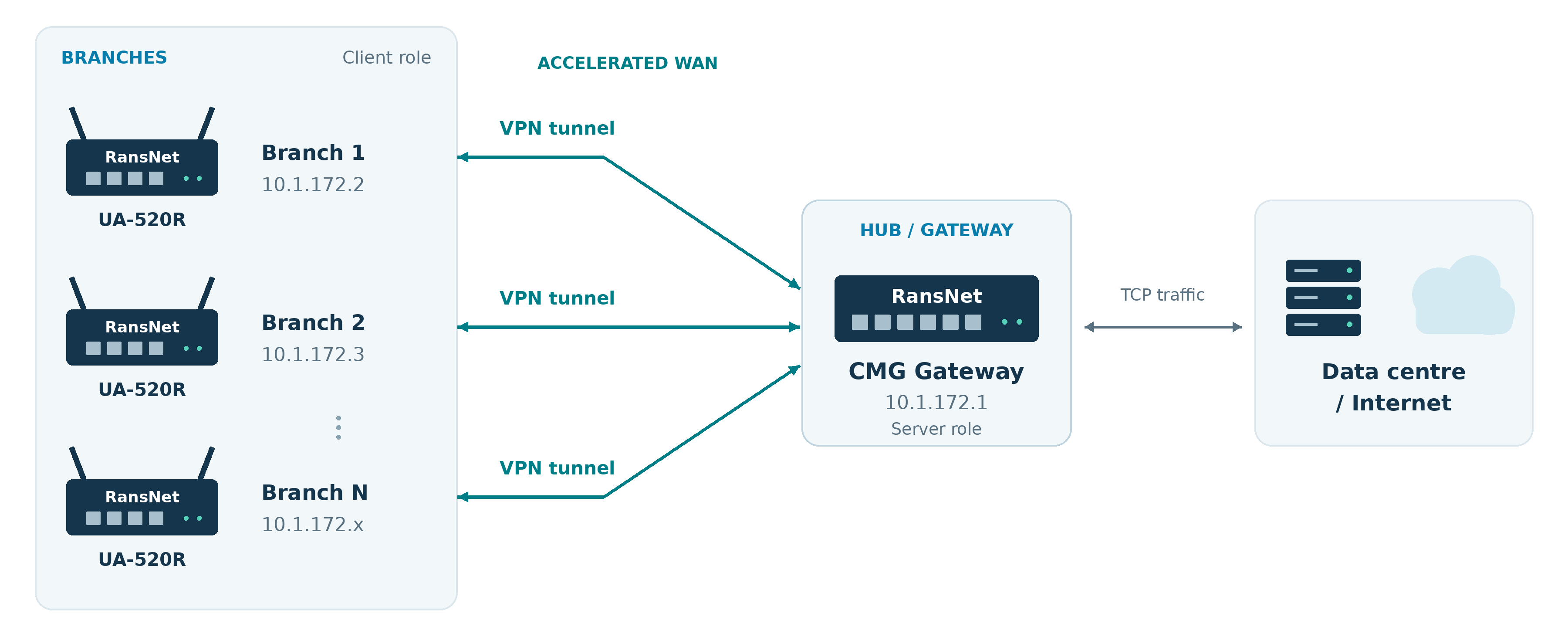
Hub (server role) — one line per tunnel interface, serving every branch on that tunnel:
Each branch (client role) — point the client at the hub's tunnel address:
Note
In hub-and-spoke, only connections opened from the branch side are accelerated (data then flows fast in both directions). Connections opened from behind the hub toward a branch — for example a server at HQ connecting to a device at the branch — are forwarded normally, unaccelerated.
Warning
Before enabling the client role on any branch, confirm that the servers behind the hub accept connections from the hub's own address and route the replies back to it — see Hub-to-Server Leg: Source Address, Routes and Firewalls. Networks that only allow or route the branch LAN subnets will drop every accelerated connection.
Spoke-to-Spoke via the Hub
When branches reach each other through the hub, the same hub-and-spoke configuration applies: the hub is the server and the branches are clients. A connection from Branch 1 to a host at Branch 2 is accelerated on the long leg from Branch 1 to the hub; the hub then opens the connection to Branch 2 over its tunnel as normal TCP.
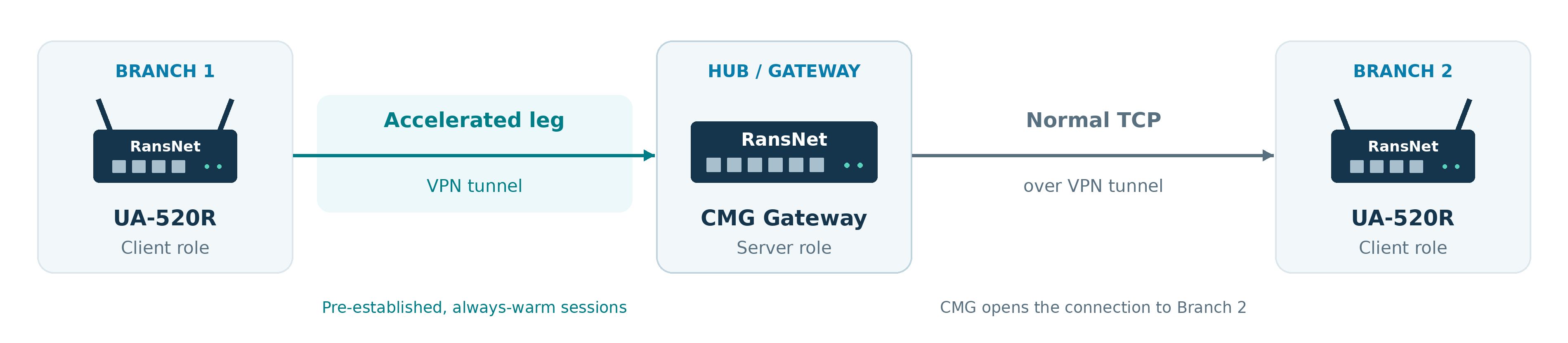
No extra configuration is needed beyond the hub-and-spoke settings above.
Point-to-Point (Two-Way)
On a dedicated tunnel between two sites — for example a site-to-site WireGuard tunnel or a link in a mesh VPN — both sides open connections to each other. Use the p2p role on both ends: each router runs both client and server, so connections are accelerated whichever side opens them.
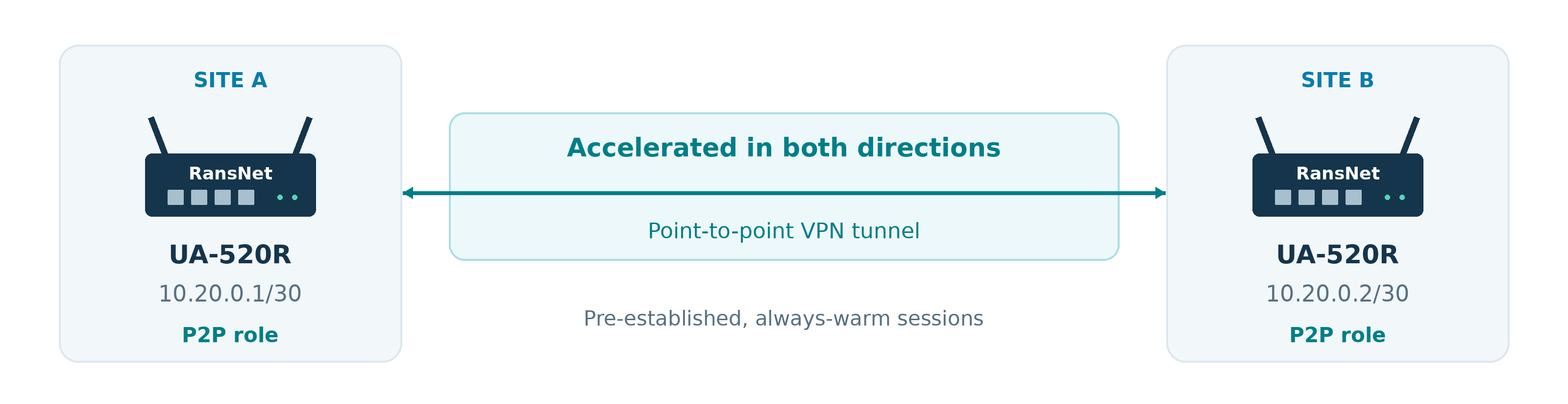
Site A:
Site B:
Note
The p2p role needs a point-to-point subnet (/30 or /31) so each side can find the other automatically. On any other subnet it runs as server only and shows a warning — use the client and server roles instead.
Over a WAN Interface (No Tunnel)
TCP Acceleration can also run directly on an Ethernet or cellular WAN interface, for example when traffic to a hosted service is routed straight out the WAN. The branch points the client at the hub's public address, and the hub runs the server role on its WAN interface. Always set a psk on both ends in this case.
Hub:
Branch:
Warning
Never enable the server role on an internet-facing interface without a psk. Without authentication, anyone who can reach TCP 7070 could relay connections through the hub. The accelerator authenticates sessions with the psk but does not encrypt them; use a VPN tunnel when the traffic must be protected in transit.
Pre-Shared Key on Tunnels
A psk can also be added to any role on a tunnel interface for extra assurance. It must match on both ends:
Link Speed (bandwidth)
The client measures the link it accelerates: its speed while the link is full, and its round-trip time. It uses this to size its buffers to the link, and to step aside — let new connections pass untouched, as with acceleration off — when speed × round-trip time is too small for acceleration to help (see When TCP Acceleration Helps). By default it accelerates until a measurement shows otherwise.
If the link speed is known — for example a satellite service plan — declare it with bandwidth <download> <upload> in kbit/s, so the right decision applies from the very first connection:
| Setting | Behaviour |
|---|---|
No bandwidth |
Accelerates from the start; buffers and the step-aside decision follow the measured link speed once the link has been seen full |
bandwidth <down> <up> |
Uses the declared speed immediately. A measurement can only lower it (if the link delivers less than its plan), never raise it |
With bandwidth 20000 5000 on a 550 ms satellite link, speed × round-trip time is well above the threshold and connections are accelerated. On a 600 kbit/s VSAT plan — or on any link with a low round-trip time — the client steps aside, and show tcp-accelerate says so in its Link estimate line.
Tip
Set bandwidth on satellite and other high-latency sites whose service plan is known. It costs nothing, sizes the accelerator correctly from the first connection, and makes show tcp-accelerate show the expected link speed next to what is measured.
Removing TCP Acceleration
Connections already in progress through the accelerator are closed; new connections are forwarded normally.
Resiliency and WAN Failover
When TCP Acceleration runs on a VPN tunnel interface, it lives inside the tunnel and inherits the tunnel's resiliency. If the branch's active WAN link fails, the router's WAN failover mechanisms move the tunnel to another available link (for example from fibre to 4G/5G), and the accelerated sessions move with it:
- Existing connections are kept. Accelerated connections are not dropped and applications do not need to reconnect when the tunnel moves to another WAN link — no accelerator change or reconfiguration is involved.
- Expect a short pause, not a reset. Traffic pauses while the tunnel moves to the new link, then resumes. The pause depends mainly on how quickly the failure is detected: a link that goes down (cable unplugged, carrier lost) switches over in seconds, while a failure detected by health-check probes adds the detection time. On high-latency links TCP itself takes a few extra seconds to resume after any outage.
- Failback is handled the same way when the original link recovers.
A prolonged outage of the tunnel itself — every WAN link down — can end transfers that are in progress, as it would without acceleration; new connections are accelerated again as soon as the tunnel is back.
Combining WAN links
TCP Acceleration speeds up traffic over the path a tunnel uses; it does not combine the bandwidth of several WAN links. Aggregating multiple WAN links into a single higher-capacity connection is covered in a separate topic.
Firewall and NAT
| Deployment | What to configure |
|---|---|
| Accelerated tunnel interface | Nothing. The server listens on its tunnel address and the router opens TCP 7070 on that tunnel only |
| Accelerated WAN interface, hub directly on the internet | Nothing on the router (TCP 7070 is opened on that interface automatically). Ensure upstream firewalls allow inbound TCP 7070 to the hub |
| Accelerated WAN interface, hub behind a firewall or NAT | On the upstream firewall, forward TCP 7070 on the public address to the hub's WAN address, and point branches at the public address with tcp-accelerate client peer <public-ip> |
| Branch behind NAT | Nothing. Branches only make outbound connections to the hub |
If the accelerator runs on a tunnel interface, port forwarding may be needed to establish the tunnel (if it's behind another router or firewall).
Hub-to-Server Leg: Source Address, Routes and Firewalls
The hub does not forward the branch client's original packets to the server. It opens a new connection from its own IP address — the address of the hub interface that routes toward the server — and relays the data. This changes what the server's network sees:
| Without TCP Acceleration | With TCP Acceleration | |
|---|---|---|
| Source address the server sees | Branch client (for example 192.168.3.25) |
Hub's own address on its server-facing interface (for example 172.16.10.1) |
| Replies are routed to | The branch LAN subnet, back through the hub | The hub's address directly |
| Firewall / ACL / allow-list entries that matter | Branch LAN subnets | The hub's address |
Every accelerated connection fails if the hub's address is not allowed and routed
If the server, the server's default gateway, or any firewall between the hub and the server does not accept connections from the hub's address, or does not route the replies back to it, the hub cannot open any connection. The branch shows HEALTH up and POOL 4/4, but every accelerated connection fails — web pages and file transfers do not load — and the hub's FAILED count rises with every attempt. Branch fallback does not help here, because the branch has already handed the connection to the hub. Removing tcp-accelerate restores normal operation immediately.
Before enabling acceleration, on the network behind the hub:
- Identify the hub's source address — the address of the hub interface that the route to the servers uses (check the route with
show ip route <server-ip>on the hub and take that interface's address). - Return route — make sure the servers, and their default gateway, route replies for that address back to the hub. On the hub's directly connected server subnet this is usually automatic; if the servers sit behind another router, add a route for the hub's address (or its subnet) pointing back to the hub.
- Firewalls and ACLs — on every firewall or router ACL between the hub and the servers, permit the hub's address to the server addresses and ports the branches use, in addition to (or instead of) the branch LAN subnets.
- Server allow-lists — servers or applications that only accept specific client IPs (licensing, databases, management interfaces) must also allow the hub's address. Logs on those servers will show the hub's address for accelerated users.
Example — branches reach application servers in 172.20.20.0/24 through the hub. The hub's server-facing interface is eth1 172.16.10.1/24, and the router in front of the servers is 172.16.10.254:
With acceleration enabled, connections arrive at the servers from 172.16.10.1. The router at 172.16.10.254 and any firewall in front of 172.20.20.0/24 must permit 172.16.10.1 to the required ports (for example TCP 80, 443 and 21), and the servers must route replies for 172.16.10.1 back via 172.16.10.254.
Check from the hub before enabling the branches:
| Items to Test | Command | Expected Outcome |
|---|---|---|
| Hub reaches a server from its own address | ping <server-ip> on the hub |
Replies received |
| Replies come back to the hub (packet capture on the hub's server-facing interface while a branch user retries) | tcpdump -ni <interface> host <server-ip> from the hub shell |
Requests from the hub's address and replies to it; requests with no replies mean a missing return route or a blocking firewall |
If the server side cannot be changed to accept the hub's address, leave TCP Acceleration disabled for the branches that use those servers.
MTU and TCP MSS
No MTU or MSS setting is needed for TCP Acceleration:
- Accelerated long leg — the sessions between the routers are opened by the routers themselves on the accelerated interface, so their segment size follows that interface's MTU automatically. On a tunnel, this is the tunnel MTU the router already discovers and maintains.
- Short legs — the LAN client's connection to the branch, and the hub's connection to the destination server, each negotiate their own segment size on their local network.
- Traffic that is not accelerated (UDP, IPv6, connections that fall back to direct forwarding) keeps using the router's automatic per-tunnel TCP MSS clamping as before. See TCPMSS Clamp to PMTU.
If a tunnel's MTU is wrong (for example a cellular modem MTU that needs manual attention), fix it at the tunnel or WAN level as described in MTU Configuration and Troubleshooting; accelerated sessions then follow the corrected MTU.
Congestion Control
Congestion control is the logic that decides how fast TCP sends and how it reacts when the path is congested. TCP Acceleration uses CUBIC on the accelerated long leg, on both the branch and the hub/gateway:
- Window growth is based on time, not round trips. Classic TCP grows its sending window once per round trip, so a 600 ms path ramps up 20–30 times slower than a local one. CUBIC grows its window as a function of the time since the last loss, so long paths regain speed far faster.
- Fast return to the previous rate. After a loss CUBIC reduces its rate by about 30% (classic TCP halves it), climbs quickly back toward the rate where the loss happened, holds steady near it, then probes carefully for more.
- Predictable and fair. CUBIC is loss-based and is the default in Linux and most operating systems, so accelerated sessions share links fairly with other traffic.
Because the long leg is carried by sessions established in advance and shared by many connections, the slow start that normally penalises every new connection on a long path is avoided, and CUBIC only has to manage the steady flow on the shared sessions.
Other congestion control algorithms, including model-based ones such as BBR, were evaluated. On satellite and cellular paths with alternating upload and download traffic, CUBIC gave the most consistent results; BBR occasionally held a download far below the link rate after an upload. CUBIC is therefore the default.
Limitations and When Not to Use It
Router CPU (Entry-Level Models)
Acceleration processes every accelerated byte on the router CPU. On entry-level routers such as the XE-300, the CPU saturates at modest rates, and acceleration can make bulk transfers slower:
| XE-300, 550 ms path | Without | With |
|---|---|---|
| 10 small downloads | 86 s | 47 s (faster) |
| Download, 4 connections | 7.3 Mbit/s | 16.4 Mbit/s (faster) |
| Upload, 4 connections | 16.5 Mbit/s | 7.4 Mbit/s (slower) |
On entry-level models, enable acceleration for browsing, SaaS and download-heavy sites; leave it off for upload-heavy sites (backups, CCTV upstream). On HSA-520-class routers this limit is well above typical satellite and cellular rates.
Gateway-class (x86) routers used as branches have far more CPU headroom, so performance is much less likely to be limited by turning TCP Acceleration on. The achievable rate still depends on the model, the total traffic the router carries, and the speed of the link or tunnel in use.
Latency for Other Traffic Under Heavy Load
Accelerated transfers fill the link more effectively. During heavy bulk transfers, latency for other traffic sharing the link (for example voice or video calls) can rise noticeably; in testing, peak round-trip time under load rose from about 560 ms to 1.5 s. Combine acceleration with Traffic Shaping to protect real-time traffic, or leave it off on links dedicated to real-time services.
Other Limitations
| Limitation | Details |
|---|---|
| TCP only | UDP traffic (voice, video calls, DNS, QUIC/HTTP3) is not accelerated |
| IPv4 only | IPv6 TCP is forwarded normally |
| Forwarded traffic only | Connections opened by the router itself (management, routing protocols) are not accelerated |
| Direction (client/server) | Only connections opened from the client side are accelerated; use the p2p role on point-to-point links for both directions |
| Source address at the destination | The destination server sees the hub's address as the connection source, not the original LAN client's address. The server network must route replies to that address and its firewalls must allow it — see Hub-to-Server Leg |
| Connection reporting | A LAN client's connection is answered locally first. If the destination then refuses or is unreachable, the client sees the connection close instead of a refusal |
| Existing connections | Only new connections are accelerated; connections open before enabling continue as before |
| End-to-end TCP options | Each leg negotiates its own TCP options; applications relying on end-to-end TCP behaviour (rare) may be affected |
| Fast-path offload | On branch routers, enabling the client role disables hardware/software fast-path forwarding, which raises CPU usage for all forwarded traffic |
When Not to Use It
- Low-latency links (below about 50 ms): little gain, extra CPU.
- Slow links, even with high latency — for example satellite or VSAT plans below about 1 Mbit/s: normal TCP already fills the link, so there is nothing to gain (see When TCP Acceleration Helps).
- Entry-level routers carrying heavy uploads (see XE-300 above).
- Links dedicated to real-time UDP (voice/video): nothing to accelerate, and shared-link latency can rise during transfers.
- Applications that must see the original client IP at the server, unless the server's allow-list or logging can use the hub address instead.
Verification
| Items to Test | Command | Expected Outcome |
|---|---|---|
| Client is connected to the hub | show tcp-accelerate (branch) |
HEALTH up, POOL 4/4 for the interface |
| Connections are being accelerated | show tcp-accelerate (branch), then open a few web pages from a LAN device |
New TCP conns shows classified and accelerated counts increasing; ACTIVE/TOTAL rise |
| Hub sees each branch | show tcp-accelerate (hub) |
Each branch listed under CLIENT with STATE up, 4 sessions and a measured RTT |
| psk accepted | show tcp-accelerate (hub) |
AUTH psk, AUTHFAIL 0 for the listener |
| Fallback works | Remove the server role on the hub temporarily | Branch HEALTH changes to failing; LAN traffic still flows (FALLBACK count rises) |
| Hub can open connections to the servers | Open a few web pages from a branch LAN device, then show tcp-accelerate (hub) |
Hub FAILED stays at or near 0 while TOTAL rises, and traffic counters grow |
| Link speed and decision | show tcp-accelerate (branch) |
Link estimate shows the expected speed and RTT and accelerating on a high-latency, high-bandwidth link; STEPPING ASIDE on a slow or low-latency link |
Branch (client) example:
Router# show tcp-accelerate
====================================================================================================================
TCP Accelerate  :       vxlan1 (client)
====================================================================================================================
Client role     :       classifier running, up 1h13m
New TCP conns   :       7 classified, 7 accelerated, 0 lookup errors
====================================================================================================================
INTERFACE   PEER                AUTH  HEALTH   POOL  PORT  MARK        ACTIVE  TOTAL   FAILED  FALLBACK  OUT        IN
--------------------------------------------------------------------------------------------------------------------
vxlan1      10.1.172.1:7070     none  up       4/4   7101  0xa0100000  0       7       0       0         274.34MB   1.1KB
--------------------------------------------------------------------------------------------------------------------
Link estimate   :       vxlan1 down 20.0 Mbit/s up 5.0 Mbit/s (hint), RTT 552 ms, buffers 5390 KB window / 128 KB unsent - accelerating
Hub (server) example:
Router# show tcp-accelerate
====================================================================================================================
TCP Accelerate  :       vxlan1 (server)
====================================================================================================================
Server role     :       running, up 13h2m, 1 listener(s), tcp/7070
Sessions        :       8 authenticated, 0 authentication failure(s) since start
Connections     :       active 0, total 433, failed 0, aborted 144
Traffic         :       peer->dest 2.94GB, dest->peer 1.37GB
====================================================================================================================
INTERFACE    LISTEN                AUTH  SESSIONS  AUTHFAIL  CLIENTS
--------------------------------------------------------------------------------------------------------------------
vxlan1       10.1.172.1:7070       none  8         0         2
--------------------------------------------------------------------------------------------------------------------
CLIENT           INTERFACE   STATE  SESSIONS  CONNECTED  RTT       ACTIVE  TOTAL   FAILED  UP         DOWN
--------------------------------------------------------------------------------------------------------------------
10.1.172.3       vxlan1      up     4         13h2m      4.3ms     0       0       0       0B         0B
10.1.172.4       vxlan1      up     4         9h31m      554.5ms   0       34      0       30.71MB    91.41MB
--------------------------------------------------------------------------------------------------------------------
Each branch keeps its sessions alive with a keepalive every 15 seconds, so the hub's CLIENT list and RTT stay current even when idle. A disconnected branch is listed under Problems with the time it was last seen.
Status fields:
| Field | Meaning |
|---|---|
| HEALTH | up — all sessions to the hub are up; degraded — some are up; failing — none, new connections go direct (unaccelerated) |
| POOL | Warm sessions up / configured (4) |
| ACTIVE / TOTAL / FAILED | Accelerated connections now / since start / failed to open |
| FALLBACK | Connections sent direct because no session was available |
| OUT / IN | Bytes carried toward / from the hub |
| Link estimate | Link speed in use (hint from bandwidth, measured, or hint, lowered by measurement), the measured round-trip time, the buffer sizes derived from them, and whether the client is accelerating or STEPPING ASIDE (speed × round-trip time too small to benefit — new connections pass unaccelerated). "not measured yet" until the link has been seen full |
| AUTHFAIL (hub) | Sessions rejected for a psk mismatch |
| RTT (hub) | Round-trip time to each branch, from the keepalive |
Troubleshooting
| Symptom | Likely Cause | Solution |
|---|---|---|
HEALTH failing, POOL 0/4 |
Hub unreachable on TCP 7070, wrong peer address, or server role not configured | Check tcp-accelerate client peer <ip> matches the hub's address on that interface; confirm the hub shows the server role; on a WAN interface check upstream firewall/NAT for TCP 7070 |
| Hub shows AUTHFAIL increasing | psk mismatch (or psk set on one side only) | Set the same psk on both ends, or remove it from both |
classified stays at 0 |
Traffic is not routed out the accelerated interface, or it is not TCP/IPv4 | Check the route to the destination points at the accelerated interface; remember UDP/QUIC, IPv6 and router-originated traffic are not accelerated |
| No improvement | Low-latency path, a slow link (below about 1 Mbit/s even at satellite latency), or a bulk transfer already at link capacity | Expected — the gain needs both high latency and enough bandwidth (see When TCP Acceleration Helps). Measure the link with ping and test throughput; if speed × round-trip time is below about 64 KB, leave acceleration off |
| Slower with acceleration on a slow satellite/VSAT link | Link too slow for acceleration to help; transfers queue behind each other on the shared accelerated sessions | Upgrade to firmware with the bandwidth option: the client then steps aside on such links automatically, or immediately with bandwidth <down> <up> set to the plan's speed. On older firmware, turn acceleration off on that link (no tcp-accelerate) |
Link estimate shows STEPPING ASIDE but the link is fast with high latency |
The declared bandwidth is too low, or the round-trip time is lower than expected |
Check bandwidth matches the service plan and that the RTT shown matches the path; if the link really is short (low RTT), stepping aside is correct |
| Slower with acceleration (entry-level model) | Router CPU saturated | Leave acceleration off for upload-heavy sites on entry-level routers |
| p2p role shows "p2p: server only, not point-to-point" | The interface subnet is not /30 or /31 | Use a /30 or /31 on the point-to-point link, or use client/server roles |
Branch HEALTH up, POOL 4/4, but all accelerated connections fail (web and file transfers do not load); hub FAILED equals TOTAL and traffic is 0B |
The hub cannot open connections to the servers from its own address: no return route to the hub's address, or a firewall/ACL/allow-list on the server side only permits the branch subnets | Follow Hub-to-Server Leg: add the return route and permit the hub's address. Confirm with tcpdump on the hub's server-facing interface — requests from the hub with no replies |
| Destination server rejects or logs the wrong client IP | The connection now originates from the hub | Allow the hub's address on the server, or exclude that traffic from the accelerated route |
| Voice/video quality drops during large downloads | Accelerated transfers fill the link | Apply Traffic Shaping to prioritise real-time traffic |
Best Practices
- Prefer tunnel interfaces, especially WireGuard. The tunnel provides encryption, NAT traversal and failover; acceleration rides inside it with no firewall changes.
- Enable on high-latency paths that also have bandwidth (satellite, long-distance, high-latency cellular at about 1 Mbit/s and above). Measure the link first: high latency alone is not enough — slow links gain nothing.
- One server role per hub tunnel: a single
tcp-accelerate serverserves every branch on that tunnel. - Always use a psk on WAN interfaces, and use strong, unique keys.
- Match router capacity to the site: on entry-level routers, enable for browsing-heavy sites and avoid upload-heavy ones.
- Protect real-time traffic with Traffic Shaping when voice or video shares the accelerated link.
- Prepare the server side first: make sure the network behind the hub routes replies to the hub's own address and that firewalls and server allow-lists permit it (see Hub-to-Server Leg).
Related Features
- VPN Topology — hub-and-spoke, spoke-to-spoke and full-mesh designs
- VPN Instance — tunnel configuration
- Multi-WAN — WAN failover underneath the accelerated tunnel
- WAN Failover — use-case guide for automatic failover between WAN links
- Traffic Steering — choose which traffic uses the accelerated path
- Traffic Shaping — protect real-time traffic on accelerated links