Multi-Tenant Energy Metering & Power Control
Overview
Operators of multi-tenant properties — worker dormitories, hostels, co-living and student housing, campsites, and market stalls — often need to meter and control energy per space: to track usage, curb wastage, allocate or cap consumption, and remotely cut power to a unit (for turnover, non-payment, or safety). This guide uses a dormitory as the worked example, then generalizes to other sectors.
RansNet delivers per-space metering, monitoring, and remote power control using smart circuit breakers aggregated by a per-floor edge router and centralized in mfusion — where energy sits on the same single-pane dashboard as the operator's network, routers, 4/5G and Wi-Fi, instead of a separate proprietary portal.
The Challenge
Take a worker dormitory with a few hundred rooms, leased to different employers or tenant groups. The operator receives a single utility bill for the whole building but has no way to see who consumed what. This creates recurring pain:
- No per-room visibility — consumption can't be attributed to a room or tenant, so electricity is bundled into flat rent that over-charges light users and subsidizes heavy ones.
- Runaway wastage — when power feels "free," air-conditioners and heaters run around the clock in empty rooms and the operator absorbs the cost.
- Manual meter reading — walking hundreds of rooms to read meters is slow, error-prone, and impossible to do in real time.
- No remote control — cutting power for non-payment, tenant turnover, or a safety fault means physically finding and flipping the right breaker in the electrical room.
- Billing disputes — without transparent, timestamped data, tenants contest their share and the operator has nothing to show.
- Fragmented tooling — energy, network, Wi-Fi, and CCTV each live in a separate vendor portal, so no one has a single operational view of the site.
What the operator needs, therefore, is: per-space metering, automated reads, wastage control, remote power control, defensible billing data, and a single pane of glass. The rest of this guide explores the options against these requirements and proposes a solution.
Metering Options
There are several ways to meter energy per room:
| Option | How it works | Trade-off |
|---|---|---|
| Smart energy meter (per unit) | A dedicated metering device per room — direct-connect, or CT-clamp for larger loads | Monitoring only — cannot cut power without a separate contactor; needs enclosure space |
| Multi-channel energy meter | One DIN-rail meter monitors many circuits at once via multiple CT clamps (branch-circuit monitoring) | Lowest cost per circuit for monitoring; but no per-room control, and needs CT wiring + panel space |
| Smart relay + traditional breaker | Add a switching relay behind a standard breaker | More components, wiring, and failure points; metering and control remain separate |
| Smart circuit breaker ⭐ | Breaker + meter + communications + remote switch in a single DIN-rail device | All-in-one; drops into the standard distribution board; remote ON/OFF built in |
Recommendation: use a Wi-Fi smart circuit breaker (SE-BR2T). It does everything the other options do — metering and control — in one unit that fits the existing electrical panel, making it the cleaner and more cost-effective choice at dormitory scale.
Where This Solution Fits
The proposed solution fits situations where utilities are bundled into rent or managed operationally.
| Sector | Fit | Recommended approach |
|---|---|---|
| Worker dormitories, hostels, student & co-living housing | ✅ Strong fit | Wi-Fi smart breaker (SE-BR2T) + mfusion — capped-allowance / quota model with remote safety shutoff |
| Campsites, RV parks, market stalls, temporary sublets | ✅ Strong fit | Same — rapid, low-cost deployment; activate or isolate power per slot |
Info
Where tenants are billed for exact metered consumption, local law usually requires a certified meter. That regulated per-kWh scenario is out of scope here and covered in a separate discussion.
Solution Architecture
The design uses one smart circuit breaker per room, one edge router per floor, and mfusion as the central dashboard:
- Per room — an SE-BR2T smart circuit breaker in the floor DB board meters the room (V/A/W/kWh) and provides remote ON/OFF.
- Per floor — an HSA-520R branch router acts as the IoT gateway: the floor's breakers join its Wi-Fi and publish to its MQTT broker. It backhauls to mfusion over 4G (or any available WAN).
- Central — mfusion auto-discovers every breaker, maps it to a room, and presents real-time stats, per-room usage, and cost-allocation / quota billing reports.
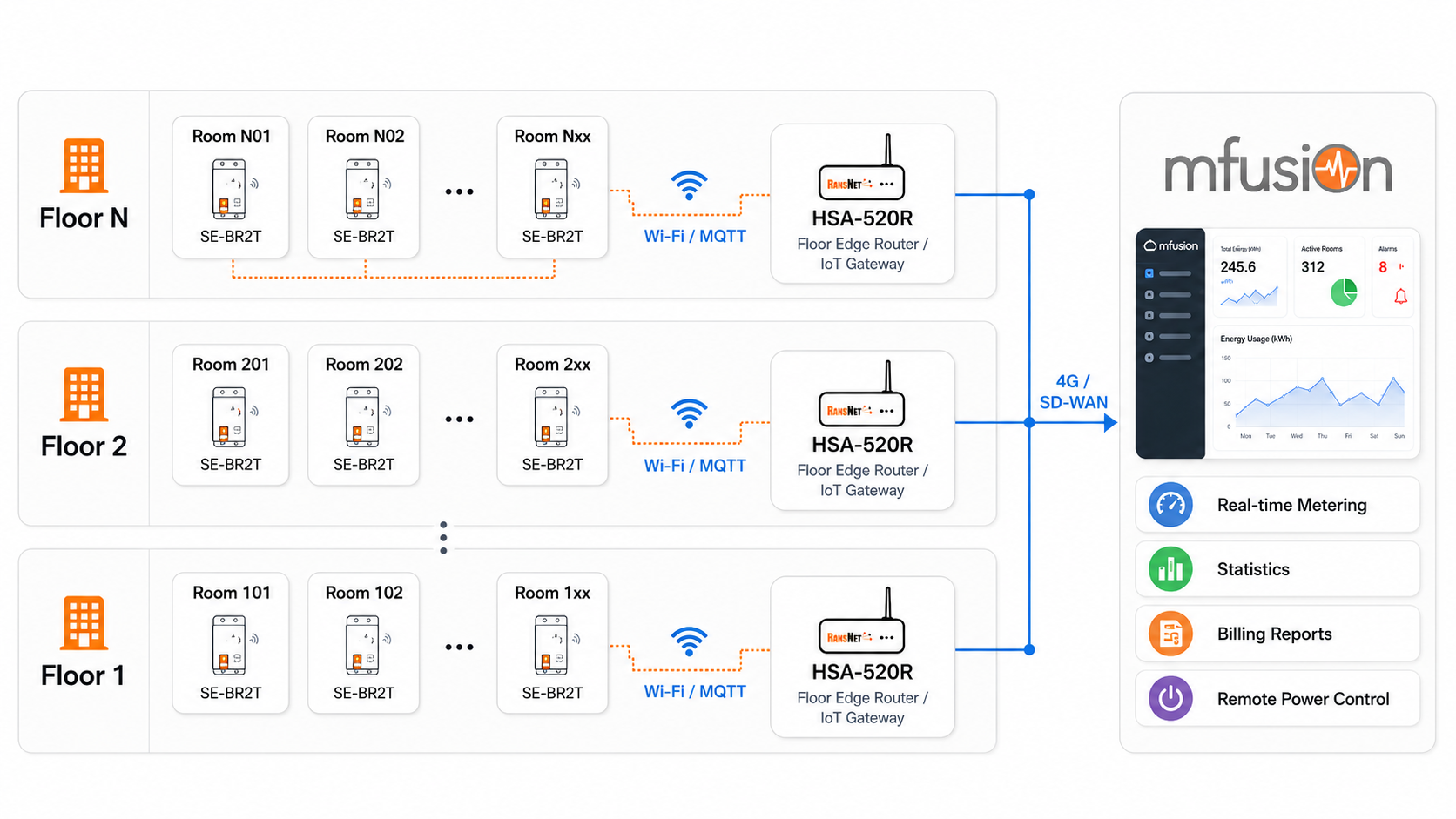
Topology summary:
- Each floor's per-room SE-BR2T breakers connect over Wi-Fi/MQTT to that floor's HSA-520R.
- Each HSA-520R forwards its floor's data to mfusion over 4G/SD-WAN.
- mfusion aggregates all floors into one dashboard, so the operator sees every room's consumption and can bill or switch power centrally.
No data loss on 4G/5G outages
The HSA-520R is store-and-forward: if the cellular backhaul drops, each floor router keeps caching meter readings locally (typically up to ~3 days) and uploads the full history once the link recovers — so no consumption data is lost. This keeps the metering record gap-free and billing defensible even on intermittent mobile links, a real advantage over meters that report cloud-direct and lose data during any outage. See IoT Integration.
Why Smart Circuit Breakers
- Space saving in electrical closets — Fitting hundreds of standalone smart meters requires significant wall space and multiple heavy sub-panel enclosures. Smart circuit breakers fit directly into standard distribution boards (DB boards), in place of a traditional circuit breaker, keeping the electrical room compact.
- Built-in power control — If a tenant group moves out, fails to pay, or violates safety rules, the operator can remotely shut off power to that specific room from software. A standard smart meter cannot do this without an expensive external contactor.
- Fewer points of failure — Combining breaker, meter, and communications into one unit means fewer wires, fewer terminal connections, and a lower chance of hardware failure over time.
Smart Circuit Breaker vs Smart Energy Meter
| Feature | Smart Circuit Breaker | Smart Energy Meter |
|---|---|---|
| Space required | Zero extra space (replaces the standard breaker) | Significant — requires large external enclosures |
| Hardware cost | Moderate | Low to high, depending on model |
| Labor & wiring | Very low (standard panel wiring) | High (extra CT clamps and voltage taps) |
| Control capability | Remote ON/OFF (non-payment / safety) | Monitoring only (needs separate contactors to cut power) |
| Maintenance | Simple (single-device swap) | Complex (multiple interconnected components) |
Design Considerations
Validate these points before committing to a full rollout — they determine whether the design holds at scale and for billing.
| Consideration | What to check |
|---|---|
| Metering accuracy | The SE-BR2T provides monitoring-grade metering — suitable for usage awareness, cost allocation, and capped-allowance or quota-style reporting. It is not positioned as a certified legal-for-trade meter; if precise per-kWh billing is required, confirm the necessary accuracy class and certification for the project (that regulated scenario is out of scope here). |
| Wi-Fi reliability at density | The breakers use 2.4 GHz Wi-Fi and sit inside metal distribution boards, which attenuate RF. At hundreds of devices this is the main reliability risk. Put them on a dedicated IoT SSID and VLAN, use a broad subnet (e.g., /22) with short DHCP leases to handle many persistent connections, keep each floor's client count within the router's limit, pilot one floor first, and position the router's antenna near/outside the panels. (Wired RS-485/Modbus is more robust for in-panel metering but is not offered by the SE-BR2T.) |
| Edge-router power resilience | Put each per-floor HSA-520R on a small UPS so metering and comms continue during brief outages and are unaffected when a room's breaker is switched off. |
| Electrical scope & breaker sizing | The SE-BR2T is single-phase, 2-pole, up to 63A. Three-phase rooms or common-area loads need a different device. For rooms with air-conditioners or other high-starting-current appliances, select the breaker's rated current to match the room feeder design, and have the final rating confirmed by the electrical consultant or licensed electrician. |
Deployment
Step 1: Install Smart Circuit Breakers
Install one SE-BR2T per room in the floor's distribution board, replacing the standard room breaker. Wire it as a normal 2-pole breaker (screw terminals, up to 35 mm²). No CT clamps or external metering are required.
Step 2: Deploy a Per-Floor Edge Router
Deploy one HSA-520R per floor as the IoT gateway. Enable its Wi-Fi for the breakers to join, and start the MQTT broker:
The router subscribes to the breakers' topic and forwards readings to mfusion. Refer to IoT Integration for the collection architecture and Smartplug Sensor Monitoring Setup for the step-by-step device-provisioning pattern (the SE-BR2T joins the same way).
Step 3: Point Each Breaker to the Floor Router
On each SE-BR2T, set the MQTT server to the floor router's LAN IP and the topic to match the router's subscription (e.g., secure/energy). The topic is a logical grouping used for discovery and room mapping — use a name that is not easily guessable, but rely on Wi-Fi security, the trusted local LAN, and mfusion access control for actual authentication, not the topic name itself.
Step 4: Aggregate and Bill in mfusion
Once the HSA-520R backhauls to mfusion, breakers auto-discover (allow up to ~5 minutes). In mfusion:
- Map each breaker to its room/tenant
- View real-time voltage, current, power, and cumulative kWh per room
- Generate per-room usage and quota / cost-allocation billing reports
- Remotely switch a room's power ON/OFF when needed
Refer to Device Monitoring — Hosts for the monitoring items view.
Verification
| Items to Test | Command / Action | Expected Outcome |
|---|---|---|
| Broker running | show mqtt status on the floor HSA-520R |
Status shows RUNNING |
| Breakers reporting | show mqtt status |
Queue shows readings; discovered sensors list the breaker MACs |
| Rooms in mfusion | Open the router in mfusion → Items tab | Each room's breaker appears with live V/A/W/kWh |
| Remote control | Toggle a room's breaker from mfusion | The SE-BR2T switches ON/OFF |
Best Practices
- One floor per edge router — sizing one HSA-520R per floor keeps each Wi-Fi/MQTT domain small and manageable, and localizes any single-router outage to one floor.
- Consistent topic naming — use a per-site/per-floor topic convention so mfusion discovery and room mapping stay organized at scale.
- Protect remote power control — remote ON/OFF affects live tenants, so make it role-based, logged, and governed by an approved operational procedure. For occupied rooms, define a clear approval process before any remote disconnection.
- Underlay resilience — the store-and-forward cache (see Solution Architecture) already protects against backhaul outages on its own; for sites where metering must never pause, add Multi-WAN (e.g., wired + 4G) on the HSA-520R for a redundant path.
Related Features
- IoT Integration — How sensors and breakers report through the router to mfusion
- Product Overview — Smart Energy Series — SE-BR2T and the wider IoT device family
- Smartplug Sensor Monitoring Setup — Device provisioning walkthrough (same pattern as SE-BR2T)
- Device Monitoring — Hosts — Viewing per-device metering items
- Multi-WAN — Backhaul redundancy for the floor routers