Wireless WAN (WWAN)
Wireless WAN (WWAN), also referred to as a mobile or cellular interface, provides WAN backhaul connectivity over 4G LTE and 5G NR cellular networks. On RansNet branch-series devices, WWAN is the primary or secondary WAN link, enabling internet and SD-WAN connectivity without a fixed-line broadband connection.
Each WWAN interface corresponds to a physical cellular modem module installed in the device. The modem establishes a data session (PDN connection) with the mobile network using a SIM card and the configured APN, and presents the resulting IP address to the device as a routable WAN interface.
Warning
Before proceeding, ensure the SIM card is fully seated and all antenna connectors are tightly screwed on. Loose antennas and improperly inserted SIMs are the most common reasons a WWAN interface fails to come online.
Navigate to Device Settings → Network → WWAN.

Single vs Dual Modem
RansNet branch devices support single-module and dual-module configurations:
| Configuration | Devices | Behaviour |
|---|---|---|
| Single module (wwan0 only) | XE-300R, HSA-520R, UA-520R, UA-800NR | One active modem. Dual physical SIM slots supported — SIMs operate in active/standby mode. The standby SIM takes over automatically on primary SIM failure. |
| Dual module (wwan0 + wwan1) | HSA-520L2, UA-800NR2 | Two independent modem modules, each with its own SIM. Both run simultaneously in active/active mode, providing two independent cellular uplinks for load balancing or redundancy via Multi-WAN. |
SIM Failover Behavior
How a router fails over between SIMs depends on whether it is a single-module (active/standby) or dual-module (active/active) device. In both cases, failover can optionally be driven by link-health metrics using WWAN tracking.
| Mode | Devices | SIMs connected | Failover mechanism | Typical failover time |
|---|---|---|---|---|
| Active/Standby | Single module (XE-300R, HSA-520R, UA-520R, UA-800NR) | One at a time | Modem redials on the other SIM slot | Up to ~2 minutes |
| Active/Active | Dual module (HSA-520L2, UA-800NR2) | Both simultaneously | Kernel-level route switch between two live modems | ~2–3 seconds |
Active/Standby (Single Module, Dual SIM)
Single-module devices share one modem between two SIM slots, so only one SIM is connected at any time.
- On boot, the router connects using the primary SIM (SIM1 slot).
- If the primary SIM is removed or fails to connect, the modem automatically redials on the backup SIM (SIM2).
- If the active SIM later fails, the router switches back to the other slot — it keeps alternating between the two slots until it finds a SIM that connects.
- Because a single modem must tear down its session and redial on the other SIM, each failover takes up to ~2 minutes.
Note
The ~2-minute window covers deregistering the current SIM, switching slots, and re-registering and redialing on the new SIM — this is expected behavior for single-module hardware. The currently active slot is shown as SIM Slot in show interface wwan0 output.
Active/Active (Dual Module)
Dual-module devices have a dedicated modem per SIM, so both SIMs stay connected at once and present two independent interfaces (wwan0 and wwan1).
- Both cellular uplinks are live at all times.
- Failover between them happens at the kernel routing level — not a modem redial — so switchover is typically under 2–3 seconds.
- When the preferred link recovers, traffic returns to it according to your Multi-WAN and route-metric configuration.
Because both links are always up, they can also be used for load balancing rather than pure failover. See Multi-WAN.
Tracking-Driven Failover (WWAN Tracking)
By default, failover is triggered by SIM removal or registration failure. To fail over when a link is registered but not actually passing traffic (for example, high packet loss or latency), enable WWAN tracking — failover is then determined by your configured tracking metrics and thresholds.
- Enable per interface via Enable Tracking (see Interface Configuration) or in CLI.
- Define the target, thresholds, and metric that decide when the link is considered down.
- See Tracking WWAN/SIM Connections for full setup.
Manual SIM Failover
The mechanisms above all react to a detected problem. Sometimes you want to force a switch immediately instead of waiting for automatic detection — for example:
- Right after physically swapping a SIM card, to make the router pick it up immediately.
- Validating failover behavior during setup or scheduled maintenance.
- You already know a SIM or carrier issue exists (e.g., an expired data plan, roaming disabled) and want to move onto the other SIM right away.
What it does depends on the device type:
- Single-module (active/standby) devices — immediately switches to the other SIM slot and restarts the modem to connect on it, the same redial process described in Active/Standby above.
- Dual-module (active/active) devices — there is no other slot to switch to (each modem has its own single SIM), so this restarts that module so it re-reads its SIM. Use this after swapping a card in a dual-module device to force immediate redetection rather than waiting for the modem's own retry cycle.
CLI Configuration
BR1-COM5# debug wwan wwan0 failover
[info] forcing SIM failover on wwan0...
[info] switch over to secondary SIM2...
Run from enable mode (no configure needed) against either wwan0 or wwan1.
Note
This is a manual override and always takes effect immediately, regardless of what automatic failover last did. Afterward, automatic SIM/registration-based and tracking-driven failover both resume normally, evaluating the router's state fresh from that point on.
Tip
A GUI equivalent — an action button per interface under Device Settings → Network → WWAN — is planned for an upcoming release. Until then, use the CLI command above.
WWAN Connection Options
At the top of the WWAN tab, select the connection mode that matches your SIM plan:
| Option | Description |
|---|---|
| Single Connection per SIM | One PDN (Packet Data Network) session per SIM card. Standard for most SIM plans. |
| Multiple Connections per SIM (Multi-PDN) | Multiple simultaneous PDN sessions on a single SIM, each with a different APN. Used when a SIM plan provides separate APNs for internet and private network access (e.g., corporate intranet over a private APN alongside public internet). |
WWAN Interfaces
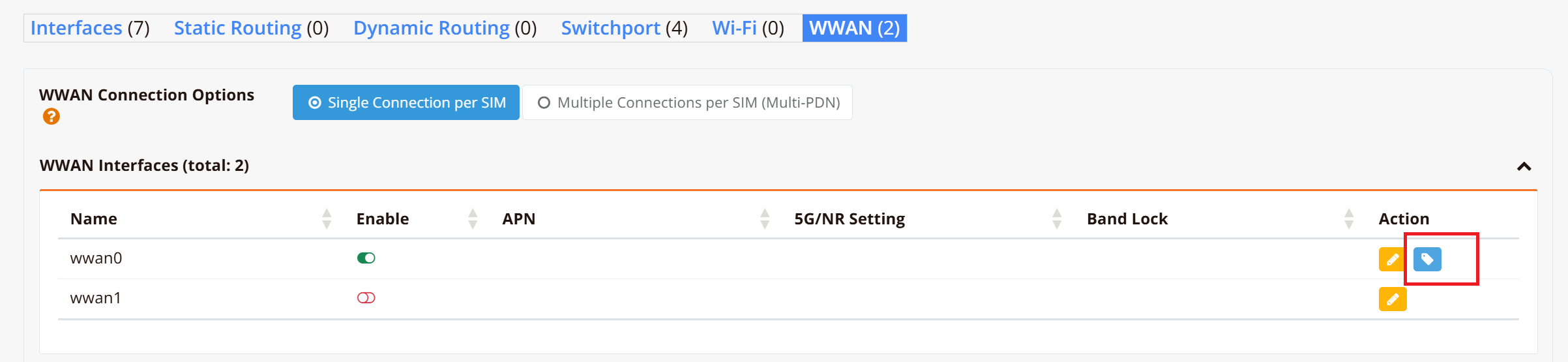
The WWAN Interfaces table lists all modem interfaces on the device:
| Column | Description |
|---|---|
| Name | Interface identifier — wwan0 (primary modem) or wwan1 (secondary modem on dual-module devices) |
| Enable | Toggle to administratively enable or disable the modem interface |
| APN | Configured Access Point Name for this interface |
| 5G/NR Setting | Active 5G mode configuration (NSA or SA, and radio access mode) |
| Band Lock | Frequency bands the modem is locked to, if configured |
| Action | Edit or reset the interface configuration |
Click the edit (yellow) button on the right side of an interface row to open its configuration form.
Interface Configuration

Basic Settings
| Field | Description |
|---|---|
| Name | Interface name (wwan0 or wwan1) — read-only |
| Admin Status | Enable or disable this modem interface |
5G/NR Settings
These settings control how the modem connects to 5G networks. They are only relevant for 5G-capable modems.
5G/NR Disable — Select which 5G sub-architecture to disable if needed:
| Option | Description |
|---|---|
| NSA | Disable 5G Non-Standalone mode. NSA uses a 5G NR radio but anchors control signalling to an existing 4G LTE core. Disabling NSA forces the modem to use SA or fall back to LTE. |
| SA | Disable 5G Standalone mode. SA uses both a 5G NR radio and a full 5G core network. Disabling SA forces the modem to use NSA or LTE. |
5G/NR Mode — Select the radio access technology the modem is permitted to use:
| Mode | Description |
|---|---|
| AUTO | Let the modem select the best available technology automatically (recommended) |
| LTE | Lock to 4G LTE only — disables 5G even if available |
| NR5G | Lock to 5G NR only — the modem will not fall back to LTE |
| LTE_NR5G | Allow both LTE and 5G NR — modem selects based on signal quality |
Optional Settings
Click each option to expand and configure it:
| Option | Description |
|---|---|
| APN | Access Point Name provided by the mobile carrier. Required for establishing the data session. Leave blank if the carrier provisions it automatically via SIM. |
| Band Lock | Lock the modem to specific frequency bands (e.g., B3, B7, B28 for LTE; n78 for 5G). Useful for optimising signal in areas with known strong bands or avoiding congested bands. Leave blank to allow auto band selection. |
| DynDNS | Enable Dynamic DNS updates for the WWAN interface IP |
| Route Metric | Administrative metric for the default route via this interface. Used to set WWAN as primary or secondary WAN when multiple uplinks are present — lower metric = higher priority. |
| Enable Tracking | Enable interface tracking to monitor the WWAN link health and trigger failover |
| Ignore Default Route | Do not install the carrier-assigned default route into the routing table. Useful when WWAN is used only for a specific VPN or SD-WAN tunnel, not as a general internet gateway. |
| MTU | Override the interface MTU (default: 1500). Reduce to avoid fragmentation on tunneled connections (e.g., 1420 for IPsec over WWAN). |
| Netflow Export | Enable NetFlow traffic export on this interface for flow-based monitoring |
CLI Configuration
Set APN manually
Set 5G mode
Band Lock
Select Preferred Service Provider
By default, the modem registers with a network automatically. In some situations — most commonly with roaming SIM cards that can register on several local carriers — you may want to lock the modem to a specific provider, for example to stay on the carrier with the best coverage, performance, or roaming rate at your site.
Warning
Scanning and switching networks interrupts the cellular connection. The router temporarily takes the WWAN interface down to free the modem's control port, then re-enables it once the new network registers — expect the link to be down for up to ~2 minutes. If you manage the router over the same cellular link, your session will drop and reconnect; where possible, run these steps from a different WAN path or the console.
GUI Configuration
Navigate to Device Settings → Network → WWAN, click the edit (yellow) button on the target WWAN interface, and enable the Preferred Provider option under Optional Settings.
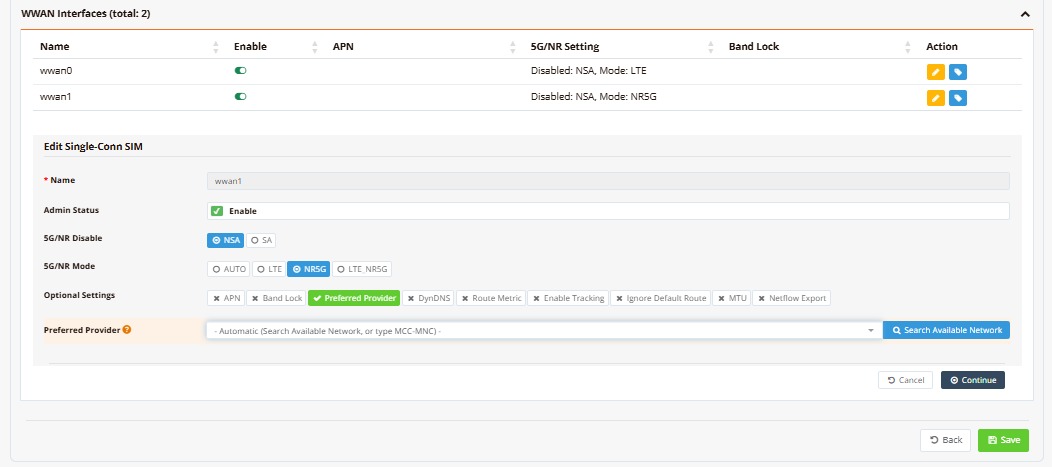
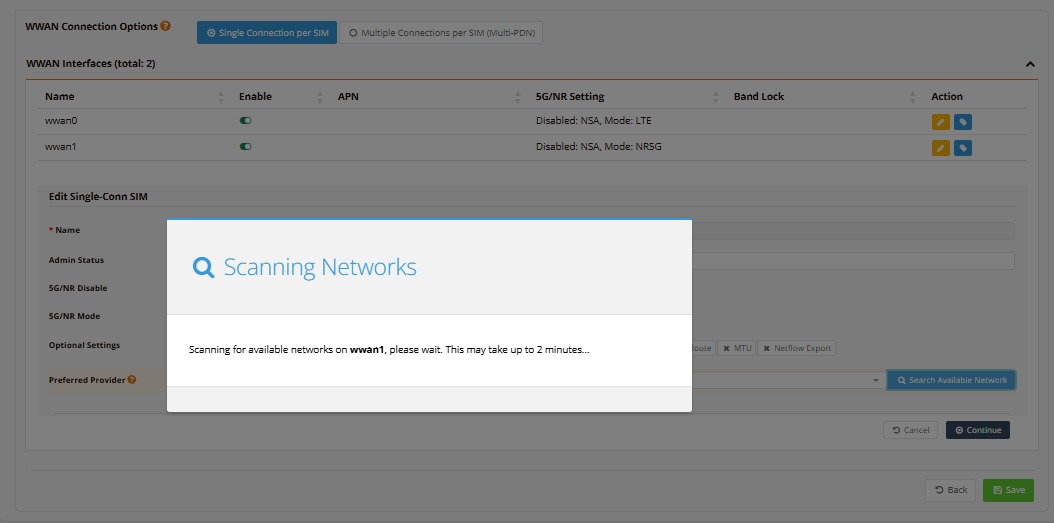
Leave the Preferred Provider field on its default - Automatic (Search Available Network, or type MCC-MNC) - entry, then click Search Available Network to scan.
The scan runs in a modal and can take up to two minutes — the same scan performed by the CLI steps below:
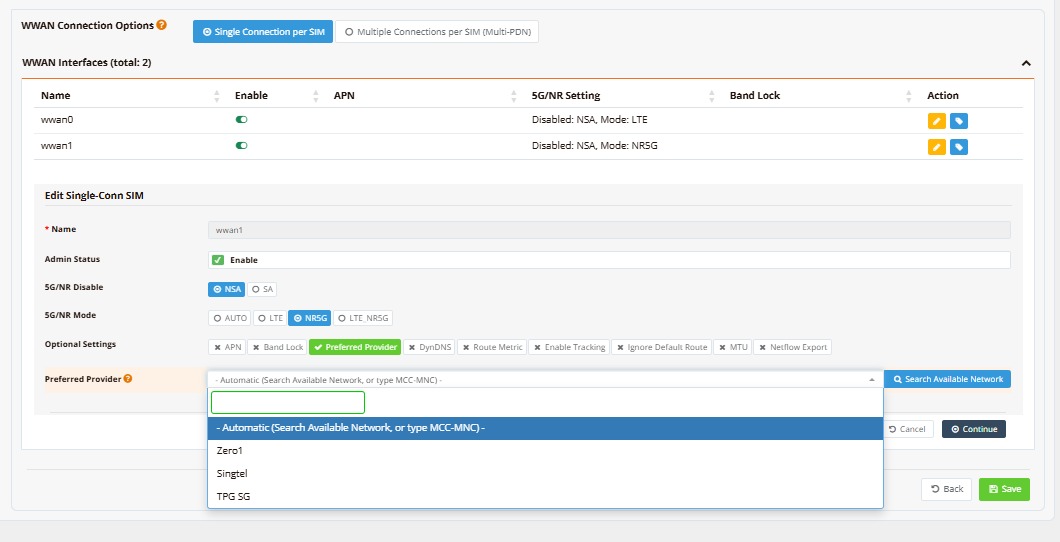
Once the scan completes, open the Preferred Provider dropdown again — it now lists every carrier detected during the scan, in addition to the default Automatic entry. Select the desired provider.
Click Continue, then Save. mfusion previews the exact CLI change it will push to the device — review it and click Confirm to Apply.
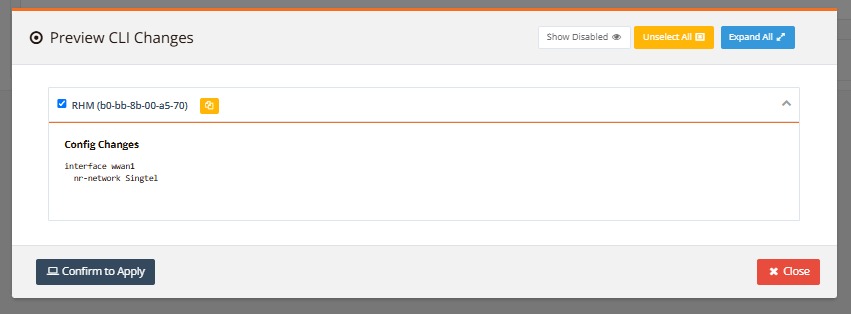
This pushes the same nr-network <provider> command shown in Step 2 of the CLI Configuration workflow below.
CLI Configuration
Step 1: Scan for available provider networks
BR1-COM5# show interface wwan0 network
[INFO]  Scanning for available networks on wwan0 (fibocom)...
[INFO]  This may take up to 2 minutes. Please wait...
[INFO]  Initiating network scan...

[INFO]  AVAILABLE NETWORKS:
=================================================================
ID   Operator Name                  MCC-MNC    Tech     Status
=================================================================
0    Zero1                          52501      5G SA    Available
1    Singtel                        52501      LTE      Available
2    StarHub                        52505      LTE      Forbidden
3    TPG SG                         52510      LTE      Forbidden
4    SGP-M1                         52503      LTE      Forbidden
5    SGP-M1                         52503      5G SA    Forbidden
6    StarHub                        52505      5G SA    Forbidden
7    TPG SG                         52510      5G SA    Forbidden
=================================================================
The scan may take up to 2 minutes and lists every network the modem can detect:
| Column | Meaning |
|---|---|
| Operator Name | Carrier name broadcast by the network. Use this (or the MCC-MNC) when selecting. |
| MCC-MNC | Numeric operator code (Mobile Country Code + Mobile Network Code) — e.g., 52501. |
| Tech | Radio technology the network was detected on (LTE, 5G SA). |
| Status | Available — the SIM is permitted to register on this network and it can be selected. Forbidden — the SIM has no roaming agreement with this network; selecting it will fail. |
Step 2: Select your preferred provider from the scan result
BR1-COM5#
BR1-COM5# configure
BR1-COM5(config)# interface wwan0
[info] changing setting for luci wwan0.
BR1-COM5(config-if-wwan0-)# nr-network Zero1
[INFO]  Selecting network for wwan0: Zero1
[OK]    Network selection accepted
[INFO]  Waiting for registration (up to 60 s)...
[OK]    Registered with selected network
[INFO]  Restarting wwan0 to obtain new IP...
BR1-COM5(config-if-wwan0-)# end
BR1-COM5# write memory
[info] saving config... please DO NOT unplug power!
[info] Config saved successfully.
[info] task executed successfully.
BR1-COM5#
nr-network accepts either the operator name (nr-network Zero1) or the MCC-MNC code (nr-network 52501) from the scan result. The router deregisters from the current network, registers with the selected one (up to 60 seconds), then restarts the interface to obtain a new IP address. Running write memory saves the selection so it persists across reboots.
Step 3: Verify the connection status
BR1-COM5# show interface wwan0
================================================================================
  Interface : wwan0
================================================================================

  Network Information
  ----------------------------------------
  Admin State            : DOWN
  Link State             : DOWN
  MTU                    : 1500 bytes

  Mobile Connection
  ----------------------------------------
  Modem IMEI             : 869814061357111
  Modem Rev              : 89611.1000.00.04.01.18
  SIM IMSI               : 525016307310294
  SIM ICCID              : 8965012508200002693F
  SIM Slot               : Secondary (SIM2)
  SIM State              : Connected
  SIM APN                :
  Provider               : 52501
  Network                : 5GNR-SA B78 (AUTO, auto)
  Cell ID                : 1FBE7E414
  RSSI                   : N/A
  RSRP                   : -101 dBm (poor)
  SINR                   : 16 dB (good)
  RSRQ                   : -11 dB (good)

  Physical Information
  ----------------------------------------
  Link Detected          : no

================================================================================
BR1-COM5#
Immediately after selection, the interface may still show DOWN while it redials — as in the output above, where the modem is already registered on the selected network (Network shows 5GNR-SA B78) but the data session is still coming up. Re-run show interface wwan0 after a minute or two: Link State should show UP with a valid IP address, and Provider should reflect the selected carrier.
To return to automatic network selection:
View WWAN status
You can view WWAN connection status from CLI using below cmd, or click on the Status button under the page of Device Settings → Network → WWAN
show interface wwan0
================================================================================
  Interface : wwan0
================================================================================

  Network Information
  ----------------------------------------
  Admin State            : UP
  Link State             : UP
  MTU                    : 1280 bytes
  IPv4 Address           : 100.67.24.147/0
  IPv4 Broadcast         : 100.67.24.147
  IPv4 Address           : 100.67.24.147/29
  IPv4 Broadcast         : 100.67.24.151

  Mobile Connection
  ----------------------------------------
  Modem IMEI             : 869814061357111
  Modem Rev              : 89611.1000.00.04.01.18
  SIM IMSI               : 525016143247531
  SIM ICCID              : 8965012501070124895F
  SIM Slot               : Secondary (SIM2)
  SIM State              : Connected
  SIM APN                :
  Provider               : Zero1
  Network                : LTE (mode=AUTO, band=auto)
  Cell ID                :
  RSSI                   : -67 dBm (good)
  RSRP                   : -99 dBm (fair)
  SINR                   : N/A
  RSRQ                   : -14 dB (good)

  Physical Information
  ----------------------------------------
  Link Detected          : yes

================================================================================
Output Field Descriptions
Network Information
| Field | Description |
|---|---|
| Admin State | Administrative status of the interface (UP = enabled, DOWN = disabled). Set via configuration; does not reflect actual connectivity. |
| Link State | Actual operational state of the interface (UP = connected and registered with cellular network, DOWN = no signal or disconnected). |
| MTU | Maximum Transmission Unit in bytes. Default is 1500; may be reduced by the carrier. |
| IPv4 Address | IP address(es) assigned by the carrier's PDN. Multiple entries indicate multiple simultaneous PDN sessions (Multi-PDN). Format is address/prefix-length. |
| IPv4 Broadcast | Broadcast address for the assigned subnet. |
Mobile Connection
| Field | Description |
|---|---|
| Modem IMEI | International Mobile Equipment Identity — unique 15-digit identifier for the physical modem module. Used to identify the hardware to the cellular network. |
| Modem Rev | Firmware version of the modem module. Format: <firmware>.<hw_version>.<date>.<other>. Used for troubleshooting and identifying modem capabilities. |
| SIM IMSI | International Mobile Subscriber Identity — unique 15-digit identifier stored on the SIM card that identifies the subscription on the carrier's network. |
| SIM ICCID | Integrated Circuit Card ID — unique 19-20 digit identifier printed and embedded on the SIM card itself. Used to identify the physical card. |
| SIM Slot | Which physical SIM slot is currently active (Primary (SIM1) or Secondary (SIM2)). On devices with dual SIM, the secondary SIM automatically takes over if the primary fails. |
| SIM State | Status of the SIM card (Connected = recognized and authenticated, Not Inserted = no SIM detected, Error = SIM issue). |
| SIM APN | Access Point Name provisioned by the carrier. If blank, the carrier provides the APN automatically via OTA (Over-The-Air) provisioning. |
| Provider | Mobile carrier name (e.g., Verizon, AT&T, Zero1) determined by the SIM's IMSI. |
| Network | Current connected technology and configuration. Format: <tech> (mode=<configured>, band=<locked>). Example: LTE (mode=AUTO, band=auto) means connected to LTE, mode is set to AUTO (modem choosing), and bands are not locked. For 5G: NR5G (mode=NR5G, band=n78) or LTE-NSA (mode=AUTO, band=auto) (LTE anchored to 5G). |
| Cell ID | Unique identifier of the current cellular base station (tower). Blank if not yet registered or not supported by the modem. Used for location and network diagnostics. |
| RSSI | Received Signal Strength Indicator in dBm. Indicates overall signal strength, combining the reference signal with noise and interference. A quick general-purpose indicator. See Signal Quality Reference for rating thresholds. |
| RSRP | Reference Signal Received Power in dBm (LTE/5G specific). Measures power of the reference signal from the base station only — more precise than RSSI for gauging coverage. See Signal Quality Reference for rating thresholds. |
| SINR | Signal-to-Interference-plus-Noise Ratio in dB (LTE/5G specific). Measures signal quality relative to interference and noise; best predictor of achievable throughput. Higher is better; N/A indicates the metric is not available or not applicable. See Signal Quality Reference for rating thresholds. |
| RSRQ | Reference Signal Received Quality in dB (LTE/5G specific). Combined measure of RSRP and RSSI; indicates overall cell quality, especially useful in congested cells. See Signal Quality Reference for rating thresholds. |
Physical Information
| Field | Description |
|---|---|
| Link Detected | Physical presence of the modem (yes = detected and powered, no = not detected or disabled). |
Signal Quality Reference
The signal metrics are best read together — a strong RSSI with a poor RSRQ, for example, indicates a strong but congested or noisy cell. The thresholds below are the exact classification ranges the device firmware uses to generate the quality labels shown in the CLI output (e.g., -67 dBm (excellent)), following 3GPP TS 36.133 / TR 38.133 service classifications.
| Classification | RSSI (dBm) | RSRP (dBm) | RSRQ (dB) | SINR (dB) | Connection Experience |
|---|---|---|---|---|---|
| 🟢 Excellent | ≥ -65 | ≥ -80 | ≥ -10 | ≥ 20 | Maximum speeds, ultra-low latency |
| 🟡 Good | -66 to -75 | -81 to -90 | -11 to -15 | 13 to 19 | Fast, reliable streaming and gaming |
| 🟠 Fair | -76 to -85 | -91 to -100 | -16 to -20 | 0 to 12 | Usable; disconnections possible under heavy load |
| 🔴 Poor | ≤ -86 | ≤ -101 | ≤ -21 | < 0 | Frequent drops, severe packet loss |
Note
RSRP and RSRQ are the most reliable indicators of LTE/5G quality. RSSI includes noise and interference, so a high RSSI alone does not guarantee a good connection — always cross-check RSRP (coverage/power) and RSRQ (cell quality). SINR best reflects achievable throughput.
Monitoring WWAN on mfusion
While the CLI show interface wwan0 command displays current WWAN status, mfusion's monitoring interface allows you to view and trend these metrics over time — essential for analyzing signal trends, identifying degradation patterns, and historical reporting on cellular performance.
Tip
For a fleet-wide summary of SIM state, signal quality, and per-device WWAN status across an entire entity, see the Mobile Monitoring dashboard. The steps below cover enabling and verifying the underlying data collection that the dashboard depends on.
Understanding WWAN Monitoring Templates
When you provision a device on mfusion, a monitoring template is automatically attached that defines which metrics are collected. The template includes a WWAN States discovery rule that auto-discovers all available cellular connection metrics (RSSI, RSRQ, SINR, Cell ID, APN status, etc.).
By default, this discovery rule is disabled to minimize unnecessary monitoring items across all devices — not every router has cellular connectivity, so collecting WWAN metrics for non-cellular devices creates clutter.
You enable WWAN monitoring in one of two ways, depending on your device distribution:
Approach 1: Enable at Template Level (All Devices)
Use this if most of your devices have WWAN connections and you want WWAN metrics enabled across the board.
Step 1: Access the Template
Navigate to ORCHESTRATOR → Monitoring → Settings → Templates. Refer to Monitoring Settings — Templates for detailed access instructions.
Step 2: Enable the WWAN States Discovery Rule
Find WWAN States in the template's discovery rules and click the toggle to enable it.
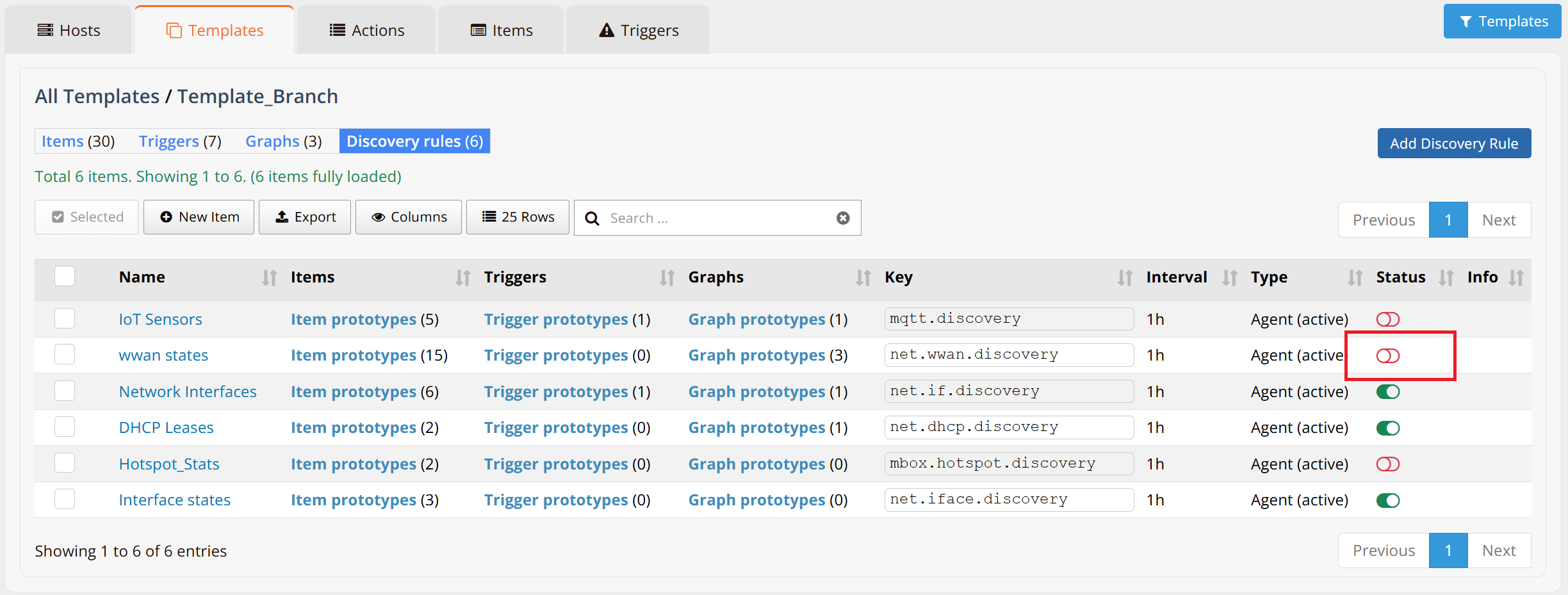
When to use: Multi-device deployments where most routers have cellular modems (e.g., all branch devices have 4G/5G backup).
Warning
Enabling this at template level applies WWAN monitoring to all devices using this template. If you have many devices without cellular connections, this creates unnecessary monitoring items. Consider Approach 2 (host-level) instead if your device mix is varied.
Approach 2: Enable at Host Level (Per-Device)
Use this if only specific devices need WWAN monitoring (e.g., selective branch routers with cellular, while others use wired links only).
Step 1: Access Host Monitoring Settings
Navigate to ORCHESTRATOR → Monitoring → Settings → Hosts. Select the target device and click Discovery Rules. Refer to Monitoring Settings — Hosts for detailed instructions.
Step 2: Enable the WWAN States Discovery Rule
Find WWAN States and toggle to enable.
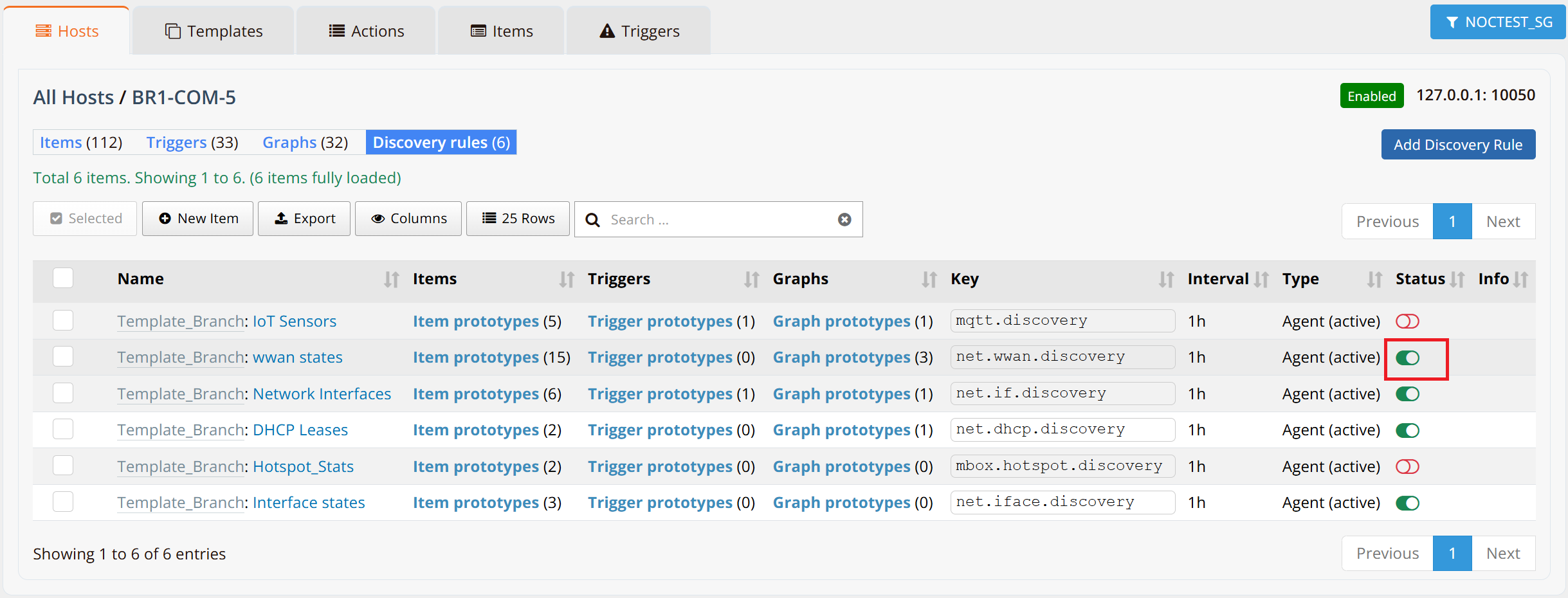
Impact: This change applies only to the selected device, leaving other devices unchanged.
Viewing WWAN Monitoring Data
Once enabled, mfusion automatically discovers and collects WWAN metrics. Discovery typically completes within 1 hour.
Step 1: Verify Items Are Discovered
Navigate to ORCHESTRATOR → Monitoring → Hosts → [device name] → Items tab to view all discovered WWAN metrics.
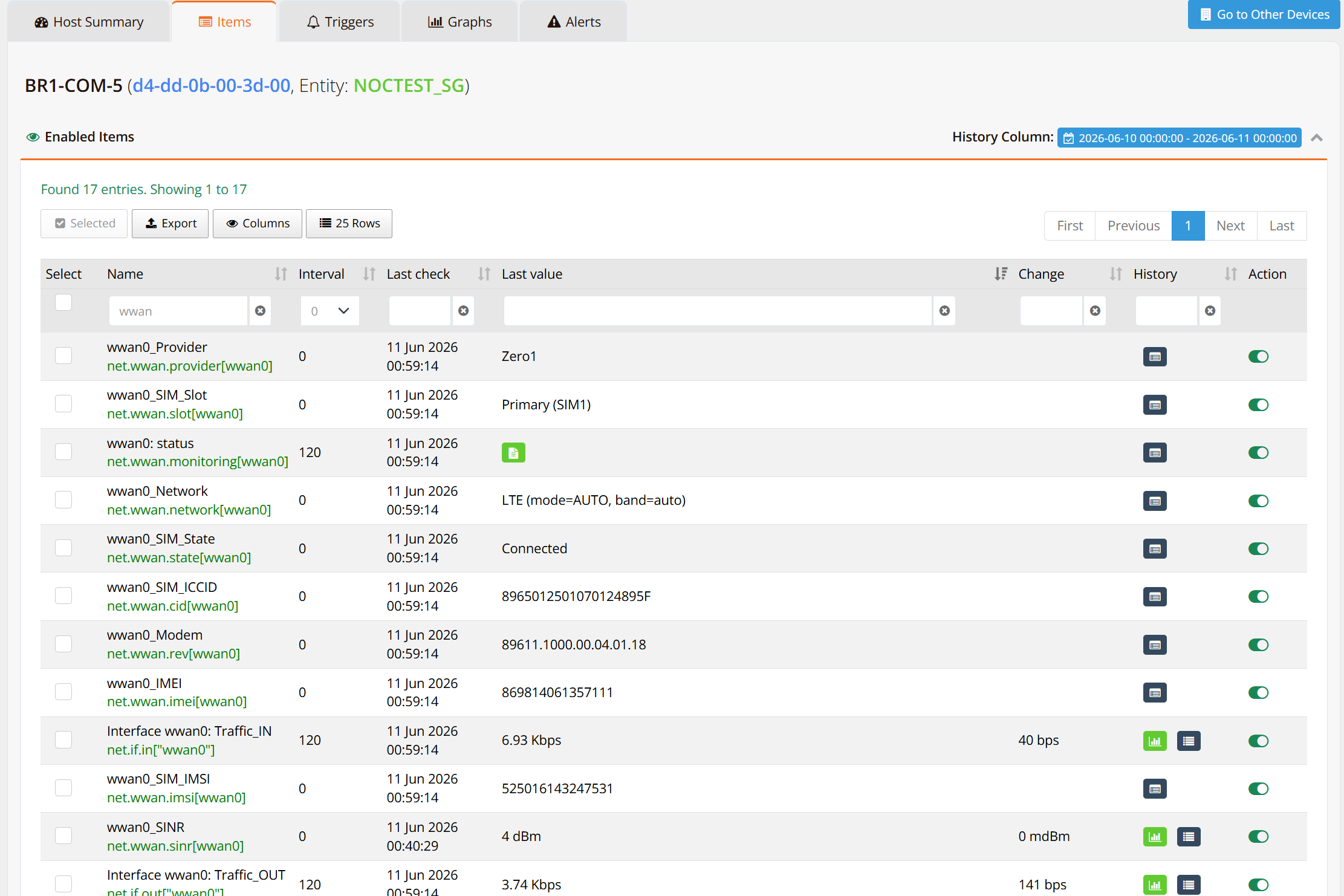
Step 2: Customize Host Table for WWAN Only
To focus on WWAN data, customize the host table to display only WWAN-related metrics.
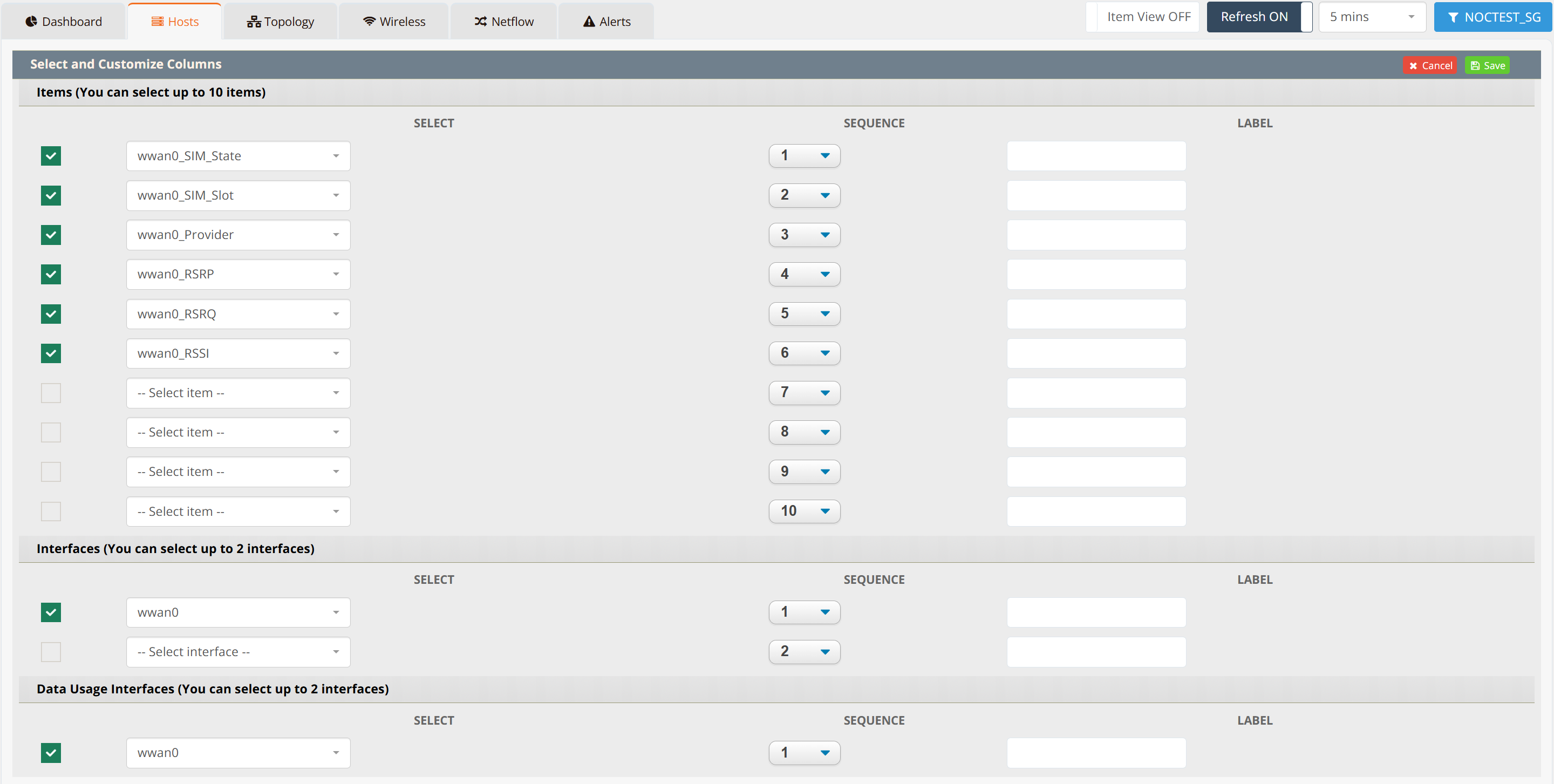
The filtered table provides a clean, tabular view of all targeted WWAN metrics.

Note
The steps above show a single host's Items tab. To see this same set of metrics — SIM state, provider, signal quality — for every WWAN-equipped device in an entity at once, use the Mobile Monitoring dashboard instead of visiting each host individually.
Step 3: View Trends and Graphs
To analyze WWAN signal quality over time, access the Graphs tab in the host detail view. Select target WWAN metric to display its historical trend.
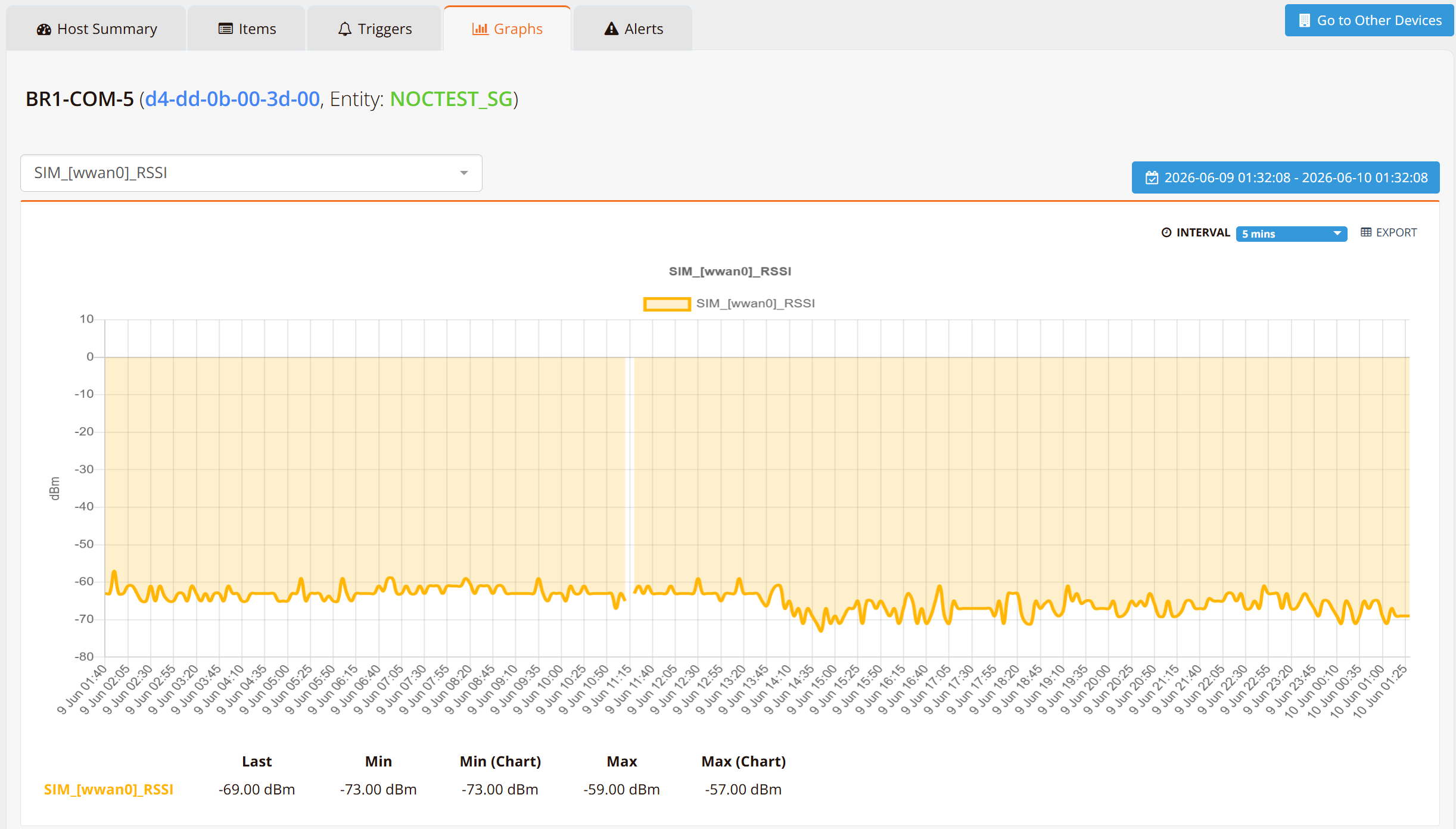
Refer to Monitoring — Host Graphs for accessing host graphs.
Best Practices for WWAN Monitoring
- Set up alerts on critical metrics — Create triggers in Monitoring Settings — Triggers for RSSI < -100 dBm or RSRQ < -12 dB to detect signal degradation early
- Monitor trends weekly — Review signal strength and quality trends to identify patterns (peak congestion times, coverage gaps, potential modem issues)
- Correlate with events — Compare metric trends with outages or performance complaints to identify root causes
- Archive historical data — Use mfusion reporting to archive WWAN metrics for compliance and capacity planning