IoT Integration
RansNet SD-WAN branch routers (UA, HSA, and XE series) include a built-in MQTT broker to interface with IoT sensors for data collection and remote control. Sensor data is forwarded to mfusion, which auto-discovers and parses each sensor and presents the readings in an intuitive dashboard.
Sensor Collection Methods
RansNet supports collecting sensor data in several flexible ways, depending on each sensor's connectivity capabilities:
| Method | Path to mfusion | Typical Sensor |
|---|---|---|
| Wi-Fi | Sensor → router Wi-Fi → router MQTT broker → mfusion | Smart Wi-Fi power plug |
| BLE / ZigBee | Sensor → IoT gateway (BLE/ZigBee) → router MQTT broker → mfusion | Battery BLE/ZigBee sensors |
| GPIO (wired) | Sensor → router GPIO ports (XE-300) → mfusion | Dry-contact / digital sensors |
| Cellular (4G) | Sensor → mfusion directly | Sensors with built-in 4G |
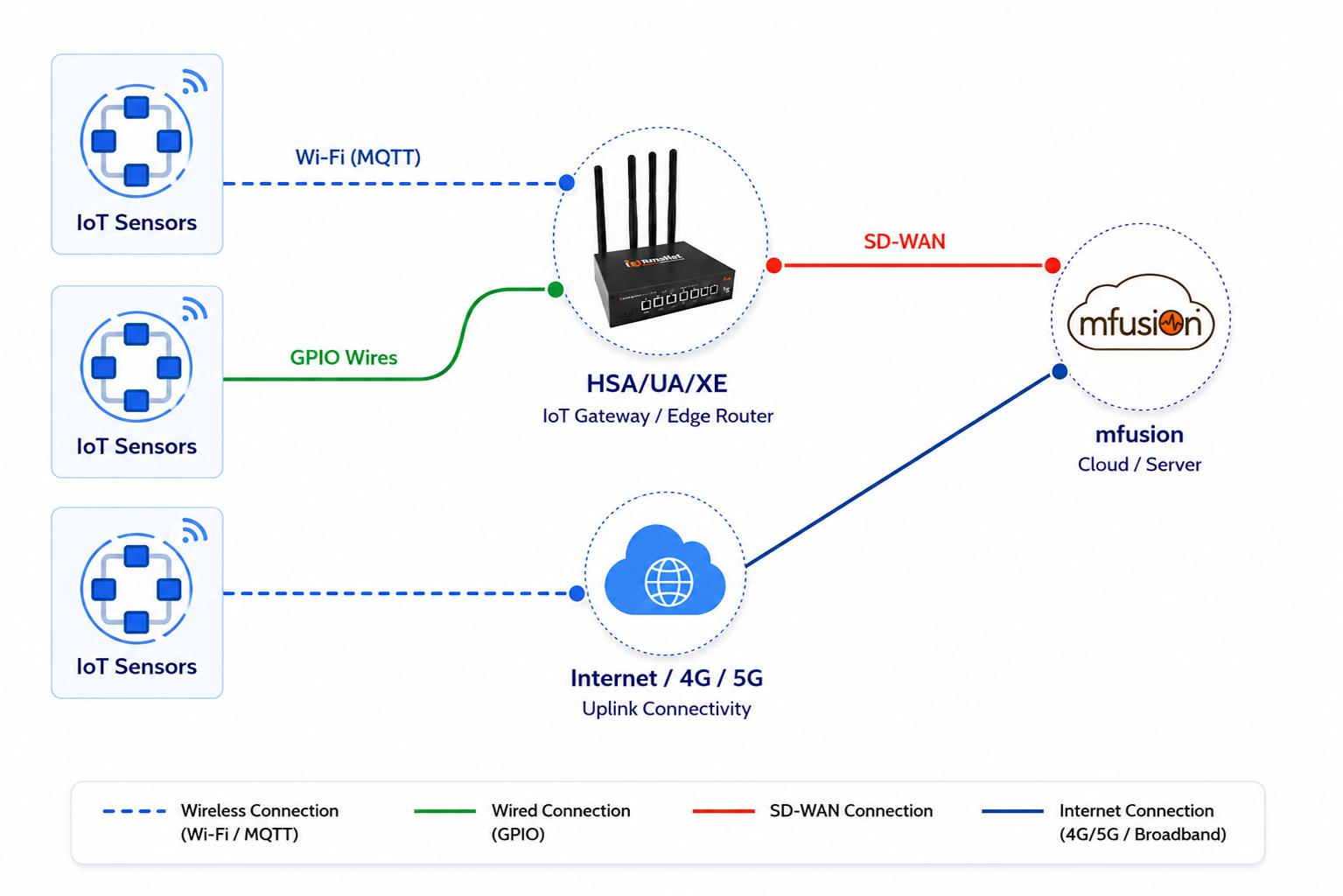
In all of the above options, mfusion auto-discovers and parses individual sensor data and presents it in an intuitive dashboard.
Info
If the router loses connectivity to mfusion for any reason, it caches the monitoring data — typically up to 3 days. Once connectivity is restored, it uploads all historical data to mfusion, so there is no data loss during the outage.
Configuration
GUI Configuration
GUI-based configuration will be documented in a future release.
CLI Configuration
Start the MQTT broker and subscribe to one or more sensor topics:
You can configure multiple subscription topics to support different types of sensors.
Info
The router forwards sensor data to mfusion over the SD-WAN tunnel. Enabling MQTT authentication between sensor and router is optional, since sensors connect through a secure local LAN. The subscription topic is a logical grouping for sensor data, not an authentication mechanism — use a topic name that is not easily guessable, but rely on Wi-Fi security, the trusted local LAN, and mfusion access control for actual authentication.
Verification
| Items to Test | Command | Expected Outcome |
|---|---|---|
| Broker running | show mqtt status |
Status shows RUNNING |
| Subscriptions configured | show mqtt subscriptions |
Lists each configured topic (e.g., secure/smartplug) |
| Data being received | show mqtt status |
Queue has entries; latest readings show sensor values |
| Sensors auto-detected | show mqtt status |
Discovered sensors list shows sensor MAC address(es) |
In mfusion, open the router and select the Items tab to confirm sensors are auto-discovered (allow up to 5 minutes after provisioning). Refer to Monitoring Items.
Related Features
- Smartplug Sensor Monitoring Setup — Step-by-step guide to provision a Wi-Fi sensor to the router's MQTT broker
- Device Monitoring — Hosts — Per-device monitoring items, triggers, and graphs
- Tracking — Reachability monitoring and condition-based actions