Third-Party Hotspot Routers
RansNet HSG can run the captive portal and RADIUS for hotspot routers from other vendors. The third-party router intercepts guests and enforces access, while HSG (on-premise or in the cloud) serves the login and purchase pages, authenticates users, records usage, and disconnects sessions on demand.
This page explains how to connect Peplink and Teltonika routers, and other routers that use the CoovaChilli UAM protocol, to an HSG portal.
Overview
How It Works
Most commercial hotspot routers use one of a few standard "external portal" protocols. You choose the protocol per portal with the portal type setting, so one HSG can serve RansNet and third-party routers at the same time, each with its own portal.
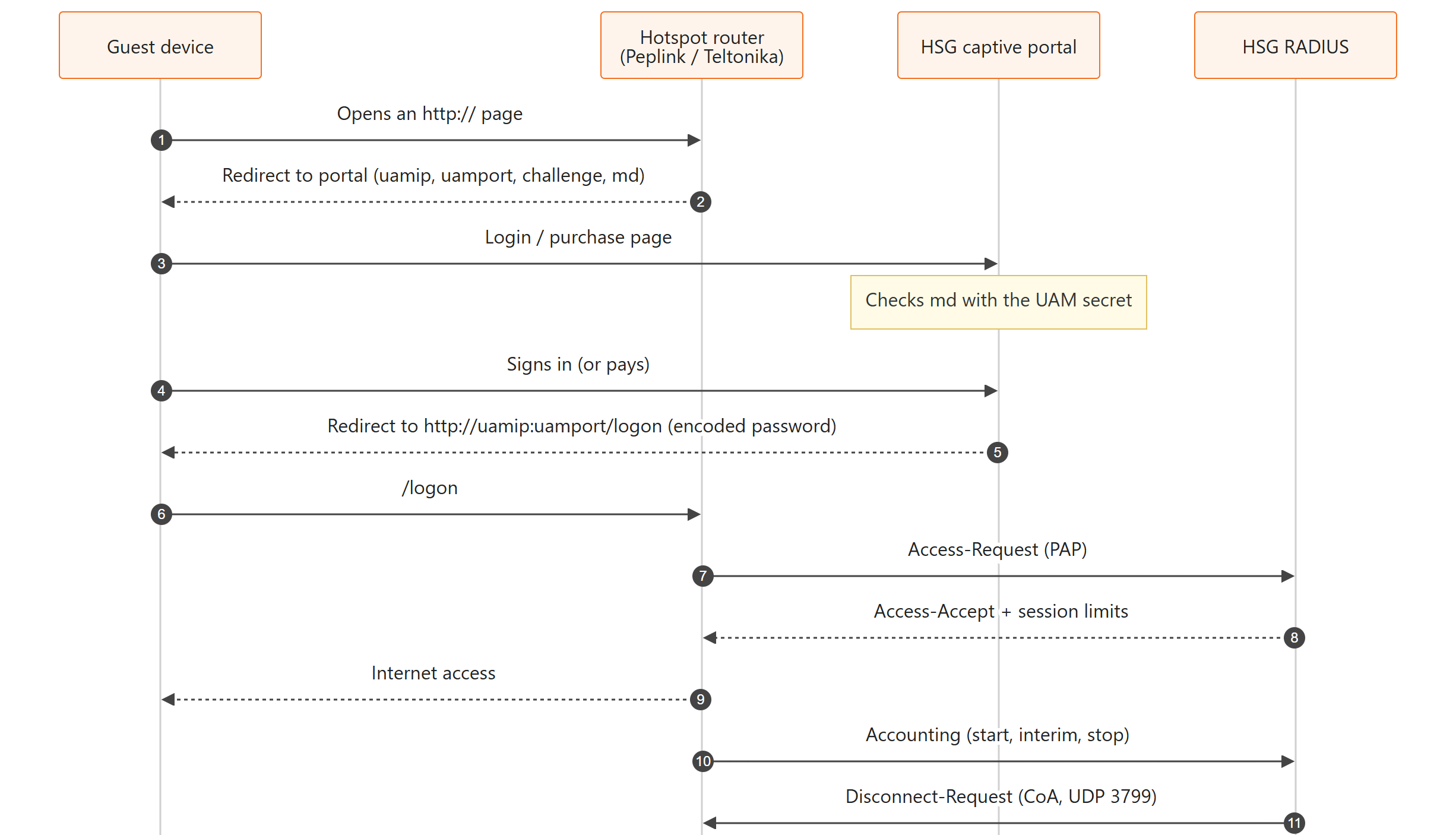
Flow summary:
- Steps 1–2: The router redirects an unauthenticated guest to the portal with its UAM parameters. The
mdchecksum, signed with the UAM secret, proves the redirect came from your router. - Steps 3–6: The portal shows the login or purchase page. When the guest signs in, or a payment completes, the portal sends the browser back to the router's
/logonaddress with the username and the password encoded with the router's challenge and the UAM secret. - Steps 7–10: The router checks the credentials with HSG RADIUS and opens access. Accounting records the session in HOTSPOT USERS → User Sessions.
- Step 11: To disconnect a guest, HSG sends a RADIUS Disconnect-Request (CoA) to the router.
Supported Router Types
| Portal Type | Routers | Login Method | Notes |
|---|---|---|---|
| mbox (default) | RansNet HSG, HSA, UA, UAP | HSG hotspot engine | Full feature set, including portal sticky, free temporary access and click-to-login email links. |
| CoovaChilli (Teltonika, Peplink) | Teltonika RUT/RUTX/RUTM (RutOS hotspot), Peplink / Pepwave (Captive Portal → External Server → CoovaChilli), other routers that run CoovaChilli | Standard CoovaChilli UAM login (/logon) |
Covered on this page. |
| WiFiDog | Routers and access points with a WiFiDog client | WiFiDog token login | Configure the router's WiFiDog gateway to point to the portal. |
Requirements
| Item | Requirement |
|---|---|
| HSG | Release with the CoovaChilli (Teltonika, Peplink) portal type (see Release Notes). On-premise HSG or mFusion cloud. |
| Portal URL | Reachable by guests before login, preferably over HTTPS with a valid certificate (e.g. https://wifi.example.com/pid/<portal>/login.php). |
| RADIUS | UDP 1812 (authentication) and 1813 (accounting) open from the router to HSG. |
| CoA (optional) | UDP 3799 open from HSG to the router, for disconnecting sessions. The router needs a public IP address or a VPN to HSG for this. |
| Peplink | Firmware with Captive Portal → Access Mode: External Server, Server Type: CoovaChilli. |
| Teltonika | RutOS with the Hotspot service and an external landing page (field names below are from a RUT241). |
Step 1: Add the Router as a RADIUS Client
HSG RADIUS answers only routers registered as RADIUS clients (NAS). Add each router's address as it reaches HSG: its public IP address, or its VPN tunnel address if it connects over a VPN. To admit a whole fleet with one shared secret, use a subnet.
Via GUI: Navigate to Device Settings → Security → RADIUS and click Add RADIUS Client. See AAA / RADIUS — GUI Configuration.
Via CLI:
security radius-server
 client 203.0.113.25/32 key Str0ngRadiusKey name peplink-cafe1
 client 10.1.168.0/22 key Str0ngRadiusKey name branch-routers
!
The first entry admits one router at its public IP address. The second admits every router in a VPN subnet. When several entries match, HSG uses the exact address first, then the most specific subnet.
Warning
Avoid 0.0.0.0/0 as a RADIUS client in production. It accepts requests from any address that knows the secret.
Step 2: Configure the Portal
Navigate to CAPTIVE PORTAL → Portal List, click Edit on the portal, and open the Settings tab.
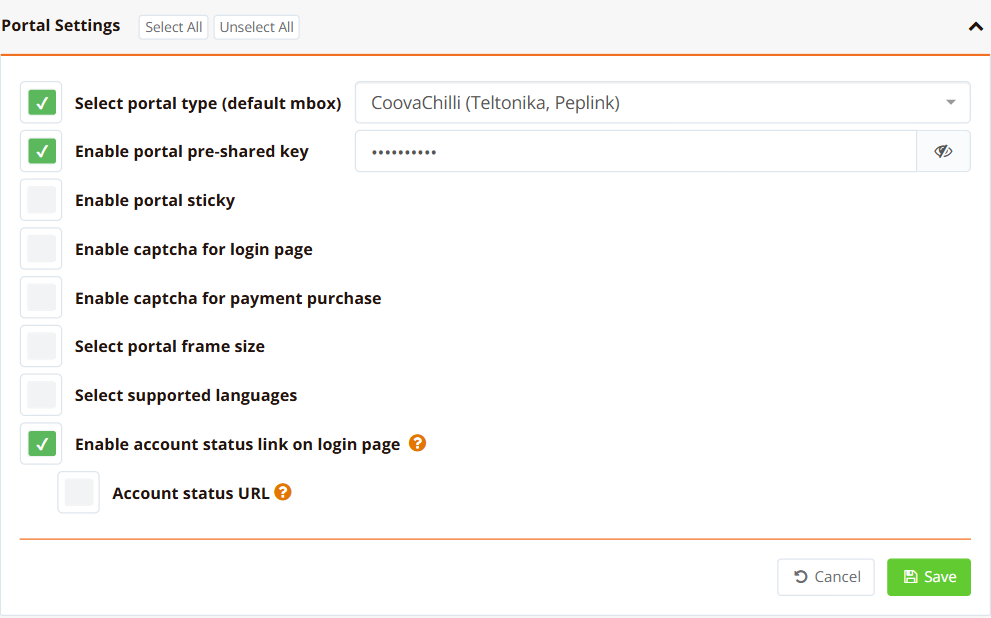
| Field | Example Value | Description |
|---|---|---|
| Select portal type (default mbox) | CoovaChilli (Teltonika, Peplink) |
Makes the portal log users in through the router's standard CoovaChilli /logon address. |
| Enable portal pre-shared key | Str0ngUamSecret |
Must equal the router's UAM Secret. Required: without it the router does not sign its redirects and the portal refuses them. |
| Enable portal sticky | Off | Not available for third-party routers (it relies on the HSG hotspot engine). |
Then set the login methods and purchases on the Login Option tab, as for any portal. See Captive Portal — Login Option.
The portal's login page address is the router's splash or landing page:
Step 3: Configure the Router
Peplink / Pepwave
On the Peplink router (or in InControl 2), open Network → Captive Portal, add a portal, and bind it to the SSID or LAN.
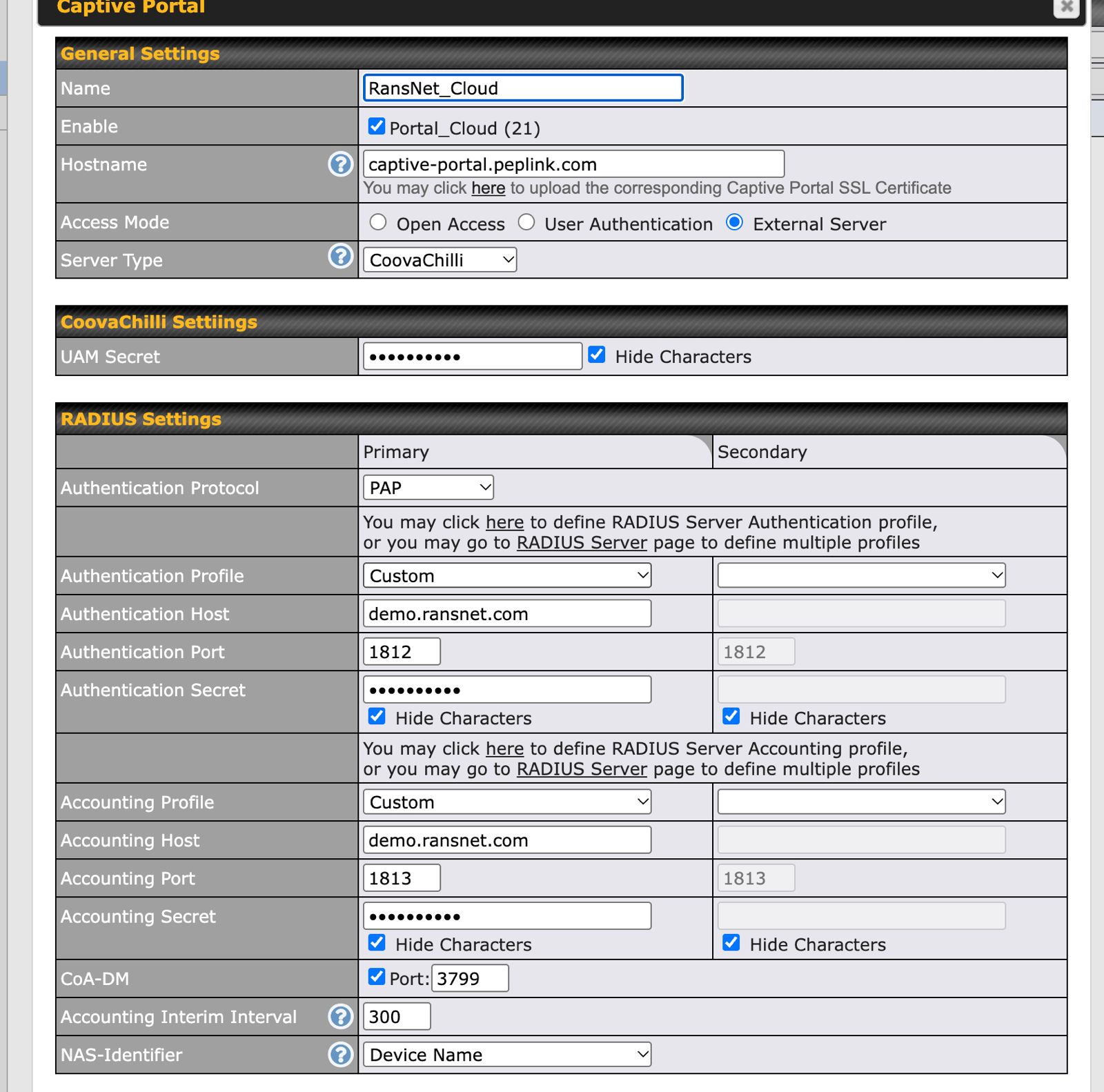
| Field | Value | Notes |
|---|---|---|
| Hostname | captive-portal.peplink.com (default) |
The router answers this name itself. Upload a certificate for it only if you change it to your own host name. |
| Access Mode | External Server | |
| Server Type | CoovaChilli | |
| UAM Secret | Same as the portal's pre-shared key | |
| Authentication Protocol | PAP | |
| Authentication Host / Port / Secret | HSG address, 1812, RADIUS client key |
Use Custom profile. |
| Accounting Host / Port / Secret | HSG address, 1813, RADIUS client key |
|
| CoA-DM | Ticked, port 3799 |
Lets HSG disconnect sessions (see Disconnecting Users). |
| Accounting Interim Interval | 300 |
Seconds between usage updates. |
| NAS-Identifier | Device Name | Shown as the hotspot name in User Sessions. Use letters, digits, ., _ or - only. |
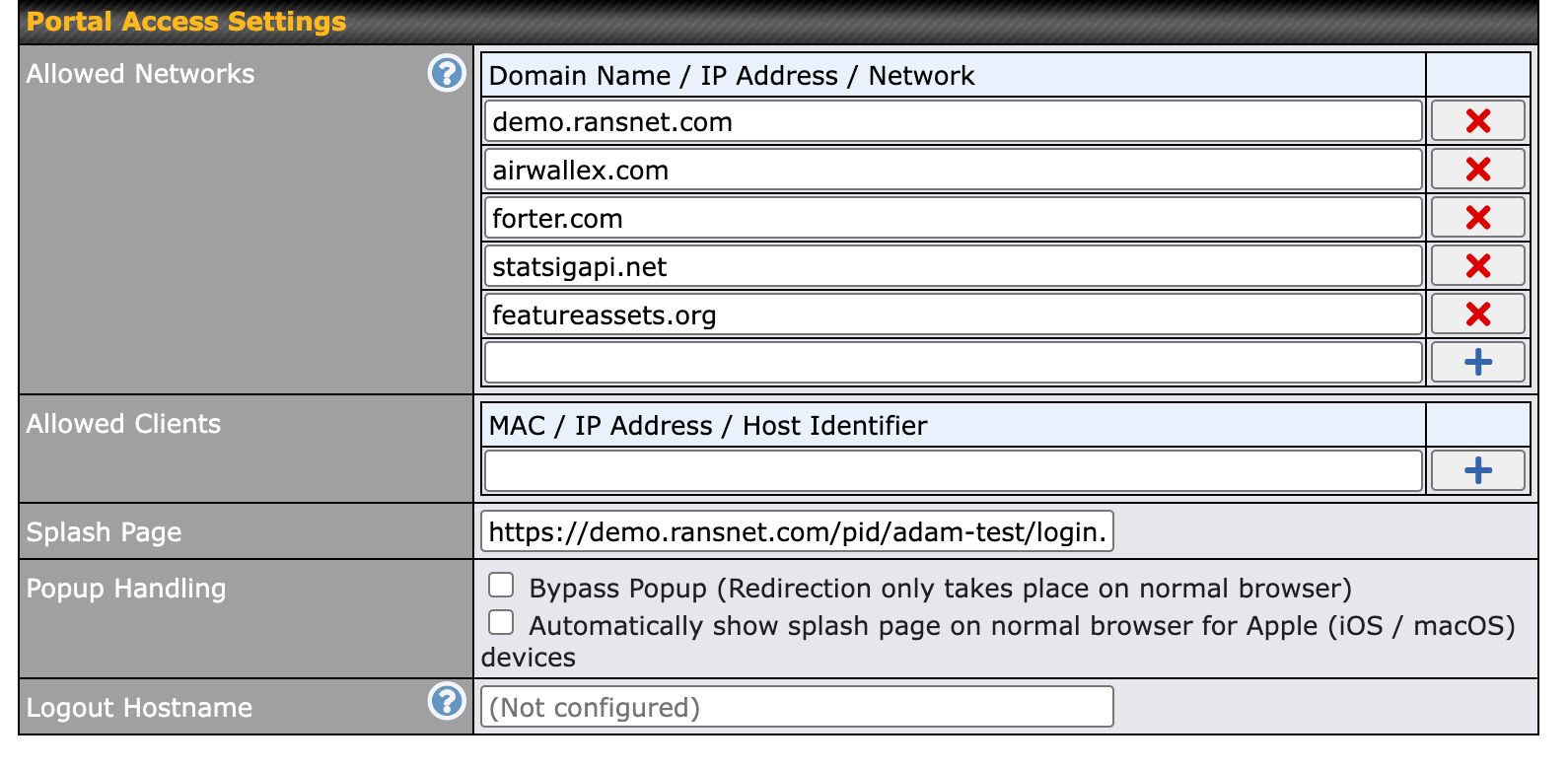
| Field | Value | Notes |
|---|---|---|
| Allowed Networks | Portal host plus payment gateway domains | See Walled Garden. |
| Splash Page | https://wifi.example.com/pid/<portal>/login.php |
The portal's login page. |
| Popup Handling | Both unticked (default) |
Note
Peplink sends its own host name (captive-portal.peplink.com) and port 8008 as the UAM address. The portal sends guests back to that address to log in, so no Peplink-specific portal setting is needed.
Teltonika (RutOS)
On the Teltonika router (e.g. RUT241), open Services → Hotspot → Hotspot general, edit the hotspot instance, and set the three parts of its Configuration page.
Step 3a: Hotspot instance
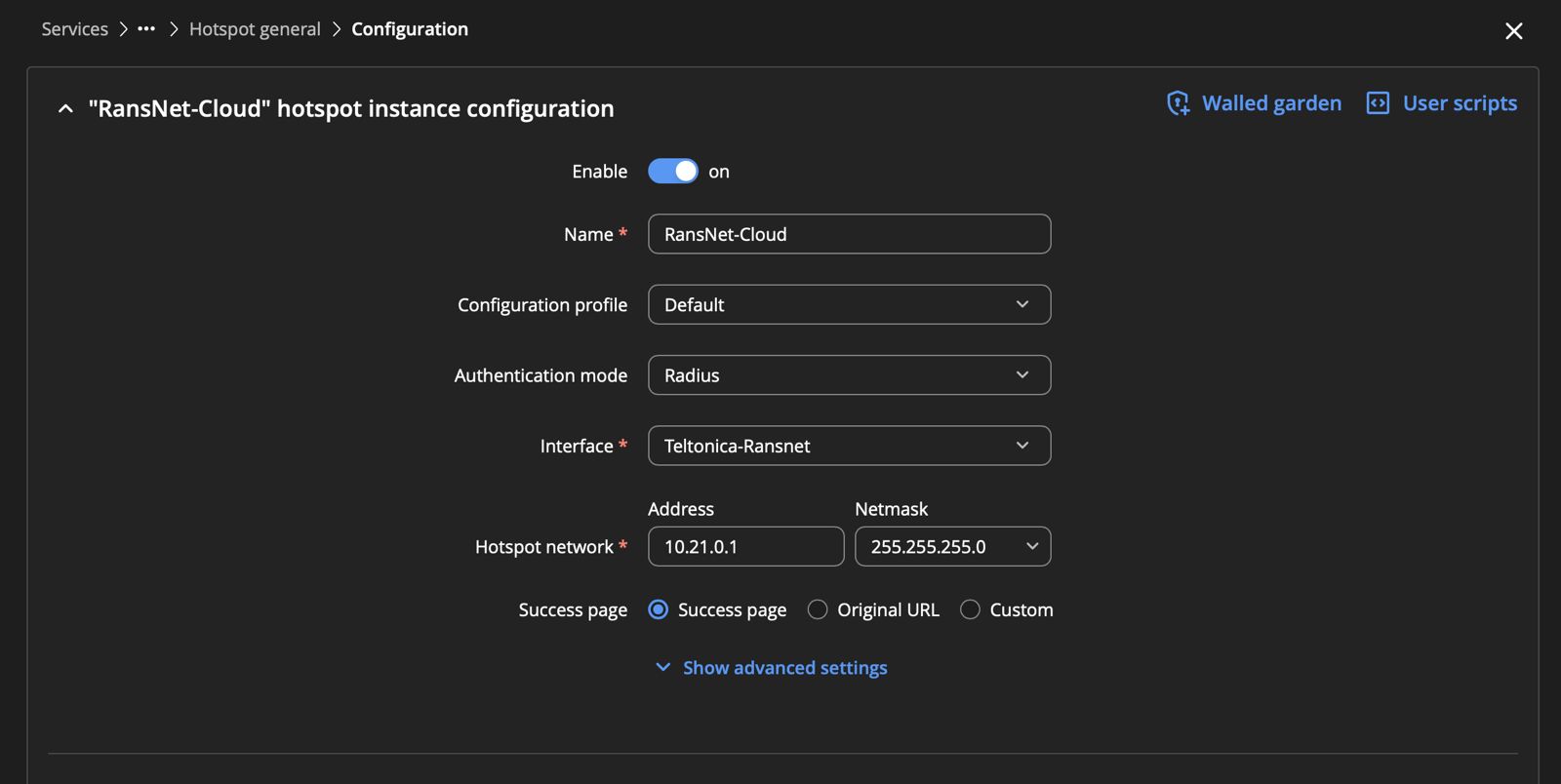
| Field | Value | Notes |
|---|---|---|
| Enable | On | |
| Name | e.g. RansNet-Cloud |
|
| Configuration profile | Default | |
| Authentication mode | Radius | Users are checked against HSG RADIUS. |
| Interface | The LAN or Wi-Fi network guests use | |
| Hotspot network | e.g. 10.21.0.1 / 255.255.255.0 |
Address range the hotspot gives guests. |
| Success page | Success page (default) | Where guests go after login. Original URL returns them to the page they first opened. |
Walled garden (link at the top right of this page) holds the domains guests can reach before login: the portal host and the payment provider's domains (see Walled Garden).
Step 3b: Landing page
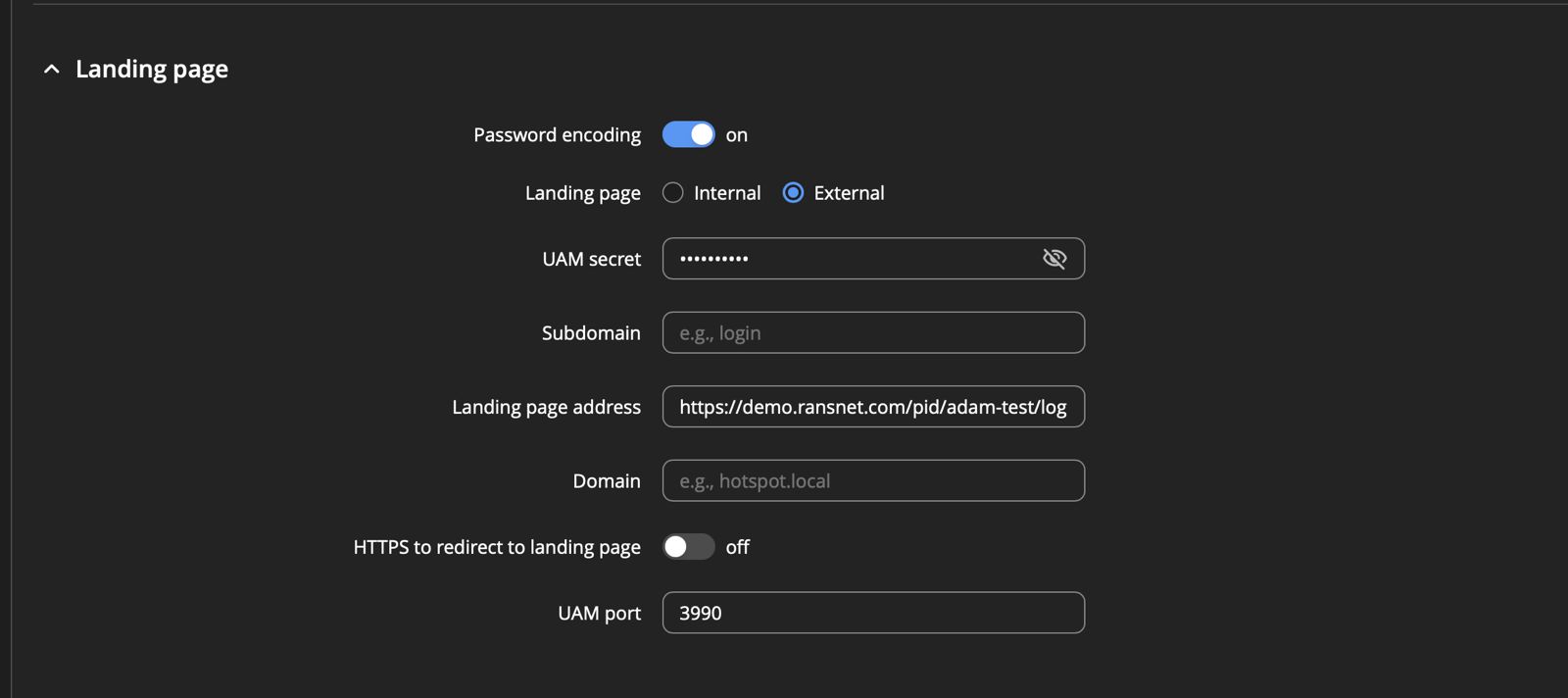
| Field | Value | Notes |
|---|---|---|
| Password encoding | On | Required: the portal sends the password encoded with the UAM secret. |
| Landing page | External | |
| UAM secret | Same as the portal's pre-shared key | |
| Landing page address | https://wifi.example.com/pid/<portal>/login.php |
The portal's login page. |
| Subdomain / Domain | Empty | |
| HTTPS to redirect to landing page | Off | |
| UAM port | 3990 |
Step 3c: RADIUS
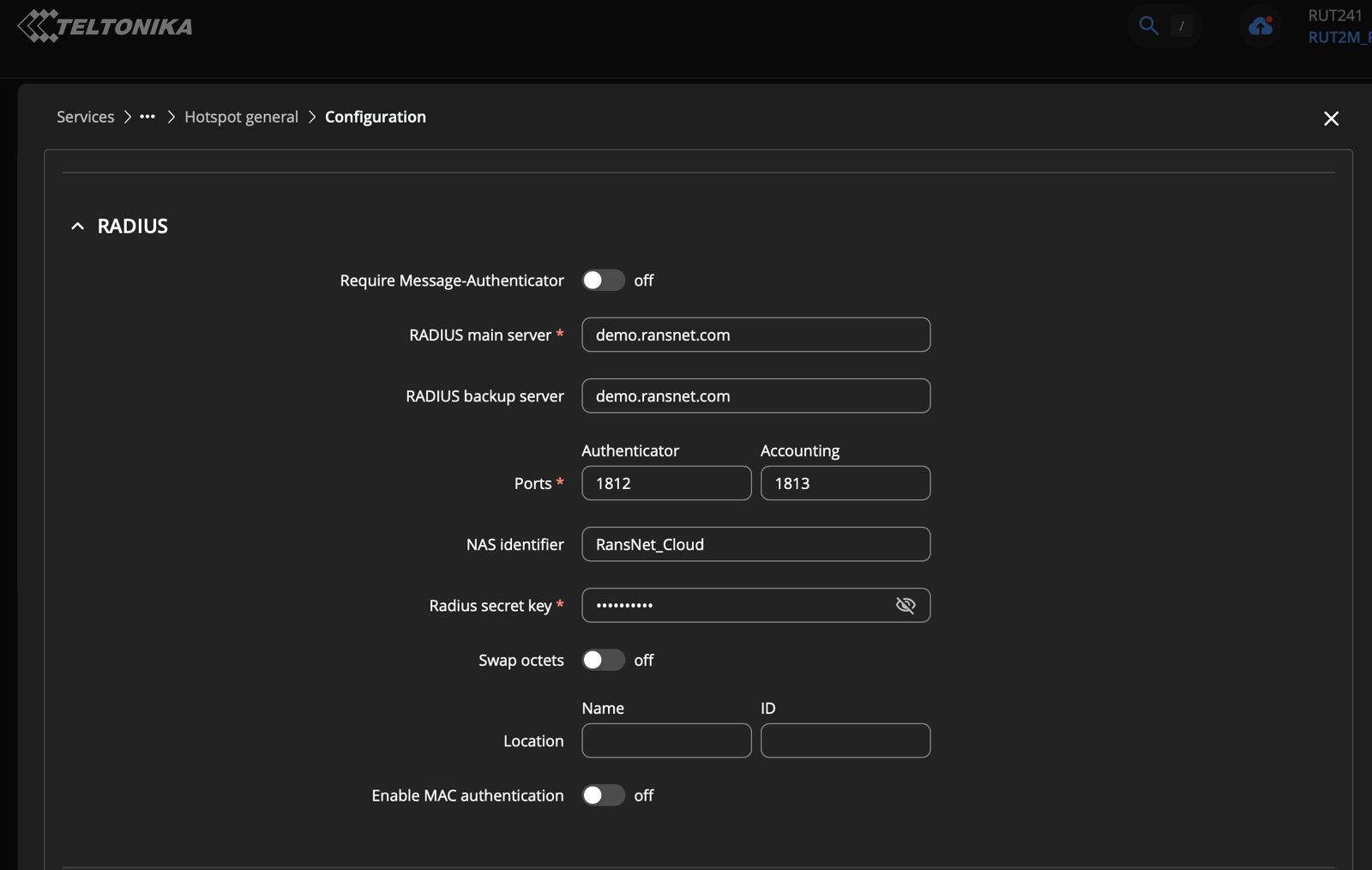
| Field | Value | Notes |
|---|---|---|
| Require Message-Authenticator | Off | |
| RADIUS main server | HSG address, e.g. wifi.example.com |
|
| RADIUS backup server | Optional, e.g. a second HSG | |
| Ports | Authenticator 1812, Accounting 1813 |
|
| NAS identifier | e.g. RansNet_Cloud |
Shown as the hotspot name in User Sessions. Use letters, digits, ., _ or - only. |
| Radius secret key | RADIUS client key | Must match the router's RADIUS client entry on HSG (Step 1). |
| Swap octets | Off | |
| Location (Name / ID) | Optional | |
| Enable MAC authentication | Off |
Note
RutOS field names and menus vary between firmware versions; the screenshots above are from a RUT241. The Teltonika hotspot intercepts http:// pages only: a guest who first opens an https:// site may not see the portal until the phone's sign-in prompt appears or an http:// page is opened.
Walled Garden
Guests must reach the portal and, for purchases, the payment provider's pages before they log in. Add these domains to the router's walled garden (Peplink Allowed Networks, Teltonika Walled Garden):
| Purpose | Domains |
|---|---|
| Portal | Your portal host, e.g. wifi.example.com |
| Airwallex (cards, Alipay, WeChat Pay) | airwallex.com, forter.com, statsigapi.net, featureassets.org |
| PayPal | paypal.com, paypalobjects.com |
| Alipay through PayPal | alipay.com, alipayobjects.com, alicdn.com |
On Teltonika, add the domains under the instance's Walled garden. Payment pages load content from several hosts, and the list changes over time: if a page loads only partly, find the blocked host in the browser's developer tools and add it.
Disconnecting Users (RADIUS CoA)
HOTSPOT USERS → User Sessions → Online Sessions → Disconnect, and the Single Session kick-out of an older login, send a RADIUS Disconnect-Request to the router on UDP port 3799.
The router must:
- Have CoA enabled (Peplink CoA-DM ticked, port
3799). - Be reachable from HSG on UDP 3799. A router behind carrier-grade NAT (common on 4G/5G) cannot receive CoA. Give it a public IP address or connect it to HSG over a VPN.
- Accept CoA from HSG's RADIUS address. HSG sends the request from the address the router sends its accounting to.
If the router cannot be reached, Disconnect reports an error and the session stays until it times out.
Feature Support
| Feature | mbox (RansNet) | CoovaChilli (Peplink, Teltonika) |
|---|---|---|
| Username/password, PIN code | Yes | Yes |
| Click to connect (accept the terms) | Yes | Yes (uses the default demouser account, or the account set on the Login Option tab) |
| Email / SMS self-registration with OTP | Yes | Yes. The verification period before the OTP is entered uses the built-in registeruser RADIUS account (5 minutes, 1 Mbps). |
| Register by purchase only, data top-up and access plan purchase | Yes | Yes. Add the payment provider's domains to the router's walled garden. |
| Portal sticky (automatic re-login) | Yes | No |
| Disconnect from User Sessions (CoA) | Yes | Yes, when the router supports CoA and is reachable on UDP 3799 |
| Bandwidth, data and time limits from access profiles | Yes | Session time limits: yes. Bandwidth and data limits: depends on the router's support for the RADIUS attributes. Test on your model. |
| Per-instance options (client-single, client-flow, bypass lists, bandwidth) | HSG CLI | Configured on the third-party router |
Verification
| Items to Test | How | Expected Outcome |
|---|---|---|
| Redirect to portal | Connect a phone to the router's Wi-Fi and open an http:// site |
The portal login page appears, without "No captive portal detected". |
| Login | Sign in with a test account | The browser returns to the router, then to the page the guest opened. The session appears in HOTSPOT USERS → User Sessions → Online Sessions with the router's NAS identifier as the hotspot. |
| RADIUS | show security radius-log on HSG |
Login OK: [<username>/...] (from client <name> ...) for the router's RADIUS client entry. |
| Accounting | Wait one interim interval (e.g. 5 minutes) | Traffic counters in Online Sessions increase. |
| Purchase | Buy a plan with the provider's sandbox mode on | The payment page loads, the guest returns to the portal's success page and is online. |
| Disconnect | Disconnect on the session in Online Sessions | "User is successfully disconnected"; the guest sees the portal again on the next page. |
Troubleshooting
| Symptom | Likely Cause | Solution |
|---|---|---|
| Portal shows "No captive portal detected" or "Invalid URL" | UAM secret on the router differs from the portal's pre-shared key, or no UAM secret is set | Set the same value on both. Reconnect the client to get a fresh redirect. |
| Login fails with "Access denied"; RADIUS log shows a garbled password | Login page opened from an old redirect (stale challenge), or UAM secret mismatch | Reconnect to the Wi-Fi so the router issues a new redirect, then log in again. Check that both secrets match. |
| RADIUS log shows nothing for the router | Router not registered as a RADIUS client, wrong secret, or UDP 1812/1813 blocked | Add the router's public or VPN address as a RADIUS client. Check firewalls on both sides. |
| Payment page does not load or loads blank | Payment provider domains missing from the walled garden | Add the provider's domains (see Walled Garden). |
| After paying with WeChat Pay, the provider page shows "Succeeded" but the guest stays there | The provider page does not return to the portal | Tap Back, or reconnect to the Wi-Fi: the portal completes the paid order and logs the guest in (within 15 minutes of the order). |
| Disconnect reports "Error disconnecting user" | CoA not enabled on the router, UDP 3799 not reachable (carrier NAT), or the router does not accept CoA from HSG's address | Enable CoA, give the router a public IP address or VPN, and check the router accepts CoA from the HSG address it sends RADIUS to. |
Guests on https:// sites never see the portal |
Router intercepts http only | Open an http:// page, or rely on the phone's sign-in prompt. |
Best Practices
Security Best Practices
- Use a strong, unique UAM secret and RADIUS key per site or fleet — they authenticate the router's redirects and RADIUS requests.
- Register routers by address, not
0.0.0.0/0— use a VPN subnet or each router's public IP address. - Serve the portal over HTTPS with a valid certificate — guests enter passwords and payment details on it.
- Keep the walled garden minimal — allow only the portal and payment provider domains.
- Never expose HSG management (SSH, GUI) to the routers' networks — only the portal (HTTPS) and RADIUS (UDP 1812/1813) need to be reachable. See Device Hardening.
Deployment Tips
- Test with sandbox payments first — tick Sandbox (test) mode on the portal and use the provider's test credentials before going live. See Captive Portal — Purchases and Payment Gateway.
- Use a VPN for CoA — routers on 4G/5G are usually behind carrier NAT; a VPN to HSG makes disconnect and Single Session work.
Related Features
- Captive Portal — Portal settings, login options, purchases
- AAA / RADIUS — RADIUS clients and authentication
- Access Profile — Session time, bandwidth and data limits, access plans for sale
- User Sessions — Online sessions and disconnect
- Payment Gateway Integration — End-to-end payment setup