System Sync
System Sync replicates system data from one RansNet gateway to another. It serves two distinct purposes:
- High Availability (HA) — combined with VRRP or route tracking, the secondary unit automatically takes over as primary if the first unit fails, so service continues with minimal disruption.
- Backup — even without automatic failover, System Sync keeps a continuously up-to-date copy of a unit's data on a second unit, for disaster recovery or manual cutover. In this mode, no automatic role switching is configured — the secondary stays read-only until an administrator manually promotes it.
This feature applies primarily to mfusion, HSG, and mlog models. It's a fixed, minimal-configuration feature by design — an administrator only identifies the peer and (for HA modes) how to determine which unit is primary; what data gets synchronized and how it's transported is handled automatically and isn't a separate set of options to configure.
Overview
System Sync keeps two categories of data identical between the peers:
- Databases — the admin database, user/account databases, hosts, entities, and other application data used by mfusion, HSG, mlog, and Ads modules.
- Files — supporting data that isn't stored in a database, including reports, backups, release files, OpenVPN certificates, and WireGuard peer keys (where configured).
A unit's role (primary or secondary) determines the direction of replication and which unit accepts writes:
- Primary — read/write. Accepts configuration changes, dashboard logins, and application writes, and runs the primary-only services (monitoring server, RADIUS server, log server).
- Secondary — read-only. Continuously receives replicated data from the primary; does not accept writes, and keeps the primary-only services stopped (see Services by Role).
Deployment Modes
System Sync supports three deployment modes, depending on whether you need automatic failover and where the two units are located:
| Mode | Description | Role Determination |
|---|---|---|
| Localized HA | Both units are at the same site, on the same network segment; failover is automatic. | VRRP VIP ownership, via a tracked route — the VIP appears as a directly-connected /32 route only on the unit currently holding it, so whichever unit has that route is primary. |
| Offsite HA | Units are at different sites/networks (e.g. DC and DR), each advertising the same mfusion IP (typically a loopback) into a routed network such as BGP; failover is automatic. | Routing table — whichever unit currently has the tracked route (via BGP or a tracked static route) is primary. |
| Backup Only | No automatic role switching — the secondary stays permanently read-only, continuously synced, until manually promoted. Useful for disaster recovery where a controlled, deliberate cutover is preferred over automatic failover. | Manual — an administrator runs promote/demote on each unit as needed. |
Determining System Role
For the two automatic (HA) modes, each unit independently determines its own role by checking whether a tracked condition currently passes, at a regular interval — it does not coordinate directly with its peer to decide this. A passing check promotes this unit to primary; a failing check demotes it to secondary. To avoid reacting to a single momentary blip, a role change only happens once the same result has been seen on two consecutive checks — a lone flickered probe or a brief BGP reconvergence doesn't, by itself, trigger a promote or demote.
track icmp <host> <interval> [max <maxrtt> <maxloss>] [src <ip>] [log]
track tcp <host> <port> <interval> [max <maxrtt> <maxloss>] [src <ip>] [log]
track route <cidr> <interval> [log]
| Command | Checks | Use With |
|---|---|---|
track icmp <host> <interval> |
Does this remote host answer ICMP echo (ping)? | Tracking a distinct third-party host's reachability |
track tcp <host> <port> <interval> |
Does this remote host accept a TCP connection on the given port? | Same, when ICMP is filtered between the units |
track route <cidr> <interval> |
Does this exact prefix currently exist in this unit's own routing table? | Both Localized HA (VRRP) and Offsite HA (BGP / tracked static routes) |
interval is the poll interval in seconds (30 is a reasonable default for this feature — role changes are comparatively expensive, involving a replication/read-only switch). For Backup Only mode, configure no tracking at all — without it, a unit never promotes itself automatically, and stays secondary until an administrator runs promote.
For HA role determination specifically, track route is almost always the right choice for both architectures below — see the note at the end of this section for why track icmp/track tcp aren't suitable for tracking a shared VIP.
Localized HA (VRRP)
For two units at the same location, run VRRP between them. When keepalived assigns the VIP to this unit's interface, the kernel adds it as a directly-connected /32 route in the routing table; when the VIP is released, that route disappears with it. Configure track route against the VIP as a /32 to detect this:
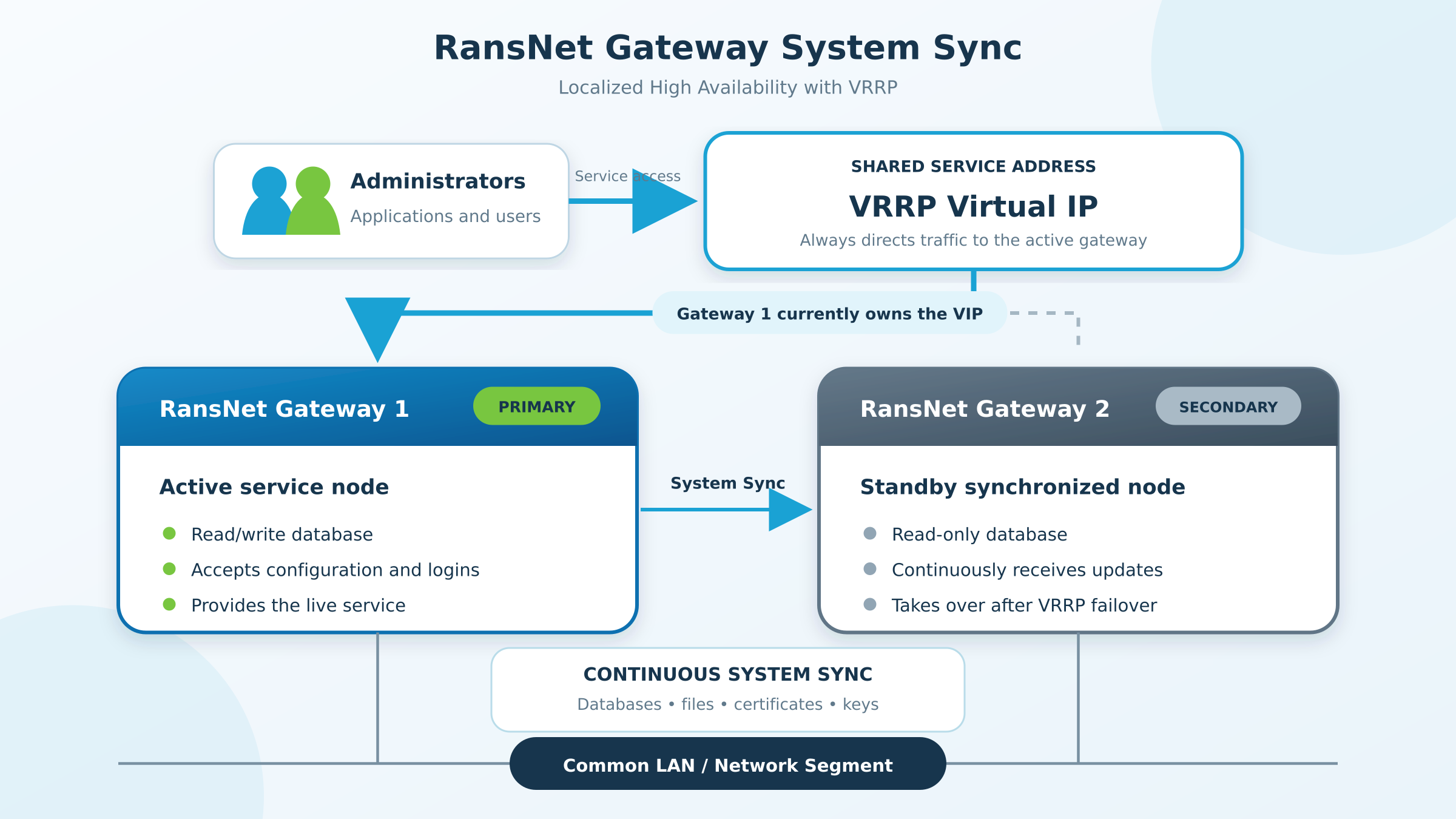
Administrators and applications always reach the pair through the shared VRRP VIP, never a unit's own address. Gateway 1 in the diagram currently owns the VIP and serves as the read/write primary; Gateway 2 continuously receives replicated databases, files, certificates, and keys over System Sync, and takes over automatically if Gateway 1 releases the VIP.
VRRP already guarantees exactly one owner of the VIP at any given time, so this cannot produce a split-brain condition under normal operation.
Don't track the VIP via track icmp/track tcp
Since both units sit on the same network segment, whichever unit currently holds the VIP answers pings and TCP connections addressed to it — so both units would see tracking pass and both would attempt to become primary. Always use track route <vip>/32 for a VRRP-based pair, not track icmp/track tcp against the VIP itself.
Offsite HA (BGP / Routed)
For units at different sites, each site advertises the same mfusion IP (typically configured on a loopback interface) into a BGP network — or a router elsewhere injects a static route toward whichever site is currently active, using route tracking to withdraw the route on failure. Configure track route on each unit to check for the presence of that specific prefix in its own routing table:
The unit that currently has this route in its table (because its own BGP session is up and advertising, or because it's the currently-selected active site) is primary.
Note
track route only reads local routing-table state — this module does not create or withdraw the tracked route itself. Provisioning the VRRP group, BGP session, or tracked static route that makes the route appear or disappear is configured separately, using the referenced VRRP, BGP, or Tracking features.
Services by Role
Some services write to the database or must only ever run on one unit. System Sync starts and stops them together with the role, so the tracking under mfusion sync is the only tracking an HA pair needs:
| Service | CLI | On the secondary | On promote |
|---|---|---|---|
| Monitoring server (mfusion) | mfusion server |
Stopped — two active monitoring servers would poll and alert twice, and its database is read-only. | Started again (in the background; up within seconds). |
| RADIUS server | security radius-server |
Stopped — RADIUS writes accounting records to the local database, which would break replication. | Started again. |
| Log server | security log-server |
Stops receiving syslog from devices (udp/tcp 514) and writing it to the database. The unit keeps logging locally (/var/log/syslog). |
Receives device syslog again. |
How it works:
- Configure the services normally on both units, with
start, exactly as on a standalone appliance. Do not configuretrackundermfusion serverfor an HA pair — System Sync decides where the services run. - A unit becoming secondary stops these services before its database turns read-only, and records which ones it stopped. Promote starts exactly those again.
- While a unit is secondary, starting one of these services by hand is refused with a message such as
this box is the mfusion sync secondary - RADIUS runs on the primary (started here on promote). The same applies to the services' own watchdogs. - A secondary also keeps its scheduled database maintenance jobs disabled, and re-checks every tracking interval that it is still read-only with these services stopped — for example after a database restart during a firmware upgrade.
no enablestops System Sync without starting anything: the unit may still hold a read-only replica of the database. Start the services by hand if the unit is meant to run standalone (see Troubleshooting).
Peer Configuration
Identify the peer unit and this unit's own address:
| Command | Description |
|---|---|
remote-ip <ip> mac <mac> |
The peer unit's IP address and eth0 MAC address. |
local-ip <ip> |
This unit's own IP address, used to bind the local sync services. |
Once a unit is in the secondary role, its dashboard is not accessible for login — the database is read-only, and dashboard login requires a database write (recording the login event), which fails on a read-only database.
Tip
For HA modes, always access the dashboard through the shared VIP (localized) or the shared advertised IP (offsite), never through a unit's own individual IP address. This way, the dashboard is always reachable at the same address regardless of which unit currently holds the primary role — the role and the specific unit serving it stay transparent to the administrator.
Firewall Access
Once enable is run, System Sync automatically permits the peer's replication and file-sync traffic through the firewall — restricted to the exact peer IP and the specific ports involved. There is nothing to configure manually here: the access is added when sync is enabled and removed automatically when it's disabled (no enable) or removed (no mfusion sync).
CLI Configuration
Full example — a localized HA pair using VRRP, with the monitoring, RADIUS and log services:
mfusion mysql-server
 start
!
mfusion sync
 remote-ip 10.65.31.53 mac 00-50-56-9b-43-fa
 local-ip 10.65.31.56
 track route 10.65.31.197/32 30 log
 enable
!
security radius-server
 start
!
security log-server
 start
!
mfusion server
 start
!
Key points:
remote-ip 10.65.31.53 mac 00-50-56-9b-43-fa— the peer unit's IP and eth0 MAC addresslocal-ip 10.65.31.56— this unit's own IP addresstrack route 10.65.31.197/32 30 log— the VRRP VIP shared by both units, tracked as a/32route and polled every 30 seconds; whichever unit currently has this route is primary.logrecords each check in the system log.enable— activates System Sync using the settings above; run this last, afterremote-ip,local-ip, andtrack(if used) are all configuredsecurity radius-server,security log-serverandmfusion serverare configured with a plainstarton both units, with notrackof their own — System Sync runs them on the primary only (see Services by Role). The peer unit's configuration is the same, withremote-ipandlocal-ipswapped.
For an offsite pair, track the BGP-advertised prefix instead of the VIP:
mfusion sync
 remote-ip 10.10.20.11 mac 00-50-56-8a-1c-4e
 local-ip 10.10.10.11
 track route 10.65.31.0/24 30
 enable
!
For Backup Only mode, omit track entirely — the secondary stays read-only until manually promoted:
Initial Setup
- Configure and enable System Sync on the primary unit first.
- Configure and enable System Sync on the secondary unit.
- On the secondary unit, force an immediate full sync:
rejoinreseeds the secondary's data fresh from the primary rather than waiting for the two units to reconcile on their own — use it at initial setup, and any time a unit needs a full resync (e.g. after extended downtime).
Warning
When testing failover, allow enough time for a full sync before promoting the secondary — some data syncs faster than others. If the secondary is promoted to primary while it is only partially synced, the original primary (now secondary) will sync from the newly-promoted unit and can lose any data that had not yet replicated.
Do not rush into a failover test the first time you set up System Sync. Confirm the secondary is fully synced first (see Verification).
Manual Role Control
For Backup Only mode, or to force a controlled cutover in an HA deployment, use these commands directly on each unit:
| Command | Description |
|---|---|
promote |
Makes this unit primary (read/write) and attaches the peer as its replica. Starts the services it stopped as secondary (see Services by Role). |
demote |
Makes this unit secondary (read-only) and attaches it as a replica of the peer. Stops the primary-only services first. |
rejoin |
Wipes this unit's local data and reseeds it fresh from the peer — use for initial setup or to recover a unit that has fallen too far out of sync. |
Verification
| Items to Test | Command | Expected Outcome |
|---|---|---|
| Sync role and status | show mfusion sync |
Shows Sync Role: PRIMARY on the intended primary unit, SECONDARY on the other. Role/Track Consistent: Yes on both units (HA modes). |
| Replication health | show mfusion sync |
Replication IO: Yes and Replication SQL: Yes on the secondary, with Replication Lag: 0 sec once caught up. Last Replication Err: NONE. |
| Dashboard access | Browse to the shared VIP / advertised IP (HA modes) | Dashboard loads and login succeeds — you are always directed to the current primary. |
| Data sync | Create a test record (e.g. an entity or host) on the primary | The same record appears on the secondary shortly after. |
| Services on the primary | show mfusion server, show security radius-server, show logging |
Monitoring service: running, RADIUS server is running, Log-server: running. |
| Services on the secondary | Same commands | Monitoring service: NOT running, RADIUS server is NOT running, Log-server: NOT running with Logging service: running (local logging continues). |
| Failover (HA modes) | Remove the tracked route from the primary (e.g. disable its VRRP group, or withdraw its BGP advertisement) | The secondary detects the change and promotes itself to primary once the change is confirmed on 2 consecutive checks, and starts the monitoring, RADIUS and log services. show mfusion sync on the (new) secondary shows Read Only: Yes, and its services are stopped. |
Example output from a healthy localized HA pair — primary:
DC1-VM56# show mfusion sync
Sync Role:             PRIMARY (tracked route tracking passed)
Read Only:             No
Role/Track Consistent: Yes
Replication IO:        n/a
Replication SQL:       n/a
Replication Lag:       n/a sec
Last Replication Err:  NONE
Last File Sync:        2026-09-20T11:49:00+08:00
and secondary:
DC2-VM53# show mfusion sync
Sync Role:             SECONDARY (tracked route tracking failed)
Read Only:             Yes
Role/Track Consistent: Yes
Replication IO:        Yes
Replication SQL:       Yes
Replication Lag:       0 sec
Last Replication Err:  NONE
Last File Sync:        2026-09-20T11:50:48+08:00
Replication IO/Replication SQL/Replication Lag show n/a on the primary — replication status only applies to a unit currently receiving data as a secondary. Role/Track Consistent: Yes on both confirms each unit's read/write state matches whether its tracked condition currently passes or fails. (If track icmp/track tcp is used instead of track route, this reads "tracked host tracking passed/failed" instead.)
Troubleshooting
| Symptom | Likely Cause | Solution |
|---|---|---|
| Secondary unit's dashboard shows a database access error | Expected behavior — the secondary is read-only, and dashboard login requires a database write | Access the dashboard via the primary unit, or via the shared VIP/advertised IP (HA modes) so you're always directed to the current primary. |
Replication Lag stays high or Replication IO/Replication SQL shows No |
Network connectivity issue between the two units, or a genuine data divergence after an abrupt failover | Check connectivity between remote-ip/local-ip addresses. If replication cannot recover on its own after a short wait, run rejoin on the affected unit to force a fresh resync. |
Both units show SECONDARY, or both show PRIMARY |
The tracked condition is not being satisfied correctly on either unit, or both currently satisfy it (e.g. a VRRP or routing misconfiguration, or track icmp/track tcp mistakenly used against a shared VIP — see the warning under Localized HA) |
Verify VRRP state with show ip vrrp (localized HA) or the routing table with show ip route (offsite HA). Confirm the track route prefix matches the actual VIP (as a /32) or BGP-advertised prefix. |
| Data missing on the secondary after failover testing | Secondary was promoted before it finished a full sync (see the warning under Initial Setup) | Run rejoin on the affected unit to force a full resync, and allow more time before the next failover test. |
start of mfusion server, security radius-server or security log-server prints this box is the mfusion sync secondary ... |
Expected — the unit is secondary, and System Sync runs these services on the primary only | Nothing to do; the services start on this unit when it is promoted. See Services by Role. |
After no enable, the monitoring server won't start; its log shows database upgrade failed on patch ... exiting |
The unit's database is still read-only — no enable does not change the database role |
If the unit should run standalone, run promote under mfusion sync (makes the database writable and stops replication), then start the services. To return it to the pair, enable and rejoin. |
Replication SQL: No with an "out-of-order sequence number" error after maintenance on the secondary |
A command that writes to the database ran on the secondary — e.g. data-reset, pass-reset, write erase (database reset), or a firmware upgrade of the secondary first |
Run rejoin on the secondary. Upgrade the primary first, and avoid database-changing commands on a secondary. |
Best Practices
- Access via the shared VIP/advertised IP — for HA modes, never bookmark or hardcode a unit's individual IP for dashboard access; always use the tracked IP (VRRP VIP) or advertised address so the current primary is always reached transparently.
- Don't rush the first failover test — allow a full sync cycle to complete before testing failover, particularly the first time System Sync is configured.
- Use
rejoinafter extended downtime — if a secondary has been offline long enough that normal replication cannot catch up cleanly,rejoinforces a full, consistent resync rather than leaving the unit in a partially-synced state. - Track only under
mfusion sync— configure the monitoring, RADIUS and log services with a plainstarton both units and let System Sync run them on the primary. Don't addtrackundermfusion serveras well: two independent trackers can disagree. - Upgrade the primary first — a firmware upgrade updates the database; on the primary those changes replicate to the secondary. Upgrading the secondary first can stop replication (fix with
rejoin). - Use
track route, nottrack icmp/track tcp, for HA role determination — a VRRP VIP shows up as a directly-connected/32route only on the unit that currently holds it, sotrack route <vip>/32is what reliably distinguishes the two units.track icmp/track tcpagainst the VIP itself doesn't work, since both units can reach a shared VIP regardless of which one owns it. The sametrack routeapproach applies to offsite/BGP pairs, tracking the wider advertised prefix instead. Configure no tracking at all for Backup Only mode.
Related Features
- On-Premise mfusion Installation — walkthrough of System Sync paired with VRRP for a redundant mfusion pair
- VRRP — virtual IP redundancy for localized HA pairs
- Tracking — reachability monitoring used to control VRRP participation and static route presence
- BGP — dynamic route advertisement for offsite HA pairs
- Static Routes — tracked static routes as an alternative to BGP for offsite HA