Mobile Monitoring
The Mobile dashboard provides fleet-wide visibility into cellular (4G/5G) connectivity — SIM registration state, active slot, provider, and radio signal quality for every WWAN-equipped device in the entity. It answers at a glance: which SIMs are connected, on which carrier and technology, and how healthy is each link.
Navigate to ORCHESTRATOR → Monitoring → Dashboard and select the Mobile tab. Use the [Entity] button in the top-right corner to switch between entities.
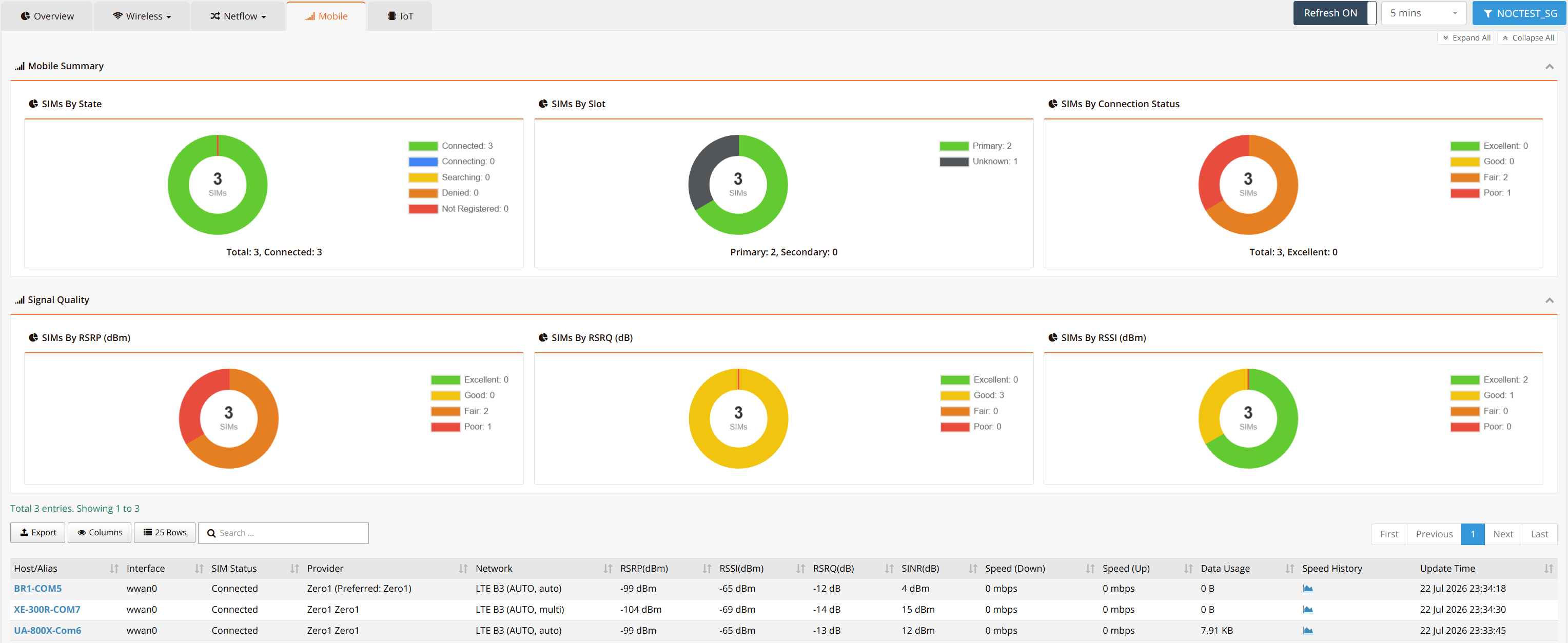
Mobile Summary
Three donut charts summarize the SIM population:
| Chart | Description |
|---|---|
| SIMs By State | Registration state of each SIM — Connected, Connecting, Searching, Denied, or Not Registered |
| SIMs By Slot | Which physical SIM slot is active — Primary (SIM1) or Secondary (SIM2). A device running on its secondary slot has failed over — see SIM Failover Behavior |
| SIMs By Connection Status | Overall connection quality classification — Excellent, Good, Fair, or Poor |
Signal Quality
Three donut charts classify every SIM's radio metrics into quality bands:
| Chart | Description |
|---|---|
| SIMs By RSRP (dBm) | Reference Signal Received Power — the most reliable coverage indicator |
| SIMs By RSRQ (dB) | Reference Signal Received Quality — overall cell quality, useful in congested cells |
| SIMs By RSSI (dBm) | Received Signal Strength Indicator — general-purpose signal strength |
The classification thresholds (Excellent/Good/Fair/Poor) follow the same 3GPP-based ranges used on the device CLI — see the Signal Quality Reference for the exact values and interpretation guidance.
Per-Device Table
The table lists every WWAN interface in the entity. Click a Host/Alias to open the host's detail view; the Speed History icon opens the interface throughput trend.
| Column | Description |
|---|---|
| Host/Alias | The device name in mfusion |
| Interface | WWAN interface (wwan0, or wwan1 on dual-modem models) |
| SIM Status | Current registration state (e.g., Connected) |
| Provider | Carrier currently in use, with the configured preferred provider if set — see Select Preferred Service Provider |
| Network | Radio technology, band, and mode (e.g., LTE B3 (AUTO, auto)) |
| RSRP / RSSI / RSRQ / SINR | Live signal metrics for the connection |
| Speed (Down) / Speed (Up) | Current downlink/uplink throughput |
| Data Usage | Data volume consumed on the cellular link |
| Speed History | Opens the historical throughput graph |
| Update Time | Timestamp of the last data refresh |
Note
Mobile metrics are collected by the WWAN States discovery rule, which is disabled by default in the monitoring template. If a cellular device does not appear here, enable the rule at template or host level — see Monitoring WWAN on mfusion.
Related Features
- Wireless WAN (WWAN) — WWAN configuration, SIM failover, and signal reference
- Tracking WWAN/SIM Connections — metric-driven SIM failover
- Monitoring Dashboard — the Overview tab and other dashboard views