Captive Portal over SD-WAN (CloudX) Deployment
Captive Portal over SD-WAN (formerly known as the CloudX design) lets customers with multiple remote locations share a single captive portal and user database across all sites. Instead of hosting a portal and RADIUS database at every branch, each branch runs a lightweight SD-WAN router that tunnels back to a central cloud gateway where the portal and user data live.
The local gateway functions as an SD-WAN router: it connects to the internet over fiber, LTE, or 5G, then builds a tunnel to the Cloud HSG where the central user database and captive portal are hosted. The same SD-WAN overlay can also carry the customer's application traffic — for example, to application servers sitting behind the cloud gateway.
In this model, the branch SD-WAN router acts as an all-in-one device but keeps no local data — no user database, no captive portal. Supported local appliances are HSG, HSA, UA, and UAP (see Product Overview).
This provides a consolidated, cost-effective, all-in-one solution for customers who need to interconnect multiple locations over SD-WAN while also serving guest Wi-Fi to engage their end customers.
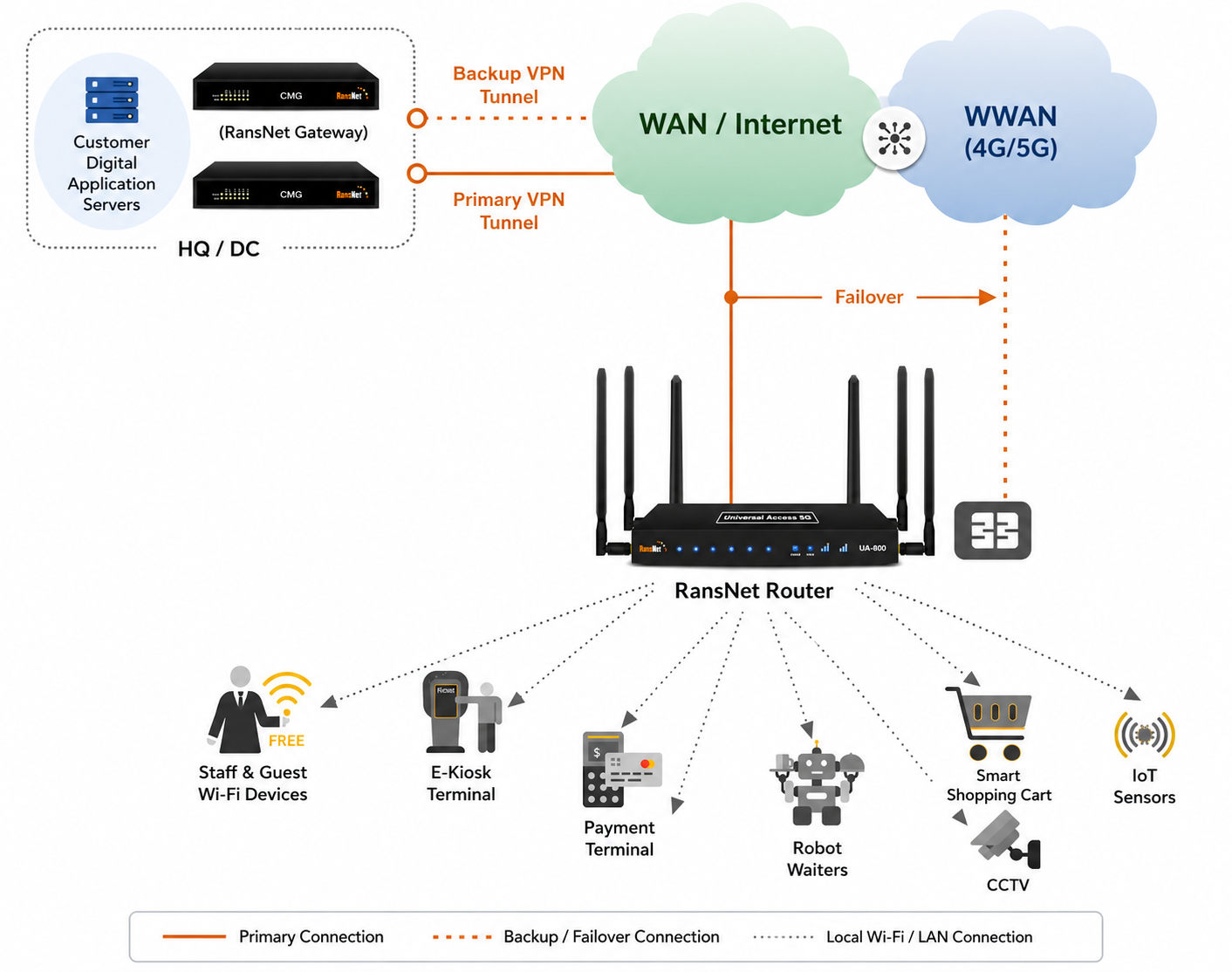
Use Cases
| Scenario | Description |
|---|---|
| CloudX mini-HSG | HSG/HSA/UA/UAP acts as a mini-HSG; additional UAP or third-party APs behind it extend wireless coverage. |
| Wi-Fi on the go | HSA/UA acts as an all-in-one device with LTE/5G backhaul to provide Wi-Fi on buses or trains. |
| Hotspot over SD-WAN | HSG/HSA/UA/UAP provides wireless hotspot access on top of SD-WAN connectivity. |
In all of these scenarios, the branch device functions as a mini-HSG using these key capabilities:
- Router and firewall
- Dual-band Wi-Fi (802.11a/b/g/n/ac wave 2, on HSA/UA/UAP)
- Dual-SIM slots (optional, for "Wi-Fi on the go" — HSA/UA)
- Hotspot controller to redirect users to the central/cloud captive portal
- SD-WAN capabilities (as an all-in-one retail solution)
Architecture Overview
- Cloud HSG (central) — Hosts the captive portal, RADIUS user database, and access profiles. Acts as the SD-WAN hub and the single source of truth for all branches.
- Branch SD-WAN router (HSG/HSA/UA/UAP) — Connects to the internet over fiber/LTE/5G, builds a VPN tunnel to the Cloud HSG, broadcasts guest Wi-Fi, and redirects users to the central portal. Holds no local user data.
- SD-WAN tunnel — Carries portal/RADIUS traffic (and optionally customer application traffic) between branch and cloud.
When a guest connects at a branch, both the captive portal access (the user reaching the login page) and the authentication (RADIUS credential exchange with the Cloud HSG) travel inside the encrypted SD-WAN tunnel — never across the public internet. The branch router redirects the user to the central portal over the tunnel, and forwards their credentials to the Cloud HSG's RADIUS server over the same secure path. This keeps user credentials and portal sessions protected end-to-end between the branch and the cloud.
Because the portal and user database are centralized, a guest account works identically at every location, and operators manage one portal and one user database for the entire network.
Note
All portal and RADIUS traffic is tunnel-encapsulated, so the cloud portal and RADIUS server do not need to be exposed to the public internet. The firewall rules in the steps below scope portal (TCP 443) and RADIUS (UDP 1812/1813) access to the branch VPN tunnel pool only.
Requirements
| Requirement | Detail |
|---|---|
| Cloud HSG | One central HSG (physical appliance or VM) with RADIUS enabled and a captive portal provisioned for the branches. |
| Branch appliance | HSG, HSA, UA, or UAP, depending on backhaul needs. An HSG branch may also be a VM. |
| Branch backhaul | Internet uplink via fiber, LTE, or 5G to establish the SD-WAN tunnel. |
| VPN protocol | SSL/OpenVPN or WireGuard. |
Note
The Cloud HSG can be a physical appliance or a VM, hosted in a RansNet data center or in the customer's own HQ/DC.
Configuration Steps
Step 1: Establish SD-WAN Between Branch and Cloud HSG
Build the SD-WAN tunnel from each branch router to the Cloud HSG using either SSL/OpenVPN or WireGuard.
Refer to Dual-WAN SD-WAN Setup for the procedure. If your branch connection does not have dual-WAN, ignore the WAN-failover portion — the rest of the setup is the same.
Step 2: Configure Captive Portal and RADIUS on the Cloud HSG
On the central Cloud HSG:
- Configure the captive portal to your requirements and note the portal name (used by the branch routers, e.g.,
cloudx). Refer to Captive Portal Configuration. - Configure users and access profiles. Refer to Access Rights and Profiles and User Management.
-
Enable RADIUS and add the branch router VPN tunnel pool as a RADIUS client. Refer to Hotspot Authentication (AAA).
-
Permit the required firewall rules so branch routers can reach the Cloud HSG over the SD-WAN tunnel — UDP
1812/1813(RADIUS) and TCP443(portal):
Step 3: Enable Hotspot for the Guest VLAN on the Branch Router
On each branch SD-WAN router:
- If the branch router also broadcasts Wi-Fi, configure the guest Wi-Fi and map the SSID to the guest VLAN. Refer to Wireless Configuration.
-
Configure the hotspot instance on the guest VLAN. Refer to Hotspot Instance Configuration.
Note
The hotspot portal URL must resolve to the gateway tunnel IP. For example, set the portal URL to
https://captive.ransnet.com/pid/cloudx/login.php, then configure DNS rewrite to mapcaptive.ransnet.comto the gateway tunnel IP (e.g.,10.1.168.1). Refer to DNS Rewrite.Configure the SD-WAN gateway tunnel IP as the RADIUS server (e.g.,
10.1.168.1) using the same pre-shared key set on the Cloud HSG. -
Configure the firewall for CloudX access — permit access to the cloud portal and PAT (source NAT) the user's source IP when reaching the cloud portal:
firewall-access 100 permit all tcp dport 443 dst 10.1.168.1 remark "permit cloud portal access"
!
firewall-snat 100 overload outbound tap+ remark "PAT client access to cloud portal"
Tip
If your SD-WAN uses a WireGuard tunnel, change
tap+towg+in the SNAT rule.
Verification
| Items to Test | Action | Expected Outcome |
|---|---|---|
| SD-WAN tunnel up | On the branch, show interface for the tunnel |
Tunnel interface is UP with a tunnel IP in the 10.1.168.0/22 pool. |
| RADIUS reachability | From the branch, reach the Cloud HSG RADIUS IP | UDP 1812/1813 to 10.1.168.1 is permitted through the tunnel. |
| Portal resolves to tunnel IP | On a guest device, check DNS for captive.ransnet.com |
Resolves to the gateway tunnel IP (e.g., 10.1.168.1) via DNS rewrite. |
| Portal loads | Connect a guest device to the SSID and open a browser | The central cloud portal page is displayed. |
| Authentication | Log in at the portal | RADIUS on the Cloud HSG authenticates the user; access is granted. |
| Same account across sites | Use the same account at another branch | Login succeeds — confirming the shared central user database. |
Troubleshooting
| Symptom | Likely Cause | Solution |
|---|---|---|
| Portal page does not load | DNS rewrite missing or wrong tunnel IP | Verify captive.ransnet.com rewrites to the gateway tunnel IP; confirm TCP 443 firewall-access and SNAT rules are present. |
| Login fails (no RADIUS response) | RADIUS client not added, or firewall blocking | On the Cloud HSG, confirm the branch tunnel pool is a RADIUS client; permit UDP 1812/1813 from 10.1.168.0/22. |
| Portal loads but cannot authenticate | Pre-shared key mismatch | Ensure the branch RADIUS key matches the key configured on the Cloud HSG. |
| Works on one branch only | Wrong SNAT outbound interface | For WireGuard tunnels use wg+; for SSL/OpenVPN use tap+ in the firewall-snat rule. |
| Application traffic not reaching cloud | Route/firewall not permitting app subnet over tunnel | Confirm SD-WAN routes and firewall rules cover the application server subnets behind the Cloud HSG. |
Best Practices
- Centralize management — Maintain one portal and one user database on the Cloud HSG; all branches inherit changes instantly.
- Match the SNAT interface to the tunnel type —
tap+for SSL/OpenVPN,wg+for WireGuard. - Scope RADIUS and firewall rules to the tunnel pool — Restrict portal/RADIUS access to the branch VPN subnet (
10.1.168.0/22) rather than opening it broadly. - Reuse the SD-WAN overlay — The same tunnel that carries portal/RADIUS traffic can carry customer application traffic to servers behind the Cloud HSG.
- Use portal-sticky for seamless re-login — In CloudX designs the branch is not the local gateway, so use portal-sticky (not client-sticky) for seamless return-user experience.
Related Features
- Crew Wi-Fi Hotspot Management — Real-world CloudX deployment for maritime fleets (central + vessel HSG)
- Dual-WAN SD-WAN Setup — Building the branch-to-cloud tunnel
- Captive Portal Configuration — Central portal templates and login methods
- Hotspot Authentication (AAA) — RADIUS server and client configuration
- Hotspot Instance Configuration — Branch guest-VLAN hotspot setup
- DNS Rewrite — Mapping the portal hostname to the tunnel IP
- Access Rights and Profiles — Central user policy definition