Vessel SD-WAN Solutions
Vessel crew networks require multi-WAN resilience and sophisticated traffic control due to the dynamic nature of maritime operations. Crew must maintain continuous access to welfare services while ensuring bandwidth is prioritized for operational and business-critical communications. RansNet enables this through multi-level WAN failover, VLAN-based traffic segregation, and application-level bandwidth control.
This guide configures a vessel with three WAN links (Starlink primary, VSAT secondary, LTE tertiary) and three user groups (crew, business, VIP), each with distinct connectivity and policy requirements.
Overview
Network Architecture
Vessel crew networks combine three distinct challenges:
- Multiple WAN links — Starlink, VSAT, and LTE have different characteristics (latency, cost, data limits). The router must intelligently select the best path and failover when any link fails.
- User segmentation — Crew, business, and VIP users have different connectivity needs and bandwidth entitlements. All must coexist on the same vessel without contention.
- Bandwidth fairness — Entertainment and video streaming consume disproportionate bandwidth. The gateway must throttle non-essential services so welfare access remains available to all crew while preserving resources for business operations.
Solution Overview
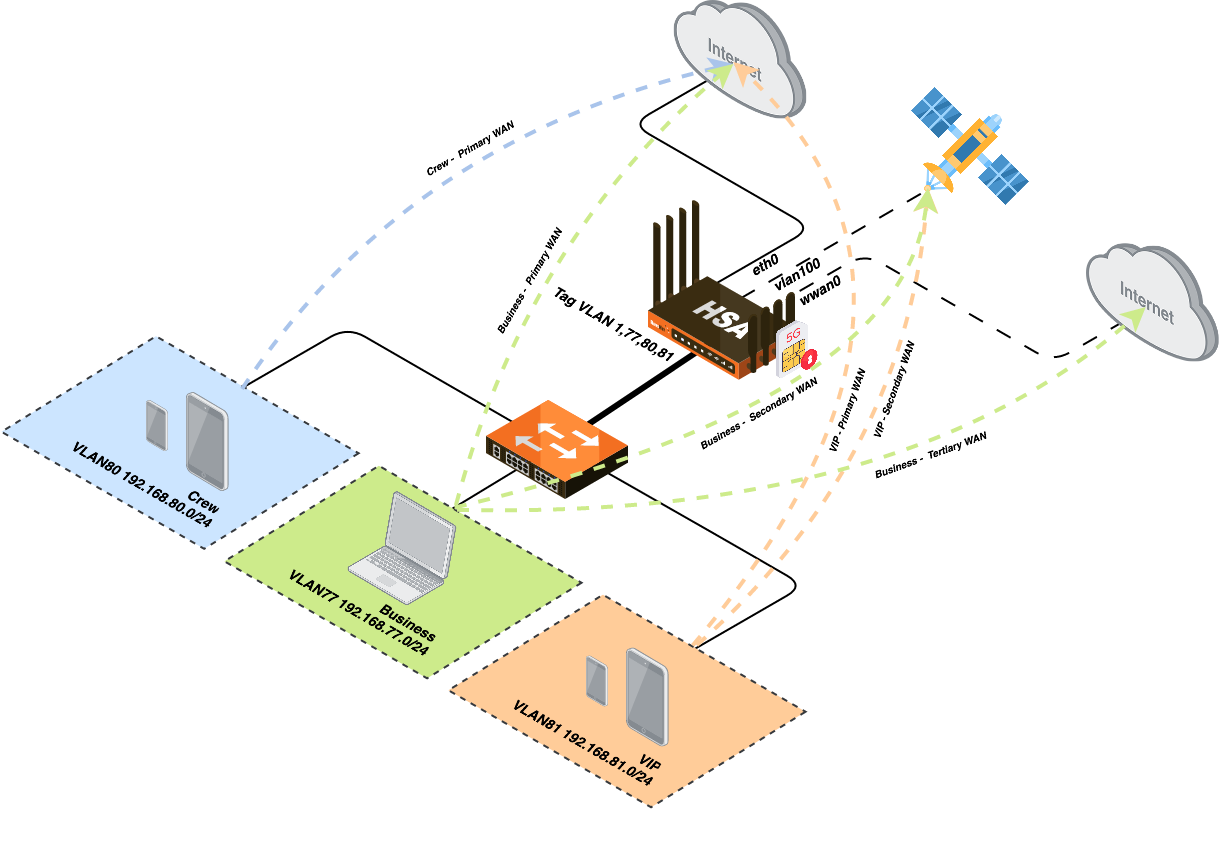
The deployment uses:
- Three WAN interfaces — Starlink (eth0), VSAT (vlan100), 4G/LTE (wwan0)
- Three LAN VLANs — Each user group on a separate VLAN with independent traffic policies
- Traffic Steering (PBR) — Routes each VLAN to its designated WAN failover sequence
- Traffic Shaping (QoS) — Throttles non-essential applications per VLAN to enforce policy
Use Cases
| User Group | Scenario | Requirements |
|---|---|---|
| Crew Welfare | Crew members access internet for personal communications (email, messaging, social media) while off-duty | Low-cost access; video streaming blocked; no failover (no loss of entitlement to limited free quota) |
| Business Operations | Vessel management, fleet tracking, navigation, cloud services, supply chain systems | High availability; automatic failover across all WAN links; prioritized access to bandwidth |
| VIP Access | Officers, management, owners requiring enhanced connectivity | Premium bandwidth allocation; failover to secondary link (not LTE); video streaming permitted |
Requirements
Infrastructure
- RansNet gateway device (HSG, UA-520R, or similar) with multiple WAN interfaces
- Three WAN links:
- Starlink (Ethernet) or similar LEO satellite broadband
- VSAT (sub-interface vlan100 or dedicated physical interface) or traditional satellite
- 4G/LTE modem (wwan0) with SIM card; optional on some models
- LAN infrastructure — Switch or AP to segregate crew, business, and VIP networks into separate VLANs
- DHCP servers — One per VLAN to distribute IPs and default gateways
Network Planning
| VLAN | Subnet | Purpose | Failover Sequence |
|---|---|---|---|
| VLAN 77 | 192.168.77.0/24 | Business Operations | Starlink → VSAT → LTE |
| VLAN 80 | 192.168.80.0/24 | Crew Welfare | Starlink only (no failover) |
| VLAN 81 | 192.168.81.0/24 | VIP Access | Starlink → VSAT (no LTE) |
WAN Link Characteristics
| Link | Latency | Cost | Data Limit | Best For |
|---|---|---|---|---|
| Starlink | ~30–50 ms | Moderate | Typically unlimited | Primary (all traffic) |
| VSAT | ~500–700 ms | High | May be limited | Secondary (operational failover) |
| LTE | ~50–100 ms | High/Variable | Carrier-dependent | Tertiary backup (business only) |
Restricted Applications
The following applications are blocked or severely throttled on the crew network to control bandwidth:
Video Streaming:
- YouTube
- Netflix
- Disney+
- TikTok
- Instagram Reels
- Facebook Video
Video Conferencing & Voice Calls:
- WhatsApp Video Call
- Telegram Video Call
- FaceTime
- Zoom
- Google Meet
- Microsoft Teams Video Meetings
Granular Control Examples:
- ✅ WhatsApp messaging (text) — allowed
- ❌ WhatsApp video calls — blocked
- ✅ Telegram messaging (text) — allowed
- ❌ Telegram video calls — blocked
- ✅ Microsoft Teams chat — allowed
- ❌ Microsoft Teams video meetings — blocked
Deployment
Step 1: Configure WAN, LAN, and DHCP
Navigate to Device Settings → Network → Interfaces and configure each interface:
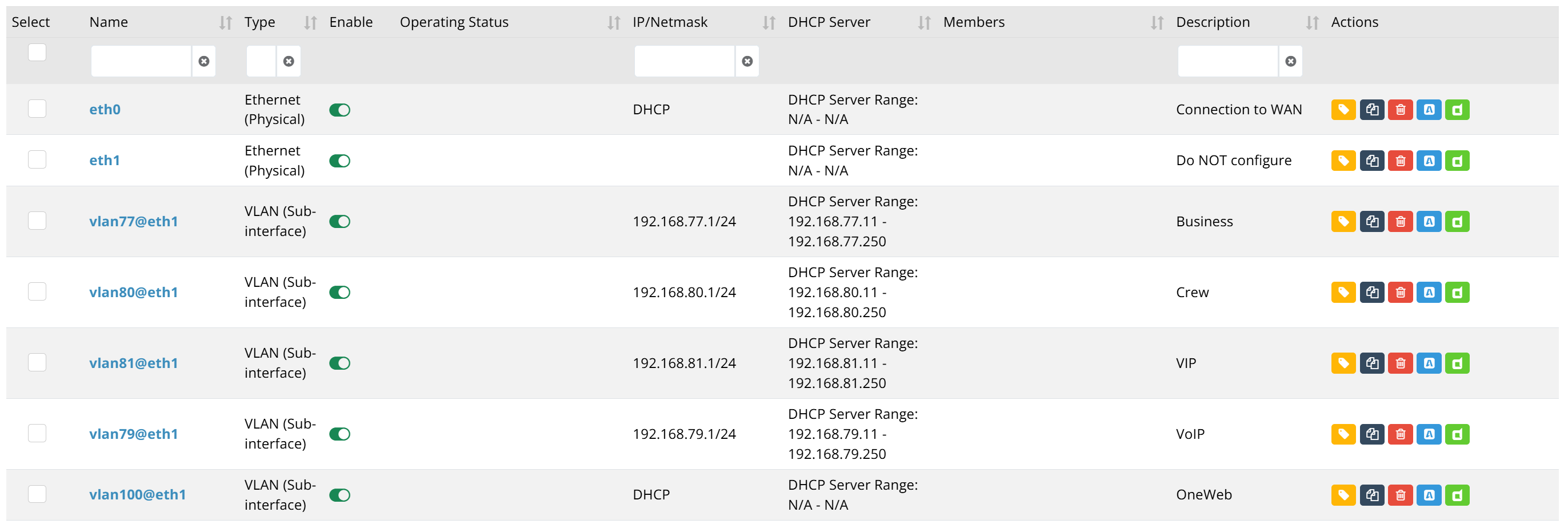
VLAN Configuration:
Create three VLAN interfaces for crew, business, and VIP networks. Each VLAN should have a dedicated IP subnet and DHCP server.
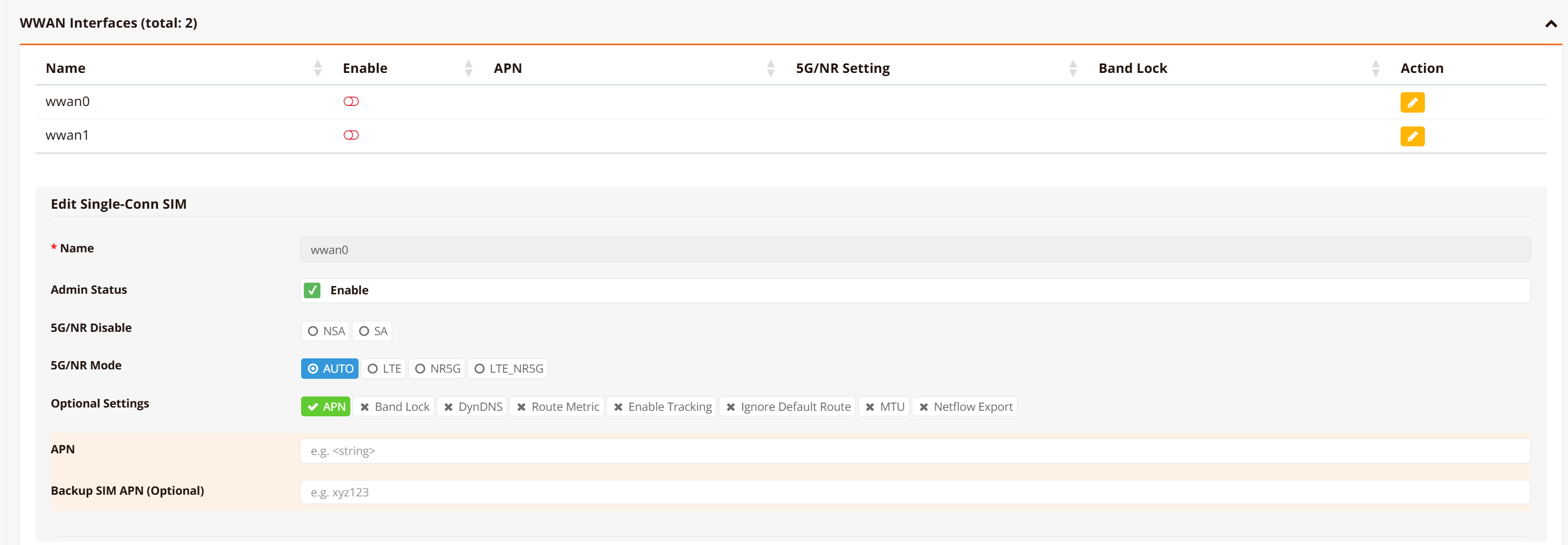
WWAN Configuration (if 5G/LTE is available):
On 5G-capable devices (e.g., UA-520R), optionally configure wwan0 for LTE backup:
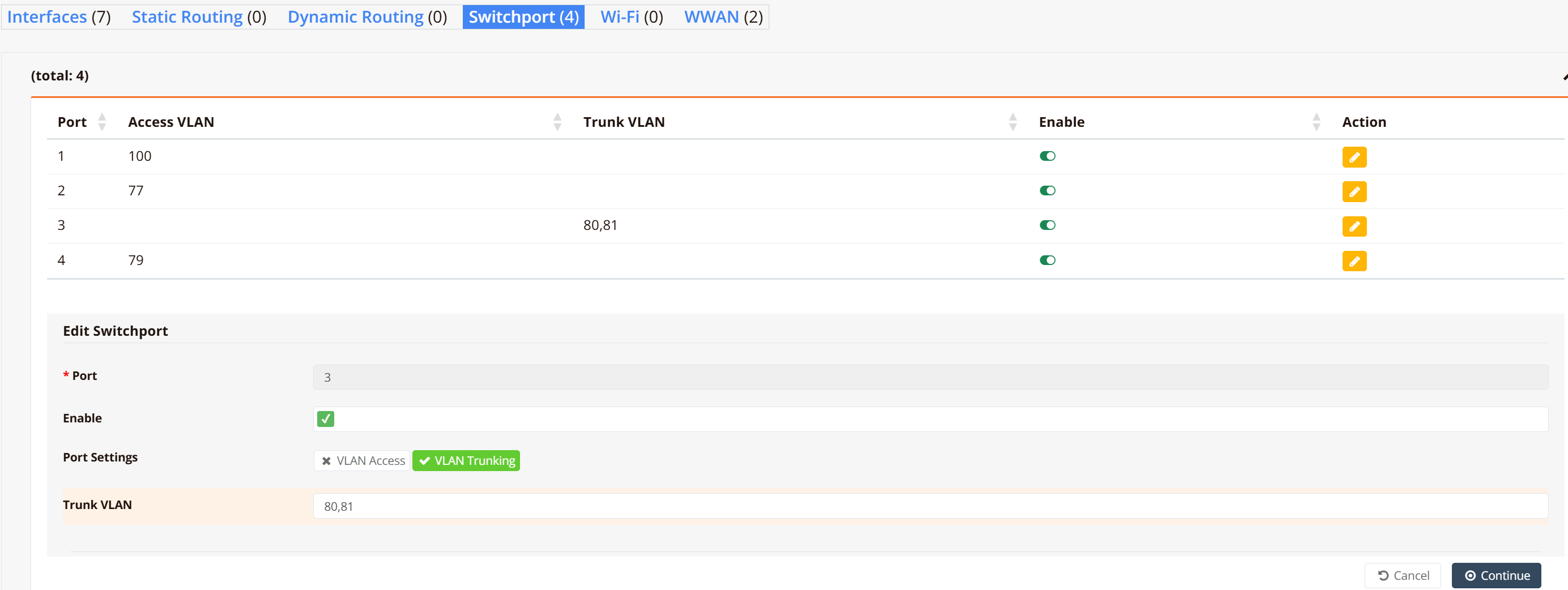
Switchport Mapping:
Map physical ports to VLANs to separate crew, business, and VIP traffic. If a downstream switch is present, configure trunk or access port settings accordingly:
For detailed interface configuration, see Network.
Step 2: Configure WAN Failover
Enable automatic health monitoring and failover between WAN links using WAN Failover Configuration.
Key Requirements:
- Use Option 2 (PBR with Tracking) to detect upstream failures, not just physical link down
- Configure tracking probes to reliable hosts (e.g., 8.8.8.8) reachable across all WAN links
Step 3: Configure Traffic Steering (PBR)
Navigate to Device Settings → SD-WAN → Traffic Steering and create policy-based routing rules to steer each VLAN to its designated WAN failover sequence.

Policy Design:
| Policy | Source VLAN | Primary WAN | Secondary WAN | Tertiary WAN | Notes |
|---|---|---|---|---|---|
| PBR-110-Crew | VLAN 80 (192.168.80.0/24) | Starlink | — | — | No failover; Starlink only |
| PBR-113/114/115-Business | VLAN 77 (192.168.77.0/24) | Starlink | VSAT | LTE | Full three-tier failover |
| PBR-111/112-VIP | VLAN 81 (192.168.81.0/24) | Starlink | VSAT | — | LTE reserved for business |
Note
If hotspot is enabled for any VLAN, the source matching uses both the virtual tunnel interface (tun+) and the VLAN subnet (e.g., src 192.168.81.0/24). This correctly identifies traffic from hotspot-authenticated users. For multiple hotspot instances across different VLANs, the src parameter is essential to distinguish each VLAN's traffic.
Tip
Use existing policy for the backup route (eg, Rule 112 uses policy from Rule 111). PBR-114/115 could have used policy of PBR-113, but for illustration purpose (to show different options) we configured dedicated rules.
Step 4: Configure Traffic Shaping (QoS)
Navigate to Device Settings → SD-WAN → Traffic Shaping and select the Class-Based Shaping tab.
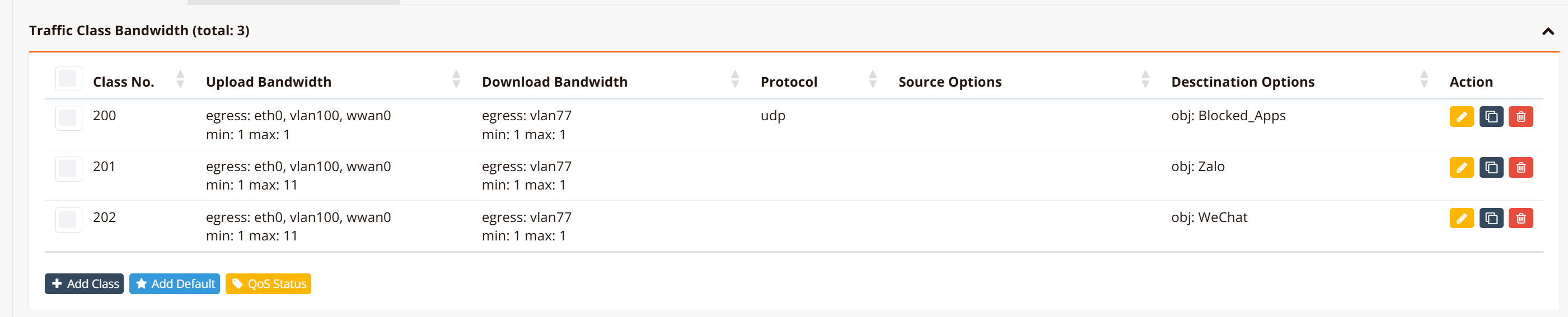
Bandwidth Allocation Strategy:
Define traffic classes and rate limits per Application or VLAN:
- Blocked_Apps: Low-speed class for blocked apps (~1 Kbps max burst) to eliminate them
- Permitted_Apps: Low-speed class for permitted apps (~1 Kbps max burst) with a burstable rate (eg. max 10Kbps) so that the apps text message can pass through but video/calls can't.
- Permit VLAN QoS: Configure QoS for different VLANs if required.
For detailed QoS configuration, see Traffic Shaping (QoS).
Step 5: Configure Firewall and SNAT
Navigate to Device Settings → Security → Firewall and configure access and SNAT rules to permit all traffic according to access policies.
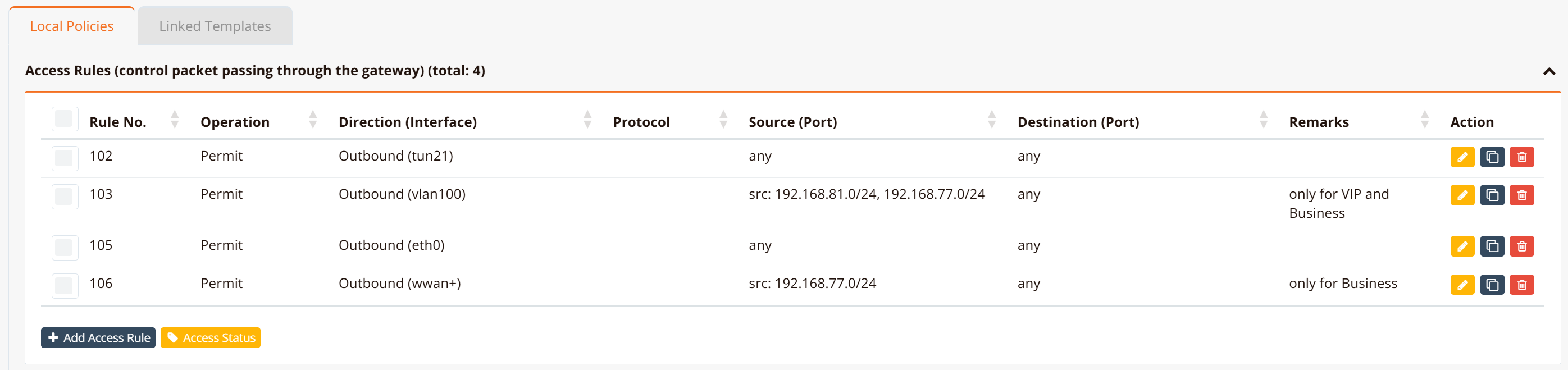
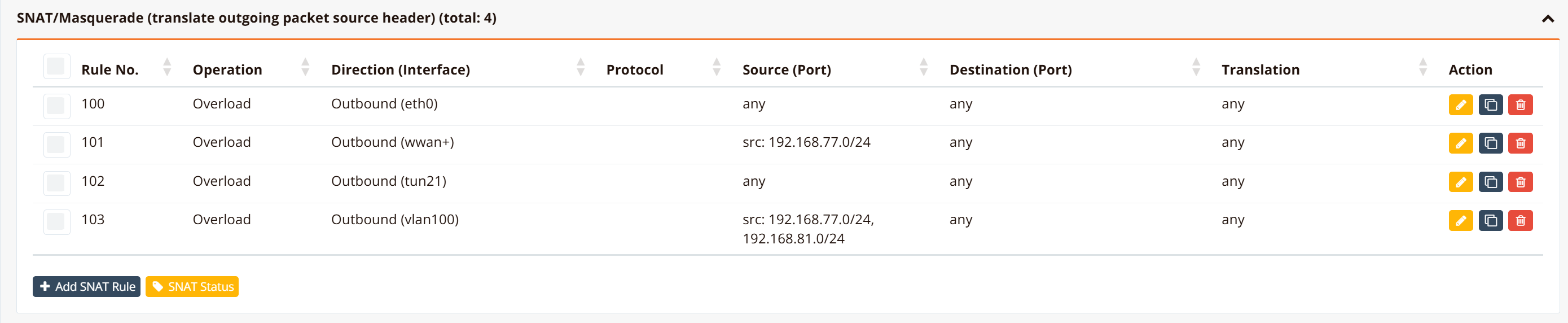
Rules by VLAN:
- VLAN 77 & 81: Permit outbound access to all WAN links with SNAT
- VLAN 80: Permit outbound to Starlink only; optionally block private/RFC 1918 traffic to prevent internal network scanning
Optional: Captive Portal for Crew Access
To further control crew internet access and enforce acceptable-use policies, enable a captive portal that authenticates crew members before granting internet access. See Crew WiFi Captive Portal for setup instructions.
Verification
Use these commands to verify crew network configuration and diagnose issues:
| What to Check | Command | Expected Output |
|---|---|---|
| WAN links online | show interface |
eth0 (Starlink), vlan100 (VSAT), wwan0 (LTE) all UP |
| Active default routes | show ip route include 0.0.0.0 |
Three default routes with different metrics; Starlink has lowest metric (primary) |
| PBR rules active | show ip pbr |
All three policies visible with correct source VLANs and nexthop WAN links |
| VLAN traffic path | show ip route 192.168.77.0 |
Business traffic routes via Starlink (primary); secondary/tertiary routes visible with higher metrics |
| QoS classes | show interface traffic-shape |
Class-based shaping rules active; bandwidth limits applied to throttled applications |
| Firewall rules | show firewall access-list |
Outbound rules permit VLAN 77/81 to all WAN links; VLAN 80 to Starlink only |
| WAN health probes | show logging system |
Probes running on all WAN links; UP status indicates reachability |
Troubleshooting
Common Issues
| Symptom | Likely Cause | Solution |
|---|---|---|
| Crew traffic fails over to VSAT when Starlink is unavailable | PBR rule misconfigured with failover instead of Starlink-only | Verify PBR has no secondary/tertiary nexthops; only Starlink should be listed |
| Business traffic doesn't failover to VSAT | Tracking probe unreachable via VSAT; VSAT link physically down | Check VSAT interface is UP (show interface vlan100); change tracking probe to a host reachable via VSAT (e.g., maritime earth station gateway) |
| VIP traffic experiencing congestion; crew traffic unaffected | QoS rule priority incorrect; crew class takes precedence over VIP | Verify VIP traffic class has higher priority (lower queue number); reduce crew class bandwidth ceiling |
| Crew VLAN can access YouTube despite QoS block | QoS rule not matching YouTube traffic; application signature not updated | Verify QoS policy has YouTube in the blocked class; manually test by checking class membership with show interface traffic-shape |
| VLAN traffic routing to wrong WAN | PBR source matching incorrect; hotspot tunnel interface interfering | Add explicit source VLAN (src 192.168.x.0/24) to PBR rules; verify hotspot tunnel interface name with show interface |
Best Practices
Resilience
- Monitor all WAN links continuously — Configure tracking probes on every link; don't rely on physical UP status alone (a modem may be UP but unable to reach the internet)
- Test failover regularly — Simulate link failures in controlled environments; document failover times to set crew expectations
- Diversify WAN providers — Use different satellite providers (Starlink + VSAT) and independent LTE carriers to minimize correlated outages
Performance
- Match tracking probes to WAN characteristics — Satellite links (VSAT) require longer probe intervals (30–60 seconds) to avoid false failovers due to high latency
- Monitor bandwidth usage per VLAN — Set alerts if crew traffic consumes >30% of total bandwidth; indicates possible policy violations or new applications
- Adjust QoS throttle rates based on crew feedback — Very restrictive rates (1 Mbps) may frustrate users; balance policy enforcement with crew satisfaction
Security
- Isolate crew VLAN from business VLAN — Prevent crew devices from accessing business systems via firewall rules
- Enable captive portal authentication — Enforce acceptable-use policies and monitor data consumption per user
- Log all denied traffic — Audit blocked applications and blocked traffic to identify rogue devices or policy violations
- Rotate LTE SIM credentials — Change APN passwords periodically to prevent unauthorized usage if device is compromised