Static Routing
Static routing lets you manually define routes to specific destinations, giving you precise control over traffic forwarding. Unlike dynamic routing protocols, static routes do not adapt automatically to topology changes — they are best suited for fixed, predictable paths such as default gateways, routes to specific subnets, or backup paths that should only activate when a primary link fails.
Both IPv4 and IPv6 static routes are supported. Each route can optionally be bound to a reachability probe that monitors next-hop health and withdraws the route from the routing table if the probe fails — providing route-level failover without requiring a full Multi-WAN configuration.
Routing Fundamentals: How a Route Is Selected
Before configuring routes, it helps to understand how the router chooses between multiple candidate routes. For every packet, the router evaluates its routing table in a strict order:
1. Longest prefix match — the most specific route always wins.
The router first selects the route whose prefix most specifically matches the destination, regardless of which protocol supplied it. A /32 host route beats a /24, a /24 beats a /16, and the default route (0.0.0.0/0) — the least specific prefix of all — is only used when nothing else matches. This rule outranks everything below: a static /24 is preferred over a BGP /16 for destinations inside that /24, even though both routes are valid.
2. Administrative distance — the most trusted source wins.
When the same prefix is learned from multiple sources (e.g., a static route and an OSPF route for the same /24), the router prefers the source with the lowest administrative distance (AD) — a trust ranking of routing protocols:
| Route Source | Default Distance | Notes |
|---|---|---|
| Connected | 0 |
Directly attached networks (kernel route) — always preferred |
| Static | 1 |
Configurable per route (1–254) — raise it to build backup routes |
| eBGP | 20 |
BGP routes learned from another AS |
| OSPF | 110 |
|
| iBGP | 200 |
BGP routes learned within the same AS |
Only the winning source's route is installed into the forwarding table; the others remain known but inactive, ready to take over if the preferred route is withdrawn.
3. Metric — the tie-breaker within the same protocol.
If the same prefix is available from the same source with equal distance, the route with the lowest metric wins (e.g., OSPF cost, or the interface route-metric that orders multiple WAN default routes — see Multi-WAN).
Reading the routing table
These values appear directly in show ip route output as [distance/metric]:
S>* 0.0.0.0/0 [1/0] via 61.13.198.165, eth0
B>* 10.2.2.0/24 [200/0] via 10.1.172.3, gre1
O>* 10.5.0.0/16 [110/20] via 10.0.0.2, eth1
The first letter is the source (Static, BGP, OSPF, Connected, Kernel), and >* marks the route that is both selected and installed in the forwarding table.
Worked example — a packet to 10.5.1.20 with these routes present:
| Route | Source | [AD/metric] |
Selected? |
|---|---|---|---|
10.5.1.0/24 via A |
Static | [1/0] |
✅ Most specific prefix wins |
10.5.0.0/16 via B |
OSPF | [110/20] |
✗ Less specific — never compared |
0.0.0.0/0 via C |
Static | [1/0] |
✗ Least specific — last resort only |
If the static 10.5.1.0/24 is later withdrawn (e.g., its tracking probe fails), the OSPF /16 takes over automatically — this layering of specific routes over broader ones is the foundation of most failover designs.
Note
Policy-based routes are evaluated before the routing table. A matching PBR rule steers traffic regardless of what the routing table says — use PBR for traffic steering by source/application, and the routing table for destination-based forwarding.
GUI Configuration
Navigate to Device Settings → Network → Static Routing.
IPv4 Static Routes
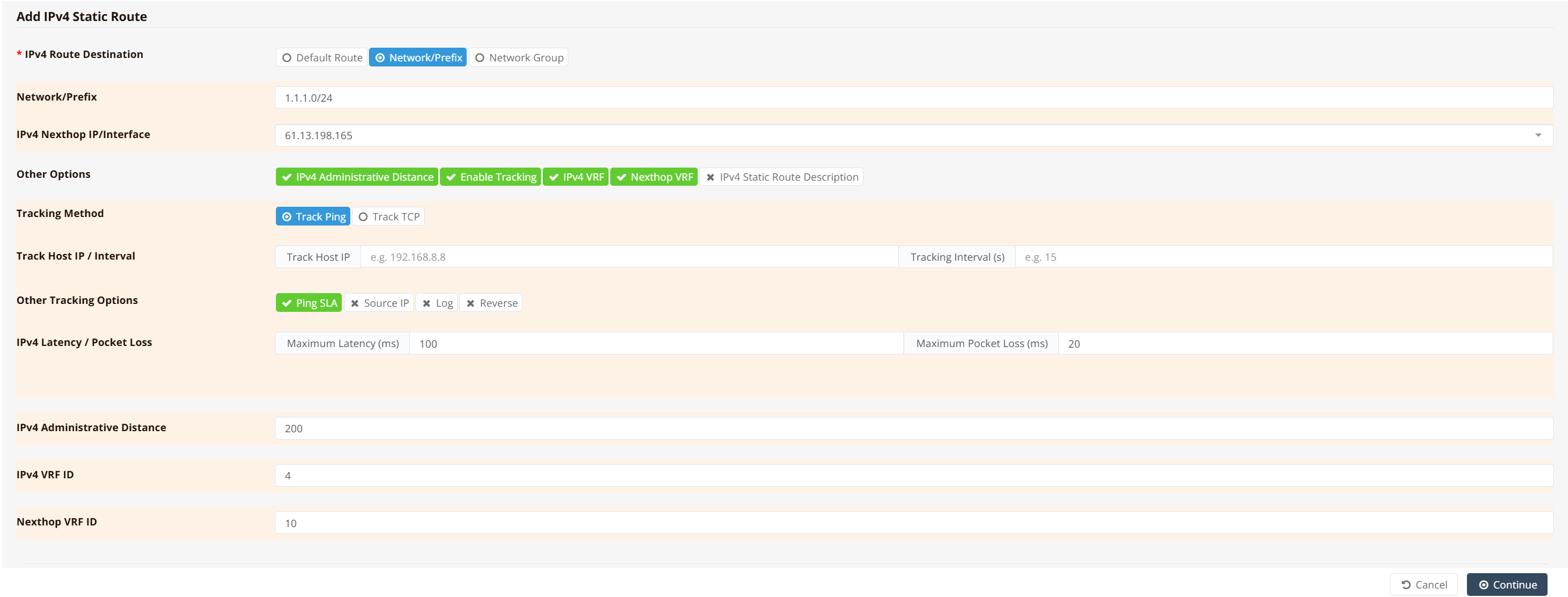
Click + Add to open the IPv4 route configuration form.
Route Destination
Select the destination type for this route:
| Option | Description |
|---|---|
| Default Route | Installs 0.0.0.0/0 — the catch-all route used when no more-specific prefix matches. Equivalent to a default gateway entry. |
| Network/Prefix | A specific destination subnet in CIDR notation (e.g., 1.1.1.0/24) |
| Network Group | Apply this route to a named group of prefixes, FQDNs, or applications. See Network Groups. |
IPv4 Nexthop IP/Interface
Enter the IP address of the next-hop router, or the exit interface name for point-to-point links (e.g., ppp0, wwan0). See Nexthop: IP Address vs Interface for guidance on which format to use.
Other Options
Expand the following options as needed:
| Option | Description |
|---|---|
| IPv4 Administrative Distance | Route priority relative to other routes to the same destination. Lower values are preferred. The default for static routes is 1; increase this to make the route a lower-priority fallback (e.g., 200 for a backup path). Range: 1–254. |
| Enable Tracking | Attach a reachability probe to this route. If the probe fails, the route is withdrawn from the routing table until the probe recovers. |
| IPv4 VRF | Assign this route to a specific VRF instance by numeric ID. The route will only be visible and active within that VRF. |
| Nexthop VRF | The VRF instance in which the next-hop address is resolved. Used for inter-VRF route leaking — when the route destination belongs to one VRF but the next-hop gateway lives in another. |
| IPv4 Static Route Description | Optional free-text label for this route entry |
Tracking Configuration
When Enable Tracking is selected, configure the probe parameters. For a full description of all tracking fields and SLA thresholds, see Tracking — Static Route.
IPv6 Static Routes
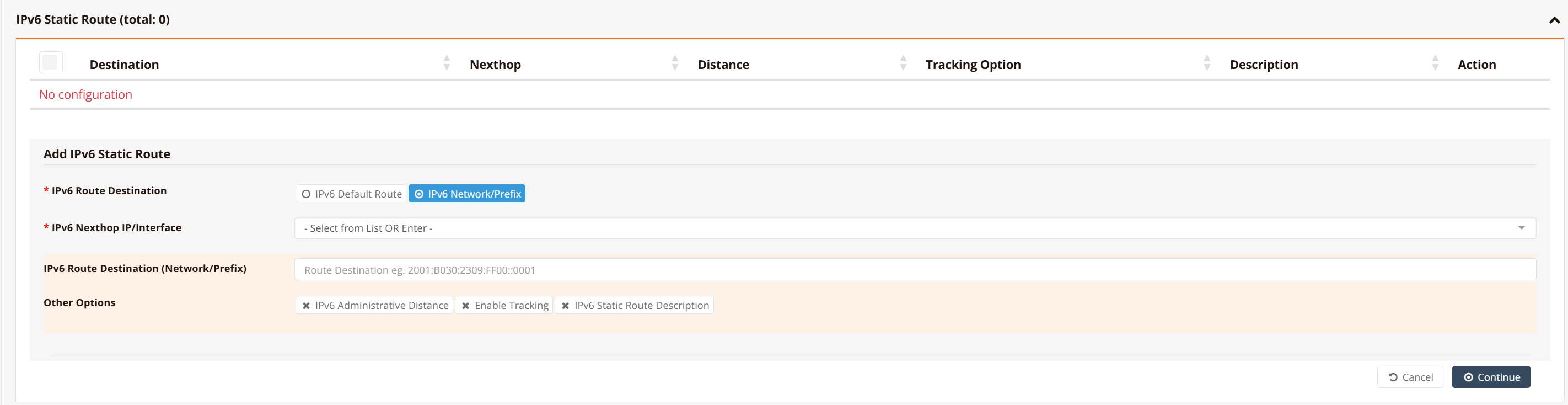
The IPv6 Static Routes table lists all configured routes with their Destination, Nexthop, Distance, Tracking Option, and Description. Click + Add to open the route form.
| Field | Description |
|---|---|
| IPv6 Route Destination | IPv6 Default Route installs ::/0. IPv6 Network/Prefix — enter the specific destination in full IPv6 CIDR notation (e.g., 2001:8020:2309:F100::/64). |
| IPv6 Nexthop IP/Interface | The IPv6 address of the next-hop router, or an exit interface name for point-to-point links |
| IPv6 Administrative Distance | Route priority — lower value is preferred. Default is 1. |
| Enable Tracking | Attach an ICMP or TCP reachability probe to monitor next-hop health |
| IPv6 Static Route Description | Optional label for this route entry |
CLI Configuration
For Ethernet interfaces, always use IP addresses as nexthops (never interface names). For point-to-point links (PPPoE, WWAN), interface names are allowed. See Nexthop: IP Address vs Interface for details.
Default gateway
Route to a specific prefix
Route with ICMP tracking and administrative distance
Key points:
track icmp <host> <interval>— probes61.13.198.165with ICMP every30secondsmax 100 20— probe fails if round-trip latency exceeds100 msor packet loss exceeds20%; when failed, the route is removed from the routing tabledistance 200— administrative distance of200makes this a low-priority backup; the route only becomes active if no lower-distance route to the same prefix exists
Route with VRF and inter-VRF nexthop lookup
ip route 1.1.1.0/24 nexthop 61.13.198.165 track icmp 61.13.198.165 30 max 100 20 distance 200 vrf 4 nexthop-vrf 10
Key points:
vrf 4— installs this route into VRF instance4; the route is only visible to traffic in that VRFnexthop-vrf 10— resolves the next-hop address61.13.198.165within VRF10, allowing the route to forward traffic across VRF boundaries (inter-VRF route leaking)
Default route via a point-to-point interface
IPv6 static route
IPv6 default route
Nexthop: IP Address vs Interface
When configuring static routes or policy-based routes, the nexthop can be specified as either a router IP address (explicit) or an exit interface name (implicit). The rules differ between static routes and policy routes, and depend on interface type.
Key distinction: Static routes on Ethernet have strict rules (IP address always); PBR on Ethernet has conditional rules (IP address preferred, interface name only if default route exists).
Static Routes — Strict Rules
Static routes are evaluated at config time. Interface names cannot be resolved unless a default route already exists (which defeats the purpose of explicit routing). Therefore:
| Interface Type | Required Nexthop Format | Reason |
|---|---|---|
| Ethernet (physical, VLAN, bridge) | IP address only — nexthop 61.13.198.165 |
Multi-point link: router must ARP for the neighbor MAC. Using interface name fails because no default route to learn the gateway IP from. |
| PPPoE | Interface name OR IP address — nexthop ppp0 |
Point-to-point link — single neighbor, so interface name resolves correctly. |
| WWAN / LTE / 5G | Interface name OR IP address — nexthop wwan0 |
Point-to-point link — single neighbor, so interface name resolves correctly. |
Examples:
! CORRECT: Ethernet static route with IP nexthop
ip route 192.168.0.0/16 nexthop 61.13.198.165

! WRONG: Ethernet static route with interface name (fails to resolve)
ip route 192.168.0.0/16 nexthop eth0

! CORRECT: WWAN static route with interface name (point-to-point)
ip route 0.0.0.0/0 nexthop wwan0
Policy Routes (PBR) — Conditional Rules
PBR rules are evaluated at runtime. If an Ethernet interface has a default route installed (via DHCP), the system learns the gateway IP and can resolve interface names dynamically.
| Interface Type | Nexthop Format | When It Works |
|---|---|---|
| Ethernet | IP address | Always (safe, explicit) |
| Ethernet | Interface name | Only if default route installed on that interface |
| PPPoE / WWAN | Interface name OR IP address | Always (point-to-point) |
Examples:
! Scenario 1: Ethernet with explicit IP (always safe)
ip pbr 100 nexthop 61.13.198.165

! Scenario 2: Ethernet with interface name — ONLY if default route exists
interface eth0
 ip address dhcp              ! ← Installs default route; system learns gateway IP
ip pbr 100 nexthop eth0       ! ← Safe: gateway learned from default route

! Scenario 3: Ethernet without default route — MUST use explicit IP
interface eth0
 ip address 61.13.198.165/24  ! ← No default route; gateway not learned
ip pbr 100 nexthop eth0       ! ← WRONG: system can't resolve gateway IP
ip pbr 100 nexthop 61.13.198.165  ! ← CORRECT

! Scenario 4: WWAN interface (both formats work; point-to-point)
ip pbr 100 nexthop wwan0      ! ← Works
ip pbr 100 nexthop 10.1.0.1   ! ← Also works
Real-World Failover Example
In selective WAN failover, the distinction matters:
interface eth0
 ip address dhcp              ! ← Installs default route

interface wwan0
 ip address dhcp nodefault    ! ← No default route (prevents unwanted failover)

! PBR rule on Ethernet: interface name works (eth0 has default route)
ip pbr 100 nexthop eth0 track icmp 1.1.1.1 15

! PBR rule on WWAN: interface name works (point-to-point)
ip pbr 101 nexthop wwan0

! For static routes (not PBR), eth0 would require explicit IP:
ip route 192.168.100.0/24 nexthop 61.13.198.165  ! Static route on Ethernet = must use IP
See WAN Failover — PBR with Tracking for complete examples.
General Guidance
Static Routes on Ethernet — Always Use IP Address
Static routes on Ethernet interfaces must always use the IP address nexthop, never interface names. This is a strict requirement.
Policy Routes on Ethernet — Interface Name Only If Default Route Exists
For PBR on Ethernet, interface names can be used only if a default route is installed on that interface (e.g., via DHCP). The system learns the gateway IP from the default route at runtime. Otherwise, use explicit IP address.
PPPoE and WWAN — Both Formats Work
Both static and policy routes on PPPoE/WWAN interfaces can use either interface name or IP address — both formats work correctly for point-to-point links.
Verification
List all active static routes:
Example output:
Codes: K - kernel route, C - connected, S - static, R - RIP,
       O - OSPF, I - IS-IS, B - BGP, E - EIGRP, N - NHRP,
       T - Table, v - VNC, V - VNC-Direct, A - Babel, F - PBR,
       > - selected route, * - FIB route, q - queued, r - rejected, b - backup

S>* 0.0.0.0/0 [1/0] via 61.13.198.165, eth0, weight 1, 00:42:11
S>* 1.1.1.0/24 [200/0] via 61.13.198.165, eth0, weight 1, 00:12:03
A route marked >* is both selected as the best match and installed in the forwarding table. A route shown without this prefix is known but not currently active — for example, when its tracking probe has failed.
Inspect a specific route:
Example output:
Routing entry for 1.1.1.0/24
  Known via "static", distance 200, metric 0
  Last update 00:12:03 ago
  * 61.13.198.165, via eth0, weight 1
Show IPv6 static routes: