Traffic Shaping (QoS)
Overview
Traffic shaping (Quality of Service, QoS) controls how bandwidth is allocated across different types of traffic, ensuring critical applications receive the throughput they need while preventing any single flow or user from monopolising a shared link.
RansNet appliances support two complementary shaping methods that can be used independently or together:
| Method | Controls | Scope |
|---|---|---|
| Class-Based Shaping | Bandwidth per traffic category | Shared pool — all matching flows share the class allocation |
| Connection-Based Limiting | Bandwidth per individual IP address | Per-device ceiling, applied independently to each IP |
Both methods use firewall marks (fwmark) for traffic classification, giving the same matching flexibility as firewall rules — any combination of IP address, subnet, protocol, port, FQDN, or named application object group.
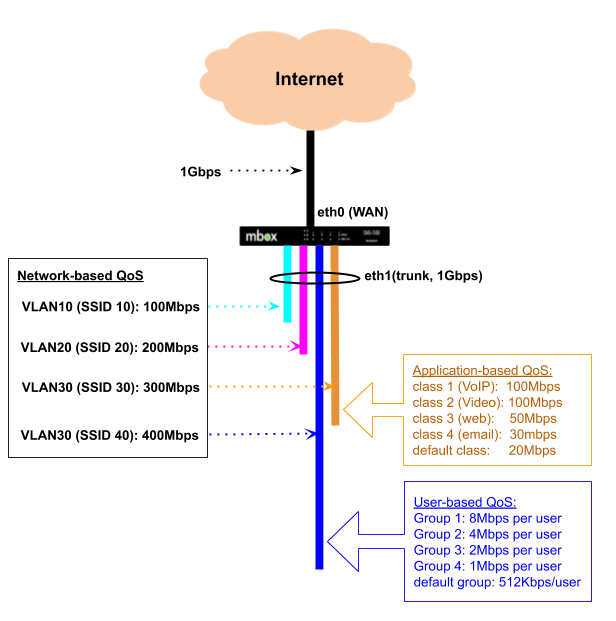
In the diagram above, a 1 Gbps backhaul is shared across multiple VLANs — each typically mapped to a separate wireless SSID or LAN segment. Each VLAN is allocated a minimum guaranteed bandwidth and a burst ceiling. When one VLAN is not using its allocation, others may borrow the unused capacity up to their ceiling. Within a VLAN, traffic can be further subdivided by application type (VLAN 30) or by individual user (VLAN 40 via Hotspot).
Key Features
- Guaranteed minimum bandwidth per class — each class reserves a protected allocation that is always delivered, even under full congestion
- Configurable burst ceiling — classes can borrow spare capacity up to a defined maximum when the link is not fully loaded
- 8-tier burst priority — class number automatically determines burst scheduling order; lower class numbers get first access to spare capacity
- Deep traffic classification — classify by IP, subnet, port, protocol, FQDN, or application object group using the same syntax as firewall rules
- Bidirectional shaping — upload and download shaped independently on WAN and LAN interfaces respectively
- Per-IP rate limiting — cap each device's bandwidth independently, regardless of traffic class
- Default catch-all class — configurable fallback for traffic that does not match any defined class
- GUI and CLI configuration — managed via the mfusion orchestrator; fwmark assignments handled automatically
Use Cases
| Scenario | Method |
|---|---|
| Guarantee VoIP or video conferencing quality on a shared WAN link | Class-based — set Minimum for voice/video class |
| Cap social media or streaming without blocking it entirely | Class-based — set Maximum for that class |
| Prioritise business applications over recreational traffic | Class-based — assign lower Class No. (e.g. 200) to business apps |
| Prevent one device from saturating the link for all users | Connection-based — per-IP ceiling |
| Per-room or per-user speed limits (hotel, guest Wi-Fi) | Connection-based |
| Aggregate cap per traffic type plus per-user fairness within it | Both — class for aggregate, connection-based within |
Class-Based Shaping
Class-based shaping uses HTB (Hierarchical Token Bucket) queuing. Each class has a guaranteed Minimum, a burst Maximum, and a scheduling priority derived from the Class No. Under congestion every class receives its Minimum unconditionally; when spare capacity exists, classes borrow toward their Maximum in priority order.
How It Works
Bandwidth Parameters
Each traffic class is defined by three parameters. The GUI labels them Minimum and Maximum; the CLI takes them as positional arguments. Their underlying HTB equivalents are shown for reference.
| GUI label | CLI position | HTB term | Description |
|---|---|---|---|
| Minimum (Kbps) | 1st argument after Class No. | rate |
Guaranteed bandwidth floor — always delivered |
| Maximum (Kbps) | 2nd argument after Class No. | ceil |
Burst ceiling — maximum including borrowed capacity |
| (derived from Class No.) | — | prio |
Burst scheduling order — which class borrows spare capacity first |
Minimum — Guaranteed Bandwidth
Minimum is the bandwidth a class is always entitled to receive, unconditionally. The HTB scheduler reserves this allocation regardless of what other classes are doing. Even when the link is fully saturated and every class is competing, each class will receive at least its configured Minimum.
Use Minimum to protect latency-sensitive traffic — VoIP, real-time video, business-critical SaaS — from being crowded out during peak hours.
Maximum — Burst Ceiling
Maximum is the upper limit of bandwidth a class can ever consume, including capacity borrowed from the parent pool. A class can only exceed its Minimum up to the Maximum when other classes are using less than their own Minimum and spare capacity is available.
- Minimum = Maximum — creates a hard cap; the class never borrows and is strictly limited to its guaranteed allocation.
- Maximum > Minimum — allows opportunistic bursting; the class expands to fill idle capacity up to the ceiling.
Priority — Burst Scheduling Order
Priority controls which class gets first access to spare capacity once all class Minimums have been satisfied. It is derived automatically from the Class No. using (Class No. − 200) ÷ 10 — lower class number = higher burst priority.
Priority is burst-order only — not strict priority
Priority only governs the order in which classes borrow spare capacity above their Minimum. It has no effect on guaranteed allocations. A class at priority tier 7 (class no. 270–279) with Minimum 50 Mbps will always receive its full 50 Mbps even when a priority tier 0 class is simultaneously active. True strict priority — "always drain this class before touching any other" — is not a feature of HTB.
| Class No. range | Priority tier | Burst order |
|---|---|---|
| 200–209 | 0 | Highest — borrows spare capacity first |
| 210–219 | 1 | |
| 220–229 | 2 | |
| 230–239 | 3 | |
| 240–249 | 4 | |
| 250–259 | 5 | |
| 260–269 | 6 | |
| 270–279 | 7 | Lowest — borrows last |
Order of Operations
HTB processes each scheduling cycle in two sequential phases:
-
Guarantee phase — all active classes are serviced up to their Minimum. This occurs unconditionally and in parallel — priority has no influence here.
-
Borrow phase — if spare capacity remains after all Minimums are satisfied, HTB offers the excess to classes in priority order. The highest-priority class (lowest Class No.) borrows first up to its Maximum, then the next tier, and so on. If the link is fully consumed in the guarantee phase, the borrow phase does not occur and priority has no effect.
| Condition | Phase | Is priority effective? |
|---|---|---|
| Link not fully loaded | Borrow — classes burst toward Maximum | Yes — lower Class No. bursts first |
| Link saturated, all classes at Minimum | Guarantee only | No — all classes receive their Minimum |
| A class has Minimum = 0 | Must always borrow; nothing guaranteed | Partially — risks starvation under congestion |
Choosing Minimum and Maximum
- Set Minimum to the bandwidth the application must have to function acceptably under worst-case congestion — this is its hard protection floor.
- Set Maximum to the most bandwidth you are willing to allow the class to consume when the link is quiet.
- The gap between Minimum and Maximum is the burst window.
- To create a strict cap with no bursting, set Minimum = Maximum.
How Traffic is Classified
Classification is a two-step process:
- A
firewall-setrule inspects traffic and stamps matching packets with a numeric fwmark. - A QoS
classreferences the same mark number — the scheduler places marked packets into the corresponding class queue.
Because firewall rules handle all the matching, QoS classes inherit the full firewall matching vocabulary, including named application object groups and FQDN.
The Class No. also controls filter evaluation order — lower class numbers are matched first. If a packet could satisfy multiple class filters, it is placed into the lowest-numbered matching class.
Note
When configuring via the GUI or orchestrator, firewall-set rules and fwmark assignments are created automatically — no manual mark management is required. The orchestrator derives the fwmark from the class number (e.g. class 100 → upload mark 1001, download mark 1002).
Avoid Overlapping firewall-set Rules Across Classes
firewall-set rules are evaluated in ascending rule number order. Each matching rule overwrites the fwmark set by any previous rule — the last matching rule wins. If two classes have firewall-set rules that can match the same packet, the packet will always end up in the class corresponding to the higher-numbered rule, regardless of which class was intended.
For example, if rule 2001 matches tcp dport 443 (HTTPS) and rule 2501 matches a social media object group that includes HTTPS destinations, any HTTPS traffic to a social media site will be marked 2501 and placed into class 250, not class 200.
To avoid this:
- Use mutually exclusive match criteria across classes wherever possible.
- Where overlap is unavoidable, place the more specific rule at a higher number so it takes precedence. This is the same discipline required for PBR rules.
Upload and Download
QoS acts on egress (outgoing) traffic only. To shape both directions, configure traffic-shape on both the WAN and LAN interfaces:
- Upload (client → internet): configure on the WAN interface (
eth0,wwan0, etc.) - Download (internet → client): configure on the LAN interface (
vlan 1,vlan 2, etc.)
Separate fwmarks are used for each direction — the upload mark matches on destination port or object, and the download mark matches on source port or object. The orchestrator assigns these automatically.
GUI Configuration
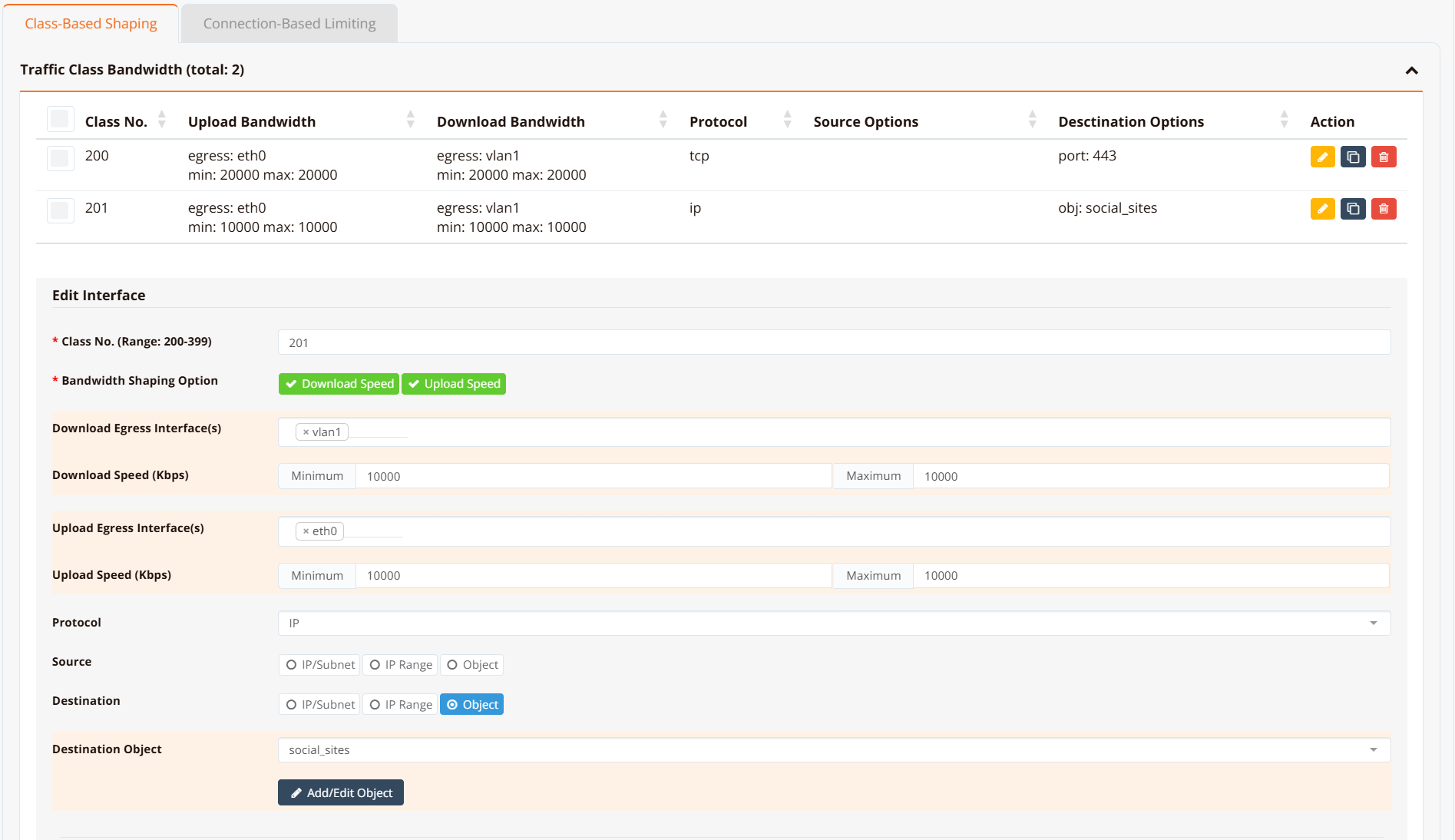
Navigate to Device Settings → SD-WAN → Traffic Shaping and click the Class-Based Shaping tab.
CLI Configuration
HSA-520# show running-config
!
hostname HSA-520
!
interface eth0
 description "Connection to WAN"
 enable
 ip address dhcp
 traffic-shape 10000000 10000000
  class 200 10000 20000 fwmark 2001 remark class-200-upload
  class 210 5000 5000 fwmark 2101 remark class-210-upload
  class 220 6000 10000 fwmark 2201 remark class-220-upload
  default bandwidth 512 512
!
interface eth1
 description "Do NOT configure"
 enable
!
interface wwan0
 enable
!
interface vlan 1 1
 description "Default VLAN for all LAN ports"
 enable
 ip address 192.168.8.1/22
 dhcp-server
  router 192.168.8.1
  dns 8.8.8.8 8.8.4.4
  range 192.168.8.10 192.168.11.254
  enable
 traffic-shape 10000000 10000000
  class 200 10000 10000 fwmark 2002 remark class-200-download
  class 210 5000 5000 fwmark 2102 remark class-210-download
  class 220 6000 10000 fwmark 2202 remark class-220-download
  default bandwidth 512 512
!
ip name-server 8.8.8.8 8.8.4.4
!
object-group VoIP
 net 118.189.175.168
!
object-group social_sites
 app Facebook
 app Tiktok
 app YouTube
!
firewall-input 100 permit all tcp src 192.168.8.0/22 dport 22
!
firewall-access 100 permit outbound eth0
firewall-access 101 permit outbound wwan+
!
firewall-snat 100 overload outbound eth0
firewall-snat 101 overload outbound wwan+
!
firewall-set 2001 mark 2001 access ip dst_object VoIP remark class-200-upload
firewall-set 2002 mark 2002 access ip src_object VoIP remark class-200-download
firewall-set 2101 mark 2101 access tcp dport 443 remark class-210-upload
firewall-set 2102 mark 2102 access tcp sport 443 remark class-210-download
firewall-set 2201 mark 2201 access ip dst_object social_sites remark class-220-upload
firewall-set 2202 mark 2202 access ip src_object social_sites remark class-220-download
HSA-520#
Key points:
traffic-shape <min> <max>sets the root bandwidth envelope in Kbps. Use10000000(10 Gbps) when there is no overall interface cap — individual class limits do the actual shaping.class <no> <min> <max> fwmark <mark>defines a class.no(Class No.) sets filter evaluation order and burst priority — lower is higher priority.minis the guaranteed Minimum;maxis the Maximum burst ceiling.fwmark <mark>links the class to afirewall-setrule with the same mark number. The orchestrator assigns this automatically.default bandwidth <min> <max>creates a catch-all class for traffic that does not match any fwmark. Omitting it allows unmatched traffic to pass at wire speed.remarkis a free-text label for identification only — no effect on shaping behaviour.
Tip
For traffic that must be protected under congestion (VoIP, real-time video), set a meaningful Minimum — this is the only mechanism that guarantees bandwidth when the link is saturated. Use Maximum to cap how much any class can consume when the link is idle.
Verification
Example output:
HSA-520# show interface traffic-shape

Interface: eth0
  Class    Min         Max         Prio    FW Mark           Sent              Dropped
  -------  ----------  ----------  ------  ----------------  ----------------  -------
  200      10Mbit      20Mbit      0       2001/0x7d1        0B/0p             0
  210      5Mbit       5Mbit       1       2101/0x835        0B/0p             0
  220      6Mbit       10Mbit      2       2201/0x899        0B/0p             0
  default  512Kbit     512Kbit     -       (catch-all)       29430B/247p       0

Interface: vlan1
  Class    Min         Max         Prio    FW Mark           Sent              Dropped
  -------  ----------  ----------  ------  ----------------  ----------------  -------
  200      10Mbit      10Mbit      0       2002/0x7d2        0B/0p             0
  210      5Mbit       5Mbit       1       2102/0x836        0B/0p             0
  220      6Mbit       10Mbit      2       2202/0x89a        0B/0p             0
  default  512Kbit     512Kbit     -       (catch-all)       0B/0p             0
HSA-520#
Min = guaranteed Minimum; Max = burst ceiling (Maximum). Prio is derived automatically from the Class No. using (Class No. − 200) ÷ 10 — class 200 → prio 0 (highest burst priority), class 279 → prio 7 (lowest). FW Mark shows the decimal value alongside the kernel's hex representation.
For low-level inspection:
show interface traffic-class eth0     (HTB class details and statistics)
show interface traffic-filter eth0    (tc filter entries and fwmark handles)
show interface traffic-control        (qdisc state for all interfaces)
Connection-Based Limiting
Connection-based limiting enforces a per-IP bandwidth cap. Unlike class-based shaping — which is a shared pool across all matching flows — connection-based limiting applies independently to each source and destination IP address.
How It Works
Each firewall-limit rule creates an iptables rate-limiting chain. Traffic matching the rule is measured per source IP (for download) and per destination IP (for upload). Packets from any individual IP that exceed the configured rate are dropped; all other traffic passes normally.
GUI Configuration
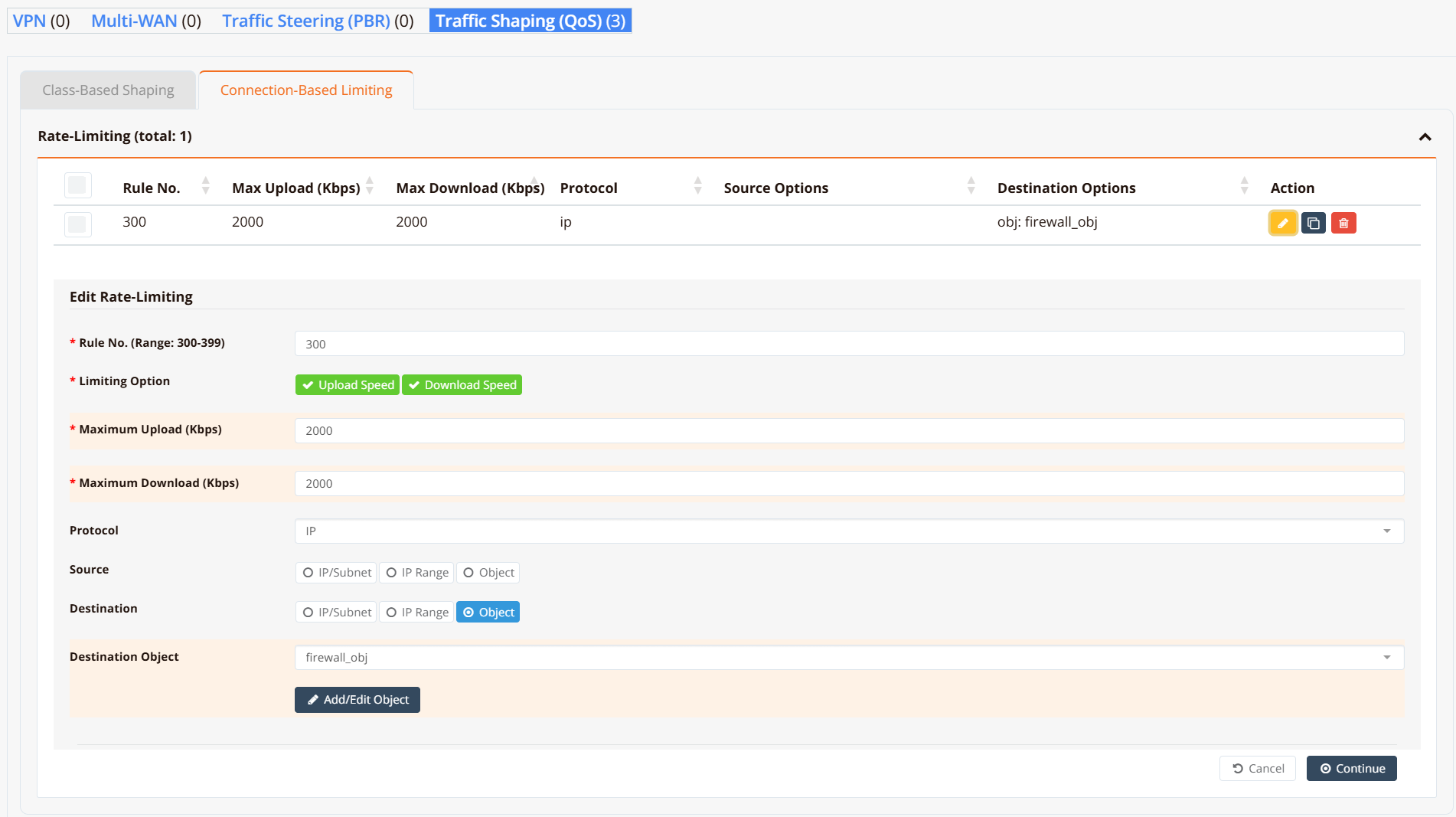
Navigate to Device Settings → SD-WAN → Traffic Shaping and click the Connection-Based Limiting tab.
CLI Configuration
object-group firewall_obj
 app WhatsApp
 fqdn docs.ransnet.com
 net 2.2.2.2
!
firewall-limit 3001 2000 all ip dst_object firewall_obj remark limit-upload
firewall-limit 3002 2000 all ip src_object firewall_obj remark limit-download
Key points:
firewall-limit <id> <rate_kbps>creates a per-IP rate-limiting rule.idsets evaluation order — lower ID is evaluated first.rate_kbpsis the per-IP ceiling in Kbps.- Configure both an upload rule (match on
dst_object) and a download rule (match onsrc_object) to limit traffic in both directions. - The same object-group vocabulary applies: match by IP, subnet, FQDN, protocol, port, or application.
Verification
Example output:
HSA-520# show firewall limit-list

###### Summary of Rate limit chain ########
 pkts bytes target         prot opt in   out   source     destination
    0     0 LIMITBPS-3001  all  --  *    *     0.0.0.0/0  0.0.0.0/0  match-set firewall_obj dst
    0     0 LIMITBPS-3002  all  --  *    *     0.0.0.0/0  0.0.0.0/0  match-set firewall_obj src

###### Chain-LIMITBPS-3001 details ###########
Chain LIMITBPS-3001 (1 references)
 pkts bytes target  prot opt in   out   source     destination
    0     0 DROP    all  --  *    *     0.0.0.0/0  0.0.0.0/0  limit: above 500000b/s mode dstip
    0     0 DROP    all  --  *    *     0.0.0.0/0  0.0.0.0/0  limit: above 500000b/s mode srcip
    0     0 ACCEPT  all  --  *    *     0.0.0.0/0  0.0.0.0/0
Each chain enforces the cap per endpoint — one DROP rule keyed on destination IP (dstip) and one on source IP (srcip). Packets exceeding the rate are dropped; conforming traffic reaches the ACCEPT rule and is forwarded normally.
Design Notes
Class Numbering Convention
Valid class numbers are in the range 200–279. The class number determines the burst priority tier and the auto-assigned fwmark values:
| Class No. range | Burst priority | Burst order | Typical use |
|---|---|---|---|
| 200–209 | 0 | Highest | VoIP, real-time video |
| 210–219 | 1 | Video conferencing | |
| 220–229 | 2 | Business-critical (SaaS, ERP) | |
| 230–239 | 3 | Interactive web (HTTPS) | |
| 240–249 | 4 | General web browsing | |
| 250–259 | 5 | File downloads | |
| 260–269 | 6 | Social media, streaming | |
| 270–279 | 7 | Lowest | Background / bulk transfers |
The orchestrator derives fwmark values automatically — class N gets upload mark N×10+1 and download mark N×10+2:
| Burst priority | Example Class No. | Auto upload mark | Auto download mark |
|---|---|---|---|
| 0 (highest) | 200 | 2001 | 2002 |
| 1 | 210 | 2101 | 2102 |
| 2 | 220 | 2201 | 2202 |
| 3 | 230 | 2301 | 2302 |
| 4 | 240 | 2401 | 2402 |
| 5 | 250 | 2501 | 2502 |
| 6 | 260 | 2601 | 2602 |
| 7 (lowest) | 270 | 2701 | 2702 |
Combining Both Methods
Class-based shaping and connection-based limiting work simultaneously and complement each other:
- Class-based shaping controls the aggregate — e.g. all social media traffic across all users combined ≤ 10 Mbps.
- Connection-based limiting controls each individual device — e.g. each user ≤ 2 Mbps of social media, regardless of what others are doing.
Applying both gives aggregate traffic control plus per-user fairness in a single configuration.
Note
One device typically opens many connections simultaneously. Class-based shaping governs the aggregate of all those connections; connection-based limiting governs the total bandwidth consumed by each device IP across all its connections.