SD-WAN Failover (WAN Resiliency)
WAN resiliency ensures that network connectivity is maintained when a primary WAN link fails.
graph TD
    ISP1["☁ ISP1-Fixed"]
    ISP2["📶 ISP2-4/5G"]
    R["RansNet Router"]

    ISP1 -->|Primary| R
    ISP2 -. Backup .-> R
RansNet devices support three distinct failover approaches, each with different levels of detection capability and configuration complexity.
| Option | Method | Detects Interface Down | Detects Upstream Failure |
|---|---|---|---|
| 1 — Route Metric | Kernel default route failover | Yes | No |
| 2 — PBR with Tracking | Policy-based routing + ICMP probe | Yes | Yes |
| 3 — Multi-WAN (MWAN) | MWAN engine + ICMP probe | Yes | Yes |
Option 1 — Kernel Default Route Failover
The simplest failover method. Each WAN interface is assigned a route metric — the interface with the lowest metric becomes the primary default gateway. When the primary interface goes down, the kernel withdraws its route and traffic shifts automatically to the next lowest metric interface.
Limitation: This method only detects physical link failure (interface UP/DOWN). It does not verify upstream reachability — if the WAN port stays physically up but the ISP connection drops, failover will not trigger.
Failover time: Typically 2–3 seconds for physical link failure detection.
GUI Configuration
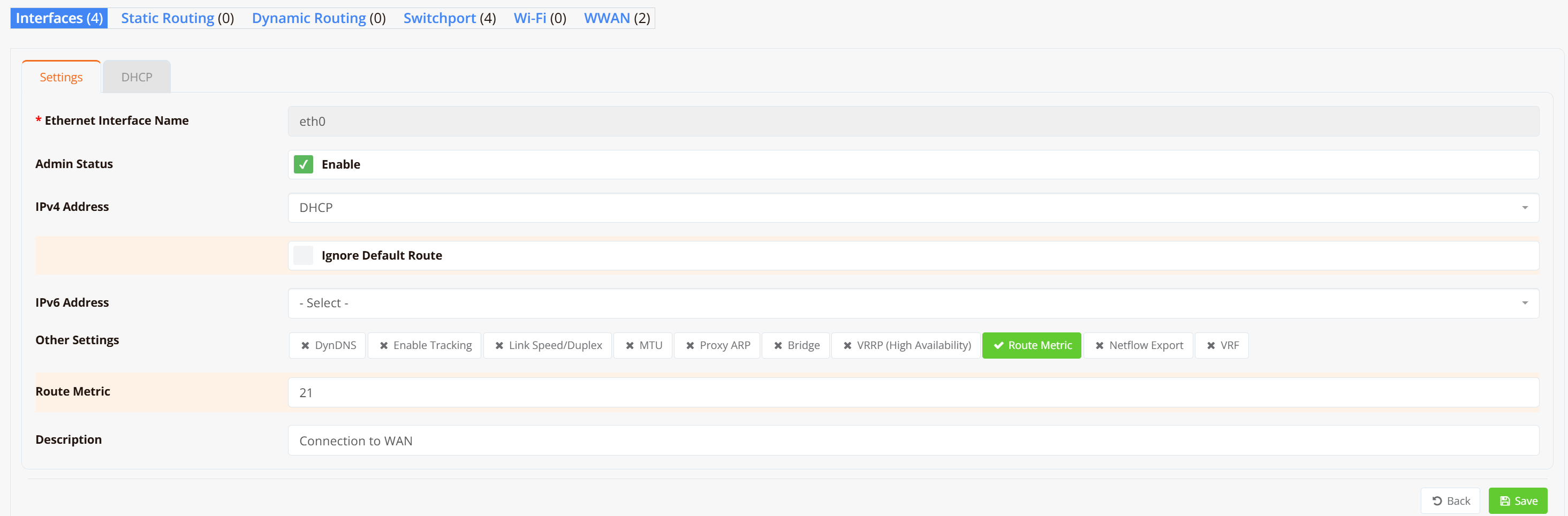
Below is an example of setting route-metric using GUI.
Navigate to Device Settings → Network → Interfaces, select the WAN interface and click on "Route Metric" option to set the desired value.
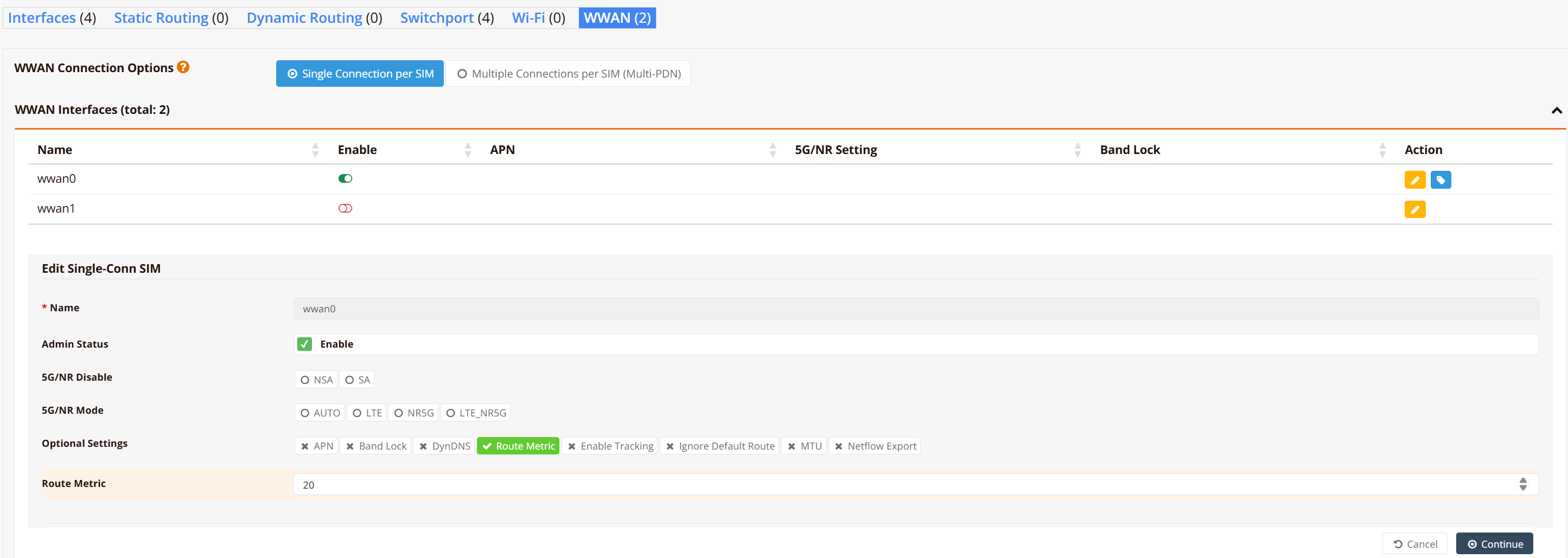
To set route metric, for WWAN interface, use below option
CLI Configuration
interface eth0
  description "ISP1 - Fixed line"
  enable
  route-metric 21

interface wwan0
  description "ISP2 - LTE backup"
  enable
  route-metric 20
In this example, we intentionally set wwan0 with lower metric (20) and is the preferred (primary) path. eth0 becomes active only if wwan0 goes down.
Note
Route metrics are assigned automatically based on interface load order at boot. Explicitly setting route-metric ensures predictable primary/backup behaviour regardless of boot sequence. By default, eth0 is booted up earlier and will be the primary path over wwan0.
Option 2 — PBR with Upstream Tracking
Policy-Based Routing (PBR) combined with ICMP tracking provides upstream-aware failover. Specific traffic is matched by PBR rule and sent via a WAN gateway, while a continuous ICMP probe monitors end-to-end reachability. When the probe fails, the PBR rule is withdrawn and traffic falls through to alternative paths.
Advantage over Option 1: Detects upstream failures (e.g., ISP routing issues) even when the WAN interface remains physically UP.
Failover time: Depends on the tracking probe interval and retry count.
Use cases:
- All-traffic failover: Route all LAN traffic via primary WAN with failover to secondary
- Selective failover: Route only specific traffic (e.g., ransnet.com) to secondary WAN when primary fails; all other traffic drops if primary is unavailable
GUI Configuration
Navigate to Device Settings → Network → Interfaces and configure the primary WAN interface with DHCP and Ignore Default Route enabled:

Navigate to Device Settings → SD-WAN → Traffic Steering to create PBR rules:
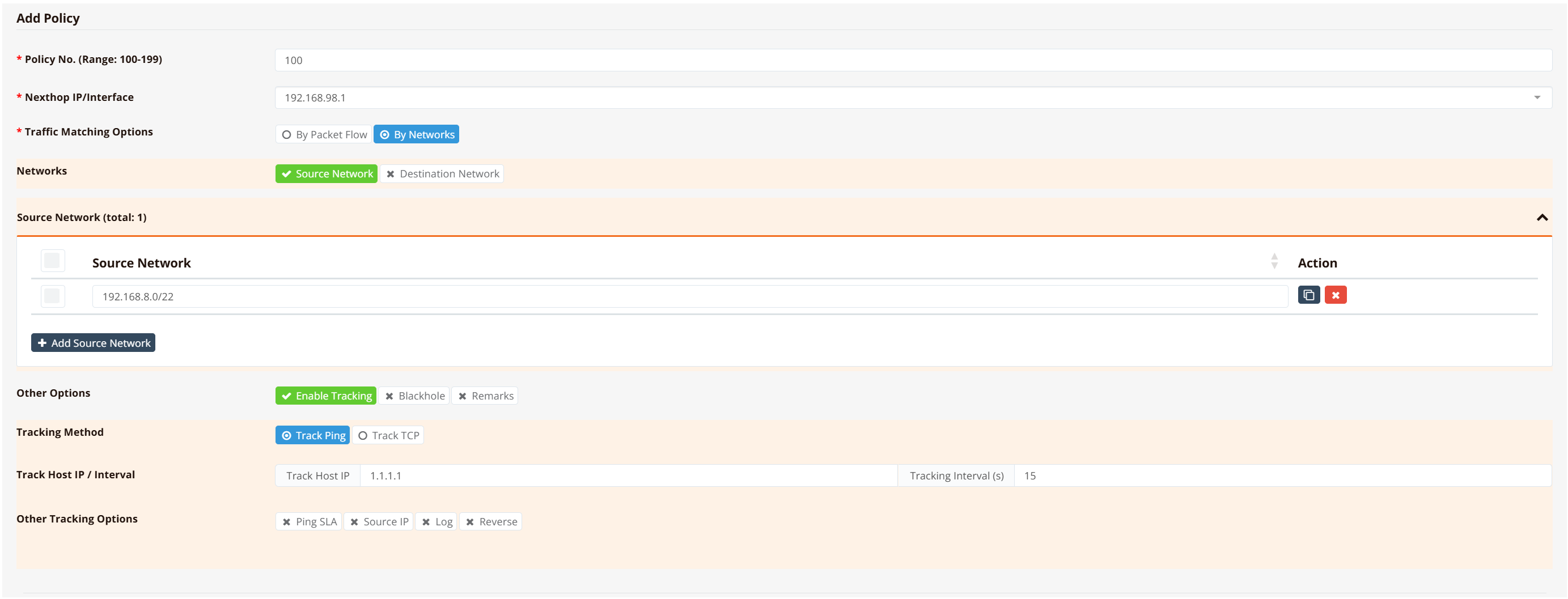
Refer to Tracking Configuration for detailed SLA thresholds.
CLI Configuration
All-Traffic Failover
Route all LAN traffic via primary WAN; if primary fails, all traffic falls through to secondary:
interface eth0
  description "Connection to WAN"
  enable
  ip address dhcp nodefault       ! No kernel default route; PBR controls path

interface wwan0
  description "LTE backup"
  enable
  ip address dhcp                 ! Provides fallback default route

interface vlan 1 1
  description "LAN"
  enable
  ip address 192.168.8.1/22
  dhcp-server
    router 192.168.8.1
    dns 8.8.8.8 8.8.4.4
    range 192.168.8.10 192.168.11.254
    enable

! Primary PBR rule: match all LAN traffic via eth0's gateway with upstream tracking
ip pbr policy 100 src 192.168.8.0/22 remark "All-LAN-traffic"
ip pbr 100 nexthop 192.168.98.1 track icmp 1.1.1.1 15

firewall-access 100 permit outbound eth0
firewall-access 101 permit outbound wwan+
firewall-snat 100 overload outbound eth0
firewall-snat 101 overload outbound wwan+
How it works:
- eth0 has
nodefault→ no kernel default route on eth0 - PBR rule routes all traffic via explicit gateway IP (
192.168.98.1) with tracking - When eth0 fails: tracking probe fails → PBR rule withdrawn → traffic has no path via eth0 → falls through to wwan0's kernel default route
Warning
If eth0 had a kernel default route, withdrawn PBR would leave traffic matching eth0's dead default route (blackhole). The nodefault flag is critical.
Key points:
- Primary WAN:
ip address dhcp nodefault→ NO kernel default route (PBR is the only path) - Secondary WAN:
ip address dhcp→ provides fallback default route - PBR nexthop uses explicit gateway IP (
nexthop 192.168.98.1), not interface name (because eth0 has no default route to resolve it from)
Selective Traffic Failover
Route only specific traffic (e.g., ransnet.com) to secondary WAN when primary fails. All other traffic uses primary; if primary fails, other traffic is dropped:
interface eth0
  description "Primary WAN - Fiber"
  enable
  ip address dhcp                ! Installs default route (all unmatched traffic)

interface wwan0
  description "Secondary WAN - 5G (for ransnet.com only)"
  enable
  ip address dhcp nodefault      ! KEY: no default route via wwan0

interface vlan 1 1
  description "LAN"
  enable
  ip address 192.168.8.1/22
  dhcp-server
    router 192.168.8.1
    dns 8.8.8.8 8.8.4.4
    range 192.168.8.10 192.168.11.254
    enable

! Define firewall object for ransnet.com traffic
object-group ransnet_destinations
  fqdn ransnet.com
  fqdn www.ransnet.com

! Mark ransnet.com traffic with fwmark 100
firewall-set 100 mark 100 inbound vlan1 ip dst_object ransnet_destinations

! PBR rules: route ransnet traffic via eth0 (primary), fallback to wwan0
ip pbr policy 100 fwmark 100 remark "ransnet.com"
ip pbr policy 101 fwmark 100 remark "ransnet.com"
ip pbr 100 nexthop eth0 track icmp 1.1.1.1 15 remark "ransnet via primary"
ip pbr 101 nexthop wwan0 remark "ransnet via secondary (fallback)"

firewall-access 100 permit outbound eth0
firewall-access 101 permit outbound wwan+
!
firewall-snat 100 overload outbound eth0
firewall-snat 101 overload outbound wwan+
How it works:
- Normal (eth0 up): All unmatched traffic uses eth0 default route; marked traffic (ransnet.com) also matches PBR rule 100 (same result)
- eth0 down: PBR rule 100 withdrawn → marked traffic falls through to PBR rule 101 → routes via wwan0; all other traffic has no path (dropped)
- eth0 recovers: PBR rule 100 re-installed → marked traffic returns to eth0
Key points:
- Primary WAN:
ip address dhcp→ installs default route (used by all unmatched traffic) - Secondary WAN:
ip address dhcp nodefault→ NO default route (only reached by explicit PBR rules) - Firewall object marks only the traffic you want to failover (e.g., ransnet.com by FQDN)
- PBR rule 100 routes marked traffic via eth0 with tracking (uses
nexthop eth0because eth0 has default route) - PBR rule 101 provides fallback to wwan0 for marked traffic only (uses
nexthop wwan0because it's point-to-point) - Unmatched traffic drops if primary fails (no unwanted failover to secondary)
Tracking and Nexthop Rules
Tracking parameters:
track icmp 1.1.1.1 15— probe1.1.1.1every 15 seconds via the nexthop interface. If probe fails, the PBR rule is withdrawn.- For slower links (5G), use
track icmp 8.8.8.8 30(longer interval) to reduce false failovers.
Nexthop selection:
- Static routes on Ethernet: Always use IP address (
nexthop 61.13.198.165). Never use interface name. - PBR on Ethernet with
nodefault: Use explicit IP address (e.g.,nexthop 192.168.98.1) because there's no default route to resolve the interface name from. - PBR on Ethernet with default route: Can use interface name (
nexthop eth0) because the system learns the gateway IP from the default route. - PPPoE / WWAN (static or PBR): Can use interface name or IP address (both work for point-to-point links).
- See Nexthop: IP Address vs Interface for detailed rules.
Option 3 — Multi-WAN (MWAN)
Multi-WAN is the most capable and flexible option. It supports both active/standby (failover) and active/active (load balancing) configurations. Each WAN interface independently tracks upstream reachability via ICMP probes. Routing decisions are made based on per-interface metric and weight values, and traffic is distributed across healthy interfaces according to those parameters.
Advantages over Options 1 and 2: - Upstream-aware failover per interface - Active/active load balancing with configurable traffic weighting - Supports multiple WAN links simultaneously
Failover time: Configurable via tracking timer and retry count (e.g., timer 5 5 = probe every 5 seconds, fail after 5 consecutive missed probes = ~25 seconds).
CLI Configuration
Active/Standby (Failover)
interface eth0
  description "ISP1 connection via fixed line"
  enable
  ip address dhcp
  mwan-group 99
  track 8.8.8.8 timer 5 5
  metric 1
  weight 1

interface wwan0
  description "ISP2 connection via LTE"
  enable
  mwan-group 99
  track 8.8.4.4 timer 10 10
  metric 2
  weight 1

mwan-rule 99 ip dst 0.0.0.0/0 group 99
Both interfaces belong to mwan-group 99. eth0 has metric 1 (primary) and wwan0 has metric 2 (standby). Traffic flows through eth0 as long as its probe to 8.8.8.8 succeeds. On probe failure, MWAN routes traffic through wwan0.
Active/Active (Load Balancing)
To balance traffic across both links simultaneously, set equal metrics and adjust weights to control the traffic ratio:
interface eth0
  description "ISP1 - 100 Mbps fibre"
  enable
  ip address dhcp
  mwan-group 99
  track 8.8.8.8 timer 5 5
  metric 1
  weight 2

interface wwan0
  description "ISP2 - LTE backup"
  enable
  mwan-group 99
  track 8.8.4.4 timer 5 5
  metric 1
  weight 1

mwan-rule 99 ip dst 0.0.0.0/0 group 99
With equal metrics, both interfaces are active. The weight ratio (2:1) distributes approximately two-thirds of traffic through eth0 and one-third through wwan0.
Tracking Parameters
The track command syntax is:
| Parameter | Description |
|---|---|
| probe-ip | IP address to probe (use a reliable public IP, e.g., 8.8.8.8 or 1.1.1.1) |
| interval | Probe interval in seconds |
| retries | Number of consecutive failed probes before the interface is marked down |
Failover time = interval × retries. For example, timer 5 5 triggers failover after ~25 seconds.
Tip
Set longer time for wwan (SIM) interface to avoid false failover. eg. timer 10 10, because wwan latency is usually higher and less reliable.
Verification and Troubleshooting
Use these commands to verify failover configuration and diagnose issues:
| What to Check | Command | Expected Output |
|---|---|---|
| Active routes | show ip route |
Primary WAN has default route (0.0.0.0/0); secondary (if using PBR) may not |
| PBR policies and rules | show ip pbr |
All configured policies and their current status (active * or withdrawn) |
| Firewall marking | show firewall set-list |
Firewall rules with marks (e.g., mark 100 for ransnet.com) |
| Tracking probe status | show logging system include track |
Enable log in the tracking config to check tracking status |
| Interface state | show interface all |
WAN interfaces show UP and IP addresses are assigned |
| DHCP-learned gateway | show ip dhcp-lease |
Shows DHCP lease, assigned IP, and gateway (especially for nodefault validation) |
| FQDN object resolution | show object-list <name> |
Shows resolved IP addresses for FQDN objects (e.g., ransnet.com IPs) |
Example: Verify selective failover configuration (ransnet.com):
! Step 1: Check routes
router# show ip route
...
K>* 0.0.0.0/0 [0/0] via 203.0.113.1, eth0  ← primary default route
...

! Step 2: Check PBR rules
router# show ip pbr
ID  src        dst        fwmark  priority action         tracked nexthop
100 -          -          100     -        MATCH ransnet  yes     eth0       (UP)
101 -          -          100     -        MATCH ransnet  no      wwan0      (fallback)

! Step 3: Verify ransnet.com traffic is marked
router# show firewall set-list
ID   Rule                                   Mark  Target
100  inbound vlan1 ip dst_object ransnet   100   MARK

! Step 4: When eth0 fails, verify PBR rule 100 is withdrawn
router# show ip pbr  ← Rule 100 disappears; rule 101 now active for ransnet traffic
ID  src        dst        fwmark  priority action         tracked nexthop
101 -          -          100     -        MATCH ransnet  no      wwan0      (active - fallback)
Common issues:
| Issue | Likely Cause | Diagnosis |
|---|---|---|
PBR rules don't appear in show ip pbr |
Firewall marking not matching traffic | Verify show firewall set-list shows the rule; ensure FQDN object is resolved via show object-list |
| Tracking shows UP but PBR still fails over | Tracking probe target unreachable via the nexthop interface | Verify show track probe uses correct interface; change probe target (e.g., from 1.1.1.1 to 8.8.8.8) |
| Secondary WAN traffic missing after primary fails (selective failover) | Secondary WAN has nodefault but PBR fallback rule missing |
Check show ip pbr — rule 101 must reference secondary WAN interface; ensure lower ID = higher priority |
| All traffic drops on primary failure (not failover to secondary) | Secondary WAN not configured or missing default route | Check show ip route and show interface all for secondary WAN; remove nodefault if secondary should catch unmapped traffic |
Choosing the Right Option
| Scenario | Recommended Option |
|---|---|
| Single WAN with WWAN backup, simple setup | Option 1 — Route Metric |
| Dual WAN, need upstream failure detection, no load balancing required | Option 2 — PBR with Tracking |
| Dual or multi-WAN, need upstream detection + load balancing | Option 3 — MWAN |