Seamless Roaming (Multi-VLAN, Single SSID/Portal)
In large Wi-Fi deployments such as stadiums or university campuses, the network is typically split into multiple VLANs by zone and partitioned into separate security domains. This creates a challenge for hotspot deployments: each hotspot instance runs on a per-VLAN basis and the instances are isolated from one another. As a result, when a user moves between locations or across VLANs, they would normally have to re-authenticate through the captive portal each time.
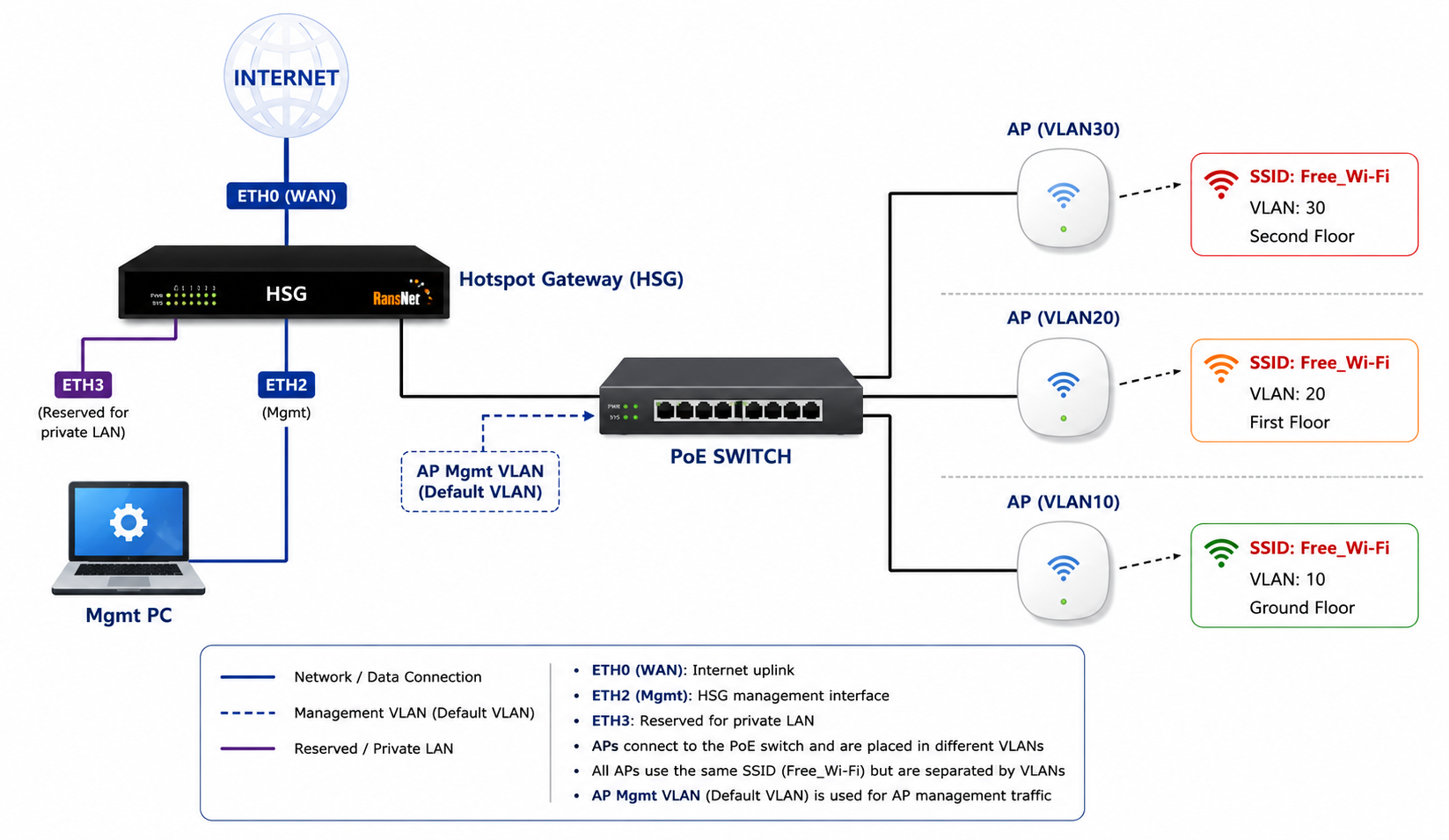
The RansNet Hotspot Gateway (HSG) solves this with seamless roaming — users connect to a single SSID and log in once at a single captive portal, while the back end runs multiple hotspot instances bound to different VLANs. On the wireless controller side, one SSID is provisioned and shared across all VLANs.
From the user's perspective, they stay connected to the same SSID and the same portal. From the network's perspective, they are roaming across different VLANs/subnets. The result is the best of both worlds — a seamless user experience on top of an efficient, segmented network design.
Use Cases
| Venue | Why roaming matters |
|---|---|
| Stadiums & arenas | Spectators move between concourses, seating bowls, and concessions — each a separate VLAN zone. |
| University campuses | Students roam across buildings and faculties segmented into different VLANs. |
| Large hotels & resorts | Guests move between towers, lobbies, and conference areas on different VLANs. |
| Convention centers | Attendees move between halls without repeated logins. |
How It Works
Seamless roaming is built on the HSG client-sticky feature. Refer to client-sticky for the full command reference.
- A single SSID is broadcast across all zones; the wireless controller maps it to the appropriate VLAN per zone.
- Each VLAN has its own hotspot instance, but all instances share the same captive portal.
- When a user first logs in (on any VLAN), the HSG stores a
MAC ↔ usernamesticky mapping. - As the user roams into another VLAN in the sticky VLAN list, the HSG auto-logs them in at the back end against RADIUS — no portal prompt appears.
Prerequisites
Complete the base deployment first — physical cabling, interface/VLAN configuration, and a single captive portal. Refer to Sample Hotspot Deployment for those steps.
Unlike a standard multi-VLAN deployment (which uses a unique portal per VLAN), seamless roaming uses one shared portal across all VLAN instances.
Configuration
Configure the hotspot instances for each VLAN (VLAN10, VLAN20, VLAN30) and enable seamless roaming on each.
Enable Sticky and the Sticky VLAN List
For every hotspot instance, enable client-sticky and configure the sticky VLAN list to include all VLANs the user may roam across.
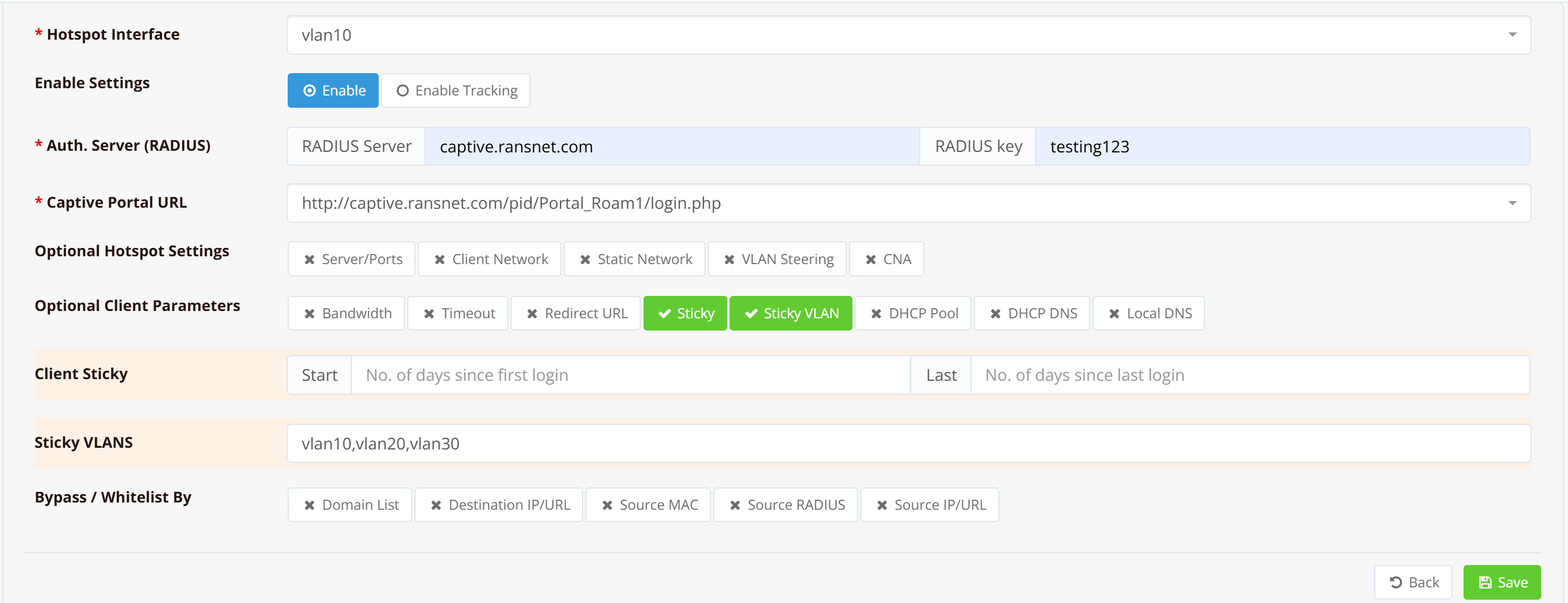
The two key settings per instance are:
client-sticky start 1— Enables sticky sessions, valid for 1 day from first login.client-sticky-vlanlist vlan10,vlan20,vlan30— Lists every VLAN the user can roam across without re-authenticating.
All instances must reference the same captive portal (Portal_Roam1 in the example below) so the login experience is identical regardless of which VLAN the user first joins.
Example CLI Configuration
For the base network configuration (interfaces, VLANs, DHCP, firewall), refer to Sample Hotspot Deployment — Example CLI Configuration. The hotspot-instance configuration with roaming enabled is shown below.
security hotspot vlan10
 hotspot-server 172.16.10.1 ports 5205 4029
 client-network 172.16.10.0 255.255.255.0
 client-static 172.16.10.0 255.255.255.0
 client-sticky start 1
 client-sticky-vlanlist vlan10,vlan20,vlan30
 client-local-dns on
 redirect-url http://www.ransnet.com
 radius-server splash.ransnet.com testing123
 hotspot-portal https://captive.ransnet.com/pid/Portal_Roam1/login.php
 start
!
security hotspot vlan20
 hotspot-server 172.16.20.1 ports 5549 4985
 client-network 172.16.20.0 255.255.255.0
 client-static 172.16.20.0 255.255.255.0
 client-sticky start 1
 client-sticky-vlanlist vlan10,vlan20,vlan30
 client-local-dns on
 redirect-url http://www.ransnet.com
 radius-server splash.ransnet.com testing123
 hotspot-portal https://captive.ransnet.com/pid/Portal_Roam1/login.php
 start
!
security hotspot vlan30
 hotspot-server 172.16.30.1 ports 5780 5408
 client-network 172.16.30.0 255.255.255.0
 client-static 172.16.30.0 255.255.255.0
 client-sticky start 1
 client-sticky-vlanlist vlan10,vlan20,vlan30
 client-local-dns on
 redirect-url http://www.ransnet.com
 radius-server splash.ransnet.com testing123
 hotspot-portal https://captive.ransnet.com/pid/Portal_Roam1/login.php
 start
Note that all three instances share the same portal (Portal_Roam1) and the same sticky VLAN list, which is what enables transparent roaming across the VLANs.
Verification
| Items to Test | Action | Expected Outcome |
|---|---|---|
| Initial login | Connect to the SSID in VLAN10's zone and log in via the portal | Login succeeds; user gains internet access. |
| Sticky mapping stored | Navigate to HOTSPOT USERS → User Sessions → Sticky Sessions | A MAC ↔ username entry appears for the logged-in device. |
| Roam to another VLAN | Move the device into VLAN20's zone (same SSID) | Device gets a VLAN20 IP and is auto-logged-in — no portal prompt. |
| Roam to third VLAN | Move into VLAN30's zone | Same seamless auto-login behavior. |
| Policy enforcement | Check bandwidth/quota on the roamed session | Account's access policy (speed, time, quota) is still enforced after roaming. |
Troubleshooting
| Symptom | Likely Cause | Solution |
|---|---|---|
| User is prompted to log in again after roaming | Target VLAN not in the sticky VLAN list | Verify client-sticky-vlanlist includes every roaming VLAN on all instances. |
| No sticky entry created | client-sticky not enabled, or sticky duration expired |
Confirm client-sticky start <days> is set and the validity period has not lapsed. |
| Roaming works one direction only | VLAN list inconsistent between instances | Ensure all instances share the identical client-sticky-vlanlist. |
| Different portal appears in a zone | Instances using different hotspot-portal URLs |
Point every instance to the same portal (Portal_Roam1). |
| Auto-login slow during mass reconnect | Portal page kicks in before background auto-login | Combine client-sticky with the portal-sticky feature. |
Best Practices
- Keep the VLAN list identical across every instance — roaming is only seamless when all instances agree on the sticky VLAN list.
- Use one shared portal for all roaming VLANs so the login experience is consistent.
- Match the sticky duration to the visit length — e.g.,
start 1(1 day) for daily events; extend for multi-day stays. - On-premise only — Seamless roaming via
client-stickyrequires the HSG to be the local gateway. For CloudX/HSA designs, use portal-sticky instead. - No landing-page redirect on roam —
client-stickyre-login is fully transparent, so marketing landing pages are not shown on roam. Use portal-sticky if a landing page is required.
Related Features
- client-sticky — Full sticky-session command reference
- Portal-sticky — Portal-based seamless re-login (cloud-capable; supports marketing redirect)
- Sample Hotspot Deployment — Base multi-VLAN setup this case builds on
- Hotspot Instance Configuration — Per-instance DHCP, portal, and access settings
- Captive Portal Configuration — Portal templates and login methods
- VLAN Steering — Dynamically assign users to VLANs by profile