Traffic Steering (Policy-Based Routing)
Policy-Based Routing (PBR) enables forwarding decisions based on multiple criteria beyond destination IP address alone. Unlike traditional routing that matches only the destination address, PBR matches source/destination addresses, applications, ports, and traffic flows to direct packets to specific next-hops or interfaces.
Overview
What PBR Does
By default, a router examines packet destination addresses and forwards them through the routing table (static routes or dynamic routing protocols like OSPF/BGP). This works well for most scenarios, but complex deployments require more granular control.
PBR allows you to:
- Route traffic from specific source networks through different ISP links
- Send application traffic (HTTP, HTTPS, etc.) to different gateways
- Redirect traffic to external proxies, firewalls, or caching engines
- Implement failover policies when primary paths fail
How It Works
PBR operates as a first-pass filter before the standard routing table:
- Packet arrives at inbound interface
- Router checks if it matches any PBR policy
- If matched: Forward using PBR next-hop (higher priority)
- If not matched: Consult routing table (including default route)
- If still no match: Drop packet
This prioritization ensures PBR rules take precedence over standard L3 routing.
Use Cases
| Scenario | Benefit |
|---|---|
| Multi-ISP Load Balancing | Route different client networks or applications through separate ISP links to balance traffic and avoid congestion |
| Application-Specific Routing | Send video streaming through a high-bandwidth ISP; email through a low-cost ISP |
| Failover Policies | Automatically route traffic through backup ISP when primary path fails |
| Interconnecting Private Networks | Direct traffic between branch offices through specific VPN tunnels |
| Compliance Routing | Route sensitive traffic through approved gateways or DLP proxies |
| Dynamic WAN / Tunnel Binding | Keep a VPN tunnel or other router-originated traffic pinned to a specific WAN interface (DHCP or cellular) even as its IP address changes |
Requirements
- Firmware: RansNet OS with PBR support
- Interfaces: Minimum 2 WAN links or multiple local networks
- Routing: At least one default route configured per ISP/nexthop
- For packet flow matching: Firewall marking feature is used
Configuration Methods
Traffic Matching Options
RansNet PBR supports three primary matching methods:
| Method | Criteria | Use Case |
|---|---|---|
| By Source/Destination Address | Source IP/network, Destination IP/network | Different client networks → different ISPs |
| By Packet Flow | Protocol, port, FQDN, application objects | HTTP/HTTPS/DNS → different gateways |
| By Existing Policy | Inherit from an existing rule for backup routes | Same traffic → different gateways |
Tip
The By Source/Destination Address method also accepts an interface name (e.g., wwan0) in place of a source network, so the policy always matches whatever IP that interface currently holds. See Configuration Example 5: Binding Traffic to a Dynamic WAN Interface.
Configuration Example 1: Routing by Source Network
Scenario
Route clients from 172.16.30.0/24 through ISP-1 (eth0) and clients from 172.16.40.0/24 through ISP-2 (eth1).
Topology
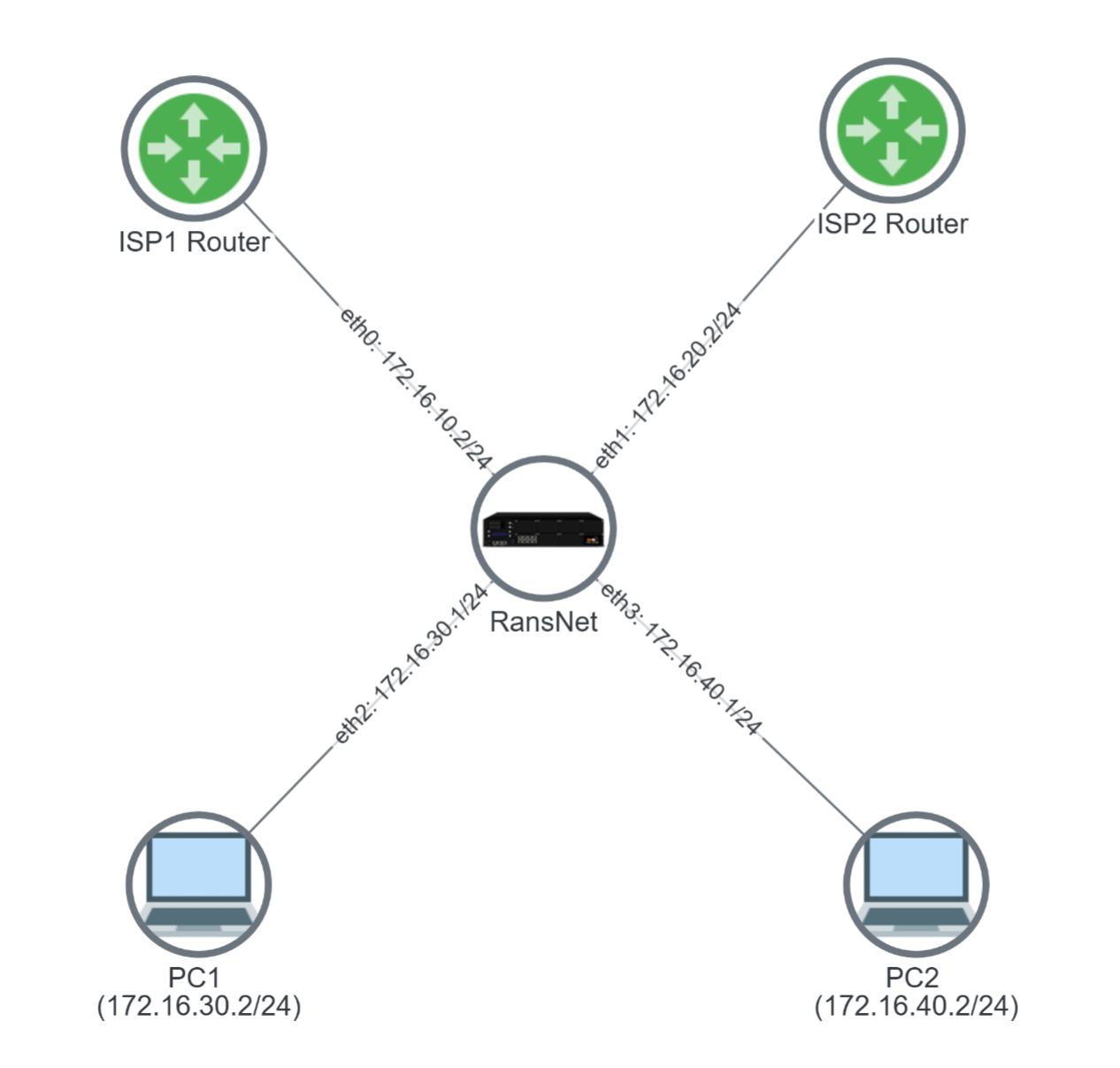
Topology Summary:
WAN Links (ISP Connections):
The RansNet router sits at the center with two WAN links:
- ISP-1 link (eth0): Connected to ISP-1 Router at
172.16.10.1/30(your device is172.16.10.2/30) - ISP-2 link (eth1): Connected to ISP-2 Router at
172.16.20.1/30(your device is172.16.20.2/30)
Local Networks (Client LANs):
Two local networks are connected to the RansNet router:
- LAN-1 (eth2): PC1 in subnet
172.16.30.0/24— traffic will route through ISP-1 (eth0) - LAN-2 (eth3): PC2 in subnet
172.16.40.0/24— traffic will route through ISP-2 (eth1)
Traffic Flow:
This setup ensures that regardless of destination, all traffic from PC1 exits through ISP-1 and all traffic from PC2 exits through ISP-2.
Configuration
GUI Configuration
Navigate to Device Settings → SD-WAN → Traffic Steering and click Add Policy.
Step 1: Configure First Policy (LAN-1 → ISP-1)
Fill in the following fields:
| Field | Value | Description |
|---|---|---|
| Policy No. | 100 |
Unique identifier for this policy (range 100–199). Lower numbers are evaluated first. |
| Nexthop IP/Interface | eth0 |
The WAN interface through which traffic matching this policy will be routed. |
| Traffic Matching Options | By Networks |
Select how packets are matched: By Networks (source/destination IP), By Packet Flow (protocol/port), or By Existing Policy. |
| Networks | Source Network |
Enable source network matching to route based on the origin subnet. |
| Source Network | 172.16.30.0/24 |
The LAN subnet whose traffic should be routed through eth0. Packets from PC1 (172.16.30.x) match this policy. Also accepts an interface name (e.g. wwan0) — see the tip below. |
Click Continue to proceed.
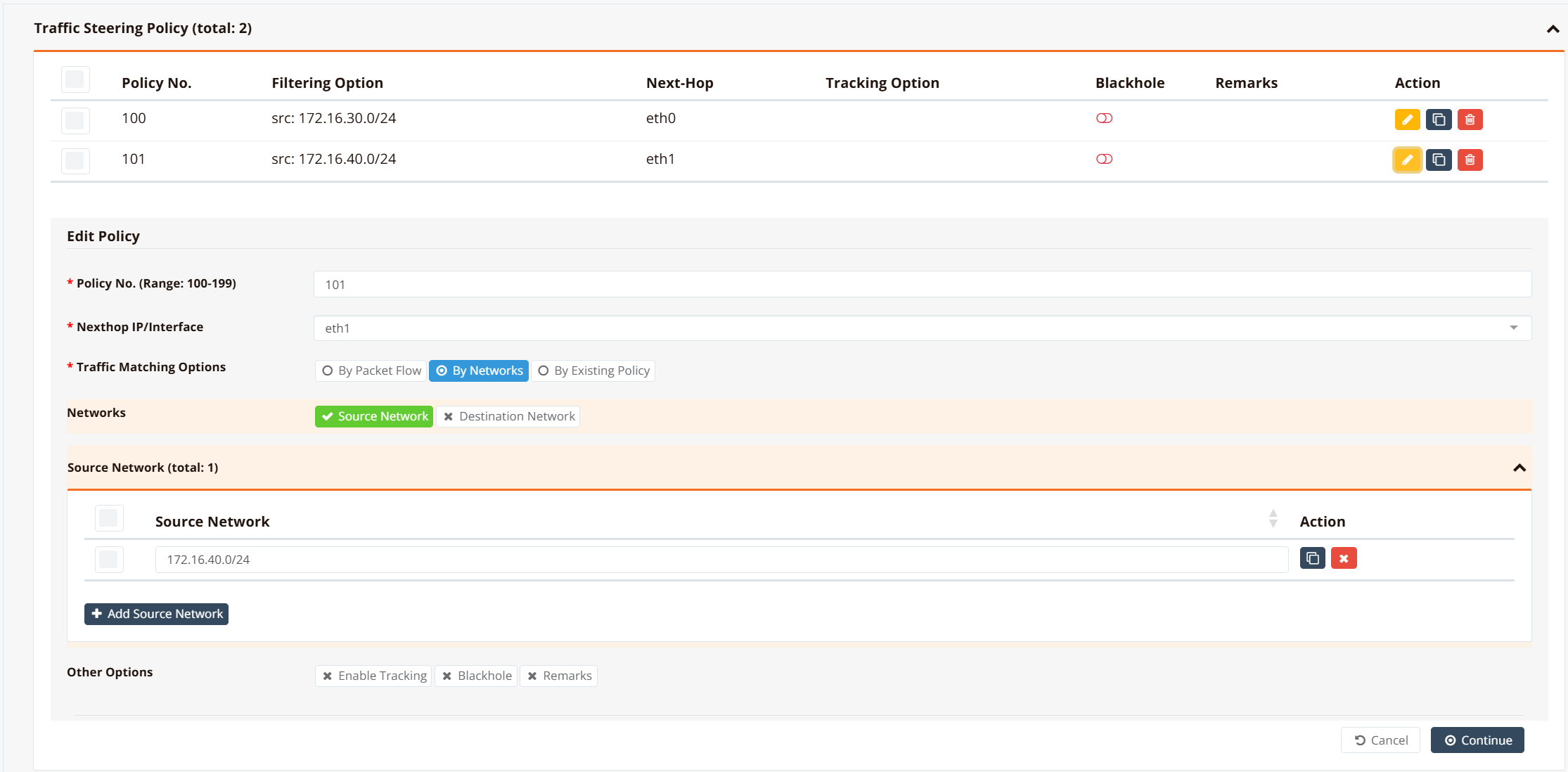
Step 2: Configure Second Policy (LAN-2 → ISP-2)
Click Add Policy again and repeat with these values:
| Field | Value |
|---|---|
| Policy No. | 101 |
| Nexthop IP/Interface | eth1 |
| Traffic Matching Options | By Networks |
| Source Network | 172.16.40.0/24 |
Then click Save and Apply Config to activate both policies.
CLI Configuration
!
interface eth0
 enable
 ip address 172.16.10.2/30
!
interface eth1
 enable
 ip address 172.16.20.2/30
!
interface eth2
 enable
 ip address 172.16.30.1/24
!
interface eth3
 enable
 ip address 172.16.40.1/24
!
ip route 0.0.0.0/0 nexthop 172.16.10.1 remark ISP-1
ip route 0.0.0.0/0 nexthop 172.16.20.1 remark ISP-2
!
firewall-access 100 permit outbound eth0
firewall-access 101 permit outbound eth1
!
firewall-snat 100 overload outbound eth0
firewall-snat 101 overload outbound eth1
!
!define policy ID to match packets by source subnets
ip pbr policy 100 src 172.16.30.0/24
ip pbr policy 101 src 172.16.40.0/24
!
!apply specific forwarding/routing rule based on pre-defined policy ID
ip pbr 100 nexthop eth0
ip pbr 101 nexthop eth1
!
Note
Nexthop Configuration
The PBR nexthop follows the same rule as static route.
However, for PBR route, you can set nexthop as an interface (e.g., eth0), provided that the interface has a default route with a gateway IP. The system automatically learns the gateway as the nexthop IP.
If no default gateway available for the exit interface, or you are not using the gateway IP as the nexthop, you must configure nexthop with a directly reachable IP address (do not use interface as nexthop).
When the nexthop is an interface, the router re-checks its gateway in the background (about every 30 seconds). If the interface's DHCP gateway changes while the link stays up (for example, a new lease from the ISP), the PBR route is updated to the new gateway automatically.
Tip
Source by Interface (Auto-Tracked IP)
The src of ip pbr policy also accepts an interface name instead of an IP/network — for example, ip pbr policy 200 src wwan0. The router resolves it to the interface's current IPv4 address and re-checks it about every 30 seconds, so the policy keeps matching after a DHCP renewal, modem reconnect or SIM failover changes the address. If the interface has no address, the rule is withdrawn until it gets one back. Interface names and networks can be mixed in one list (e.g. src 172.16.30.0/24,wwan0).
Use this for traffic the router sends from its own dynamic WAN address (VPN tunnels, probes); keep static subnets for LAN clients. See Configuration Example 5 for a full walkthrough.
Verification
| Items to Test | Command | Expected Outcome |
|---|---|---|
| PBR Policies Active | show ip pbr policy |
Shows policy 100 and 101 with source networks defined |
| PBR Routes Installed | show ip pbr |
Shows routes 100 and 101 with eth0/eth1 as nexthops |
| LAN-1 Client Routing | From 172.16.30.x: traceroute 8.8.8.8 |
Route passes through eth0 (ISP-1 gateway 172.16.10.1) |
| LAN-2 Client Routing | From 172.16.40.x: traceroute 8.8.8.8 |
Route passes through eth1 (ISP-2 gateway 172.16.20.1) |
Tip
The 172.16.30.0/24 style source network above works well for LAN client subnets, which are static. If instead you need to match traffic sourced from the router's own WAN interface — one that gets its IP via DHCP or a cellular carrier — use the interface name directly instead of a subnet. See Configuration Example 5: Binding Traffic to a Dynamic WAN Interface.
Configuration Example 2: Routing by Packet Flow (Application-Based)
Scenario
Route application traffic (HTTP, HTTPS) from client networks through different ISPs based on protocol:
- HTTP/SMTP traffic (TCP/80, TCP/25) → ISP-1
- HTTPS traffic (TCP/443) → ISP-2
This allows fine-grained control: you might send bandwidth-heavy video traffic (HTTPS) through a premium ISP while routing email (SMTP) through a cost-effective link.
Configuration
GUI Configuration
Navigate to Device Settings → SD-WAN → Traffic Steering and click Add Policy.
Step 1: Configure HTTP Policy (TCP/80, TCP/25 → ISP-1)
Fill in the following fields:
| Field | Value | Description |
|---|---|---|
| Policy No. | 100 |
Unique policy identifier. |
| Nexthop IP/Interface | eth0 |
Route HTTP/SMTP to ISP-1. |
| Traffic Matching Options | By Packet Flow |
Match based on protocol and port instead of source IP. |
| Inbound Interface | eth2 |
Apply this rule to traffic arriving on the LAN-1 interface. |
| Protocol | TCP |
Match TCP protocol (HTTP and SMTP both use TCP). |
| Destination Port | 80,25 |
Match HTTP (port 80) and SMTP (port 25). Use comma to separate multiple ports. |
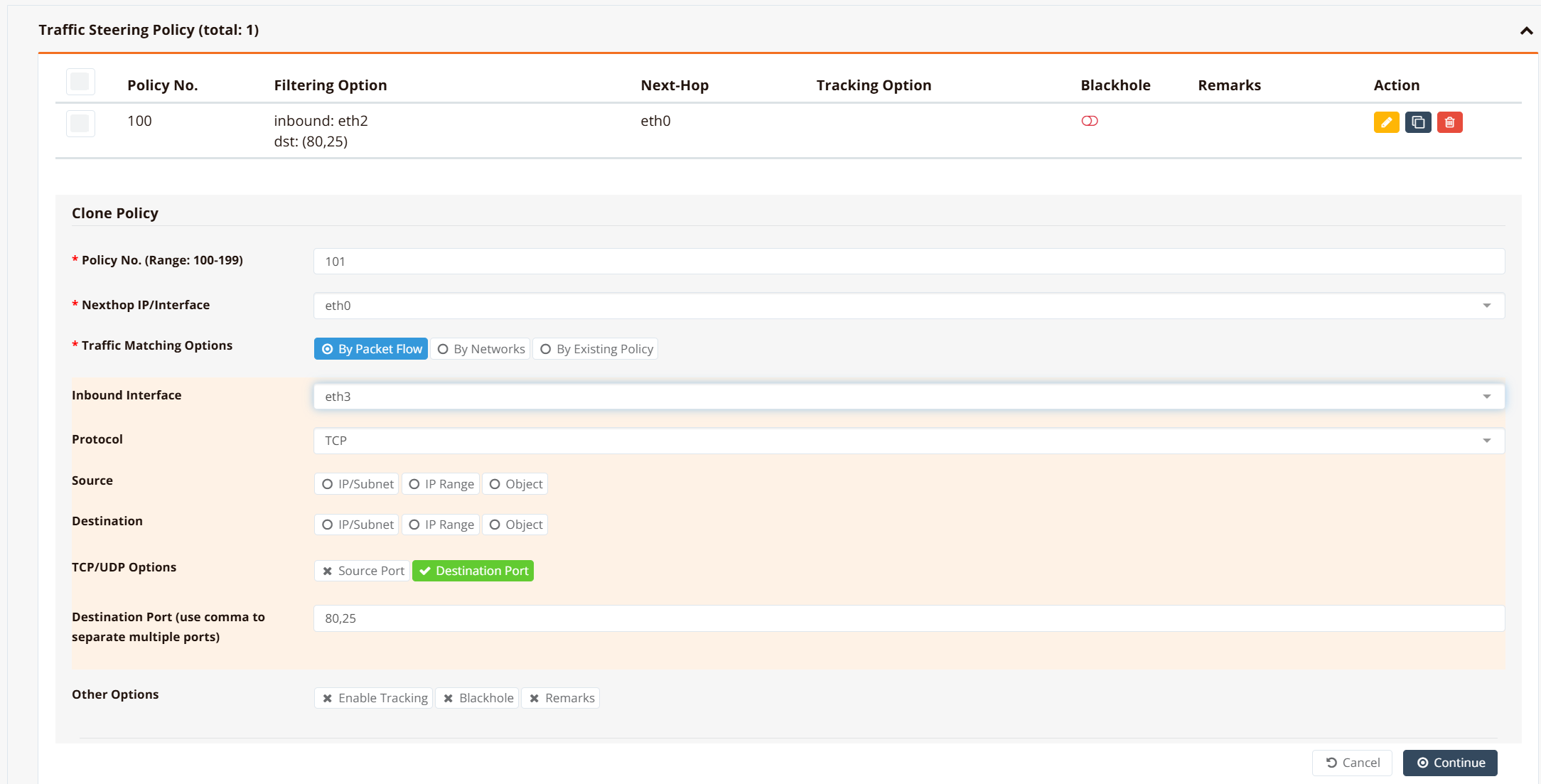
Click Continue, then Save and Apply.
Step 2: Configure HTTPS Policy (TCP/443 → ISP-2)
Click Add Policy again and repeat with these values:
| Field | Value |
|---|---|
| Policy No. | 101 |
| Nexthop IP/Interface | eth1 |
| Traffic Matching Options | By Packet Flow |
| Inbound Interface | eth2 |
| Protocol | TCP |
| Destination Port | 443 |
Note
Packet flow matching is applied at inbound interfaces. If you have multiple LANs with different routing requirements, repeat the rule on each inbound interface (eth2, eth3, etc.).
For LAN-2 (eth3): Repeat Steps 1 and 2, but change Inbound Interface to eth3 and use Policy No. 102 and 103.
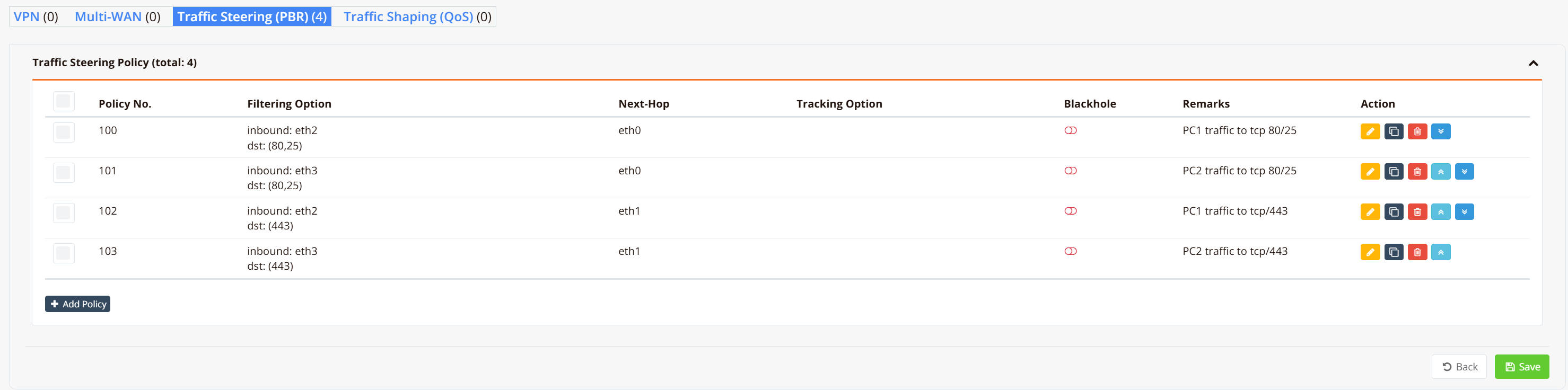
CLI Configuration
ip pbr policy 100 fwmark 100 remark "PC1 traffic to tcp 80/25"
ip pbr policy 101 fwmark 101 remark "PC2 traffic to tcp 80/25"
ip pbr policy 102 fwmark 102 remark "PC1 traffic to tcp/443"
ip pbr policy 103 fwmark 103 remark "PC2 traffic to tcp/443"
!
ip pbr 100 nexthop eth0 remark "PC1 traffic to tcp 80/25"
ip pbr 101 nexthop eth0 remark "PC2 traffic to tcp 80/25"
ip pbr 102 nexthop eth1 remark "PC1 traffic to tcp/443"
ip pbr 103 nexthop eth1 remark "PC2 traffic to tcp/443"
!
firewall-set 100 mark 100 inbound eth2 tcp dport 80,25 remark "PC1 traffic to tcp 80/25"
firewall-set 101 mark 101 inbound eth3 tcp dport 80,25 remark "PC2 traffic to tcp 80/25"
firewall-set 102 mark 102 inbound eth2 tcp dport 443 remark "PC1 traffic to tcp/443"
firewall-set 103 mark 103 inbound eth3 tcp dport 443 remark "PC2 traffic to tcp/443"
!
Verification
| Items to Test | Command | Expected Outcome |
|---|---|---|
| Firewall Rules Applied | show firewall-set |
Shows marks 100, 101, 102, 103 matching on respective interfaces |
| PBR Routes Loaded | show ip pbr |
Shows PBR routes 100, 101, 102, 103 with correct nexthop |
| HTTP Traffic Path | From LAN: curl -v http://example.com |
Connection originates from ISP-1 (eth0) |
| HTTPS Traffic Path | From LAN: curl -v https://example.com |
Connection originates from ISP-2 (eth1) |
Configuration Example 3: PBR Failover
Scenario
Extend Example 2 to add automatic failover: if ISP-2 fails, HTTPS traffic automatically routes through ISP-1 backup link.
Option 1: Track Link Default Routes (Simpler)
We configure tracking for the ISP2 default route. When ISP2 link fails, the default route for ISP2 to 172.16.20.1 (via eth1) will be withdrawn.
!
ip route 0.0.0.0/0 nexthop 172.16.10.1 remark ISP-1
ip route 0.0.0.0/0 nexthop 172.16.20.1 track icmp 172.16.20.1 60 remark ISP-2
!
When the default route to ISP-2 is withdrawn, PBR rules using nexthop eth1 automatically disappears. Remaining traffic falls back to ISP-1 default route.
ip pbr 100 nexthop eth0 remark "PC1 traffic to tcp 80/25"
ip pbr 101 nexthop eth0 remark "PC2 traffic to tcp 80/25"
!below PBR routes will stop working once the eth1 nexthop (default route) is gone.
ip pbr 102 nexthop eth1 remark "PC1 traffic to tcp/443"
ip pbr 103 nexthop eth1 remark "PC2 traffic to tcp/443"
Pros: Simple, no extra configuration
Cons: Relies on understanding routing table dependency
Option 2: Track PBR Routes Directly (Recommended)
Create explicit backup PBR routes that activate when primary tracking fails. This approach gives you finer control: different traffic types can have different failover behaviors.
Setup Overview:
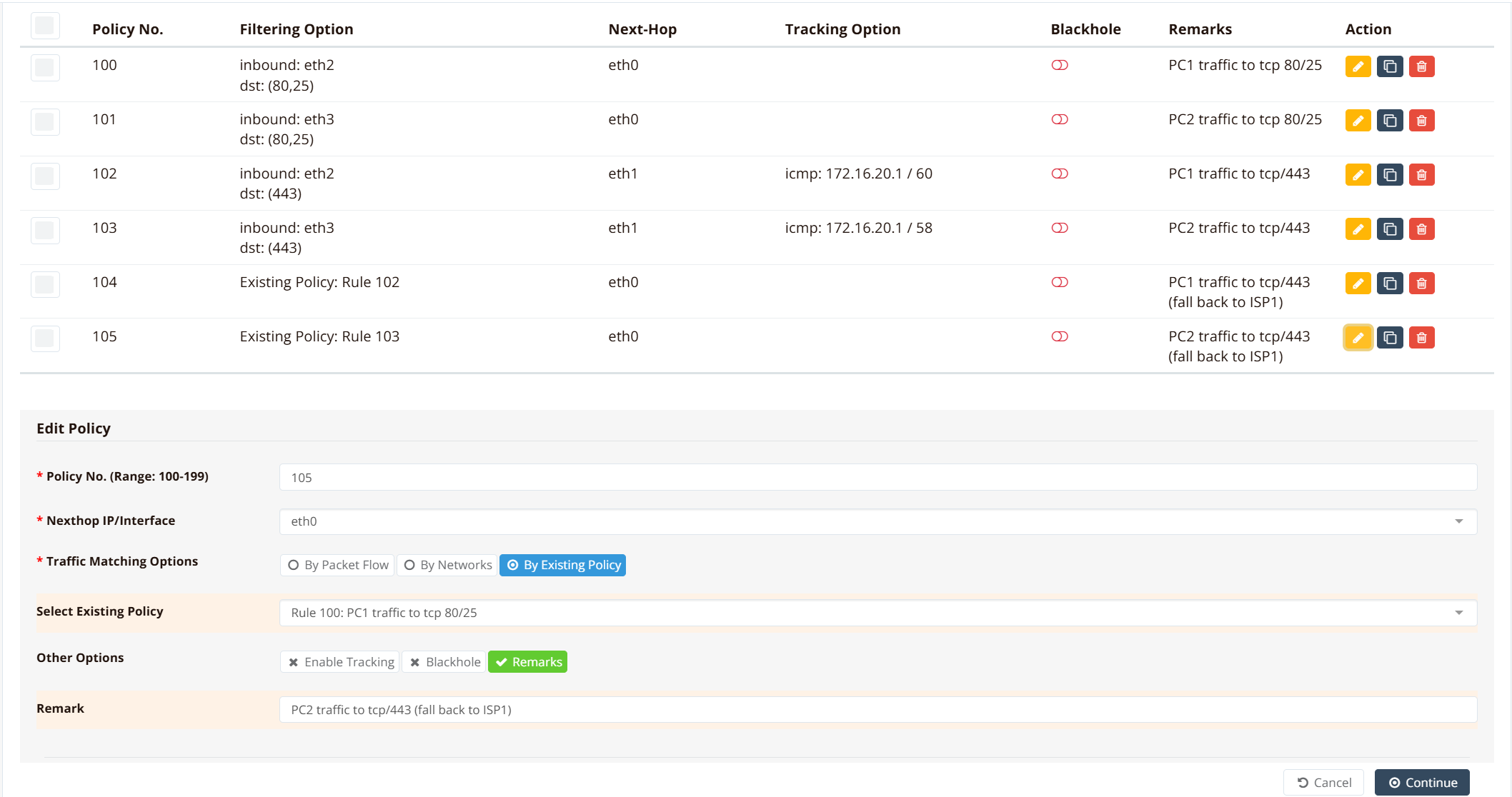
- Primary policies (102, 103): Route HTTPS to ISP-2 with tracking enabled
- Backup policies (104, 105): Route HTTPS to ISP-1 only when primary policies fail
- When ISP-2 link is active, policies 102/103 handle HTTPS traffic
- When ISP-2 link fails, policies 102/103 are withdrawn and policies 104/105 automatically activate, redirecting HTTPS to ISP-1
GUI Configuration for Failover Policies
Navigate to Device Settings → SD-WAN → Traffic Steering and create the following:
Primary Policies (Route HTTPS to ISP-2 with Tracking):
| Policy No. | Traffic Match | Nexthop | Tracking | Notes |
|---|---|---|---|---|
102 |
TCP/443 from eth2 | eth1 | track icmp 172.16.20.1 60 |
PC1 HTTPS → ISP-2, monitored |
103 |
TCP/443 from eth3 | eth1 | track icmp 172.16.20.1 60 |
PC2 HTTPS → ISP-2, monitored |
Backup Policies (Route HTTPS to ISP-1 as Fallback):
| Policy No. | Traffic Match | Nexthop | Tracking | Notes |
|---|---|---|---|---|
104 |
Same as 102 (reuse) | eth0 | No | PC1 HTTPS → ISP-1 fallback |
105 |
Same as 103 (reuse) | eth0 | No | PC2 HTTPS → ISP-1 fallback |
When configuring Policy 104, select Traffic Matching Options: By Existing Policy and reference Policy 102. This ensures 104 matches the same traffic as 102 but routes through a different nexthop.
ip pbr policy 100 fwmark 100 remark "PC1 traffic to tcp 80/25"
ip pbr policy 101 fwmark 101 remark "PC2 traffic to tcp 80/25"
ip pbr policy 102 fwmark 102 remark "PC1 traffic to tcp/443"
ip pbr policy 103 fwmark 103 remark "PC2 traffic to tcp/443"
!PRB policies matching the same traffic for tcp/443 via ISP1 (reuse existing policy)
ip pbr policy 104 fwmark 102 remark "PC1 traffic to tcp/443 (fall back to ISP1)"
ip pbr policy 105 fwmark 103 remark "PC2 traffic to tcp/443 (fall back to ISP1)"
!
ip pbr 100 nexthop eth0 remark "PC1 traffic to tcp 80/25"
ip pbr 101 nexthop eth0 remark "PC2 traffic to tcp 80/25"
!when tracking fails, pbr 102 and 103 will withdraw
ip pbr 102 nexthop eth1 track icmp 172.16.20.1 60 remark "PC1 traffic to tcp/443"
ip pbr 103 nexthop eth1 track icmp 172.16.20.1 58 remark "PC2 traffic to tcp/443"
!tcp/443 traffic will follow routes to ISP1
ip pbr 104 nexthop eth0 remark "PC1 traffic to tcp/443 (fall back to ISP1)"
ip pbr 105 nexthop eth0 remark "PC2 traffic to tcp/443 (fall back to ISP1)"
!
firewall-set 100 mark 100 inbound eth2 tcp dport 80,25 remark "PC1 traffic to tcp 80/25"
firewall-set 101 mark 101 inbound eth3 tcp dport 80,25 remark "PC2 traffic to tcp 80/25"
firewall-set 102 mark 102 inbound eth2 tcp dport 443 remark "PC1 traffic to tcp/443"
firewall-set 103 mark 103 inbound eth3 tcp dport 443 remark "PC2 traffic to tcp/443"
!
How it works:
- HTTPS traffic (fwmark 102/103) matches both policy 102/103, and policy 104/105
- PBR route 102/103 is evaluated first (lower rule number)
- When ISP-2 tracking succeeds, traffic routes via eth1
- When ISP-2 tracking fails, route 102/103 are withdrawn
- Traffic then matches routes 104/105 via eth0 (ISP-1 backup)
Pros: Explicit, flexible, allows different failover actions per policy
Cons: Requires understanding policy evaluation order
Verification
| Items to Test | Command | Expected Outcome |
|---|---|---|
| ISP-2 Active | show ip pbr |
PBR routes 102/103 show nexthop eth1 active |
| ISP-2 Failed | Disconnect ISP-2, wait 60s; show ip pbr |
PBR routes 102/103 withdrawn, routes 104/105 active (eth0) |
| Failover Tested | traceroute 8.8.8.8 (during failure) |
Packets now originate from ISP-1 (eth0) |
| Track Status | show ip route tracking |
ISP-2 track shows "DOWN" when failing |
Configuration Example 4: PBR with Hotspot Networks
When Hotspot service is enabled, client traffic arrives through dynamic tunnel interfaces (tun0, tun1, etc.). Since tunnel IDs are auto-assigned, match using tun+ wildcard combined with source IP/network to differentiate clients.
!
firewall-set 100 mark 100 inbound tun+ tcp src 172.16.30.0/24 dport 80,25 remark "PC1 traffic to tcp 80/25"
firewall-set 101 mark 101 inbound tun+ tcp src 172.16.34.0/24 dport 80,25 remark "PC2 traffic to tcp 80/25"
firewall-set 102 mark 102 inbound tun+ tcp src 172.16.30.0/24 dport 443 remark "PC1 traffic to tcp/443"
firewall-set 103 mark 103 inbound tun+ tcp src 172.16.30.0/24 dport 443 remark "PC2 traffic to tcp/443"
!
Configuration Example 5: Binding Traffic to a Dynamic WAN Interface
Scenario
A branch router has two WAN links: eth0 as the primary (static IP from the ISP) and wwan0 as a cellular backup that receives a dynamic IP from the carrier — the address can change on modem reconnect, SIM failover, or a tower/carrier-side reassignment.
A site-to-site VPN tunnel is configured to use wwan0 for its outbound traffic, to keep it off the primary link. If the PBR source rule for that tunnel is written against a fixed IP (e.g., src 10.73.172.75), it goes stale the moment wwan0's address changes — the tunnel's traffic silently stops matching the policy and falls back to the default route (usually eth0), defeating the purpose of the dedicated link, until someone notices and manually updates the rule.
Using the interface name as the source instead of a fixed IP solves this: the router always matches whatever address wwan0 currently holds.
When to Use This
Use an interface name for src (instead of a static network) whenever the traffic you're steering originates from the router's own dynamic WAN address rather than a fixed LAN subnet — typically:
- Cellular (
wwan0,wwan1) WAN links, where the carrier assigns the IP - DHCP-provisioned WAN links, where the ISP can change the lease
- Any VPN tunnel, monitoring probe, or other router-originated traffic that must stay pinned to a specific WAN even after that WAN's IP changes
For LAN client subnets (which don't change), keep using a static network as in Example 1.
Configuration
GUI Configuration
Navigate to Device Settings → SD-WAN → Traffic Steering and click Add Policy. This uses the same Source Network field as Example 1 — it now also accepts an interface name:
| Field | Value | Description |
|---|---|---|
| Policy No. | 200 |
Unique identifier for this policy. |
| Nexthop IP/Interface | wwan0 |
Egress interface for matching traffic. |
| Traffic Matching Options | By Networks |
Match based on source address. |
| Networks | Source Network |
Enable source network matching. |
| Source Network | wwan0 |
Enter the interface name instead of a subnet. The router resolves this to the interface's current IPv4 address and keeps it updated automatically if the address changes. |
CLI Configuration
Both the source match and the egress path are pinned to wwan0 here, so the whole flow — matching and forwarding — follows the interface consistently, not just one side of it.
Note
Source Matching by Interface
Similar to PBR nexthop, the src field of ip pbr policy accepts an interface name instead of a literal IP/network. The router resolves it to that interface's current IPv4 address and keeps the rule up to date in the background if the address changes — useful for WAN interfaces using DHCP or cellular data connections.
This applies to src only — dst (destination) matching still requires a literal IP/network, since a destination isn't an address the router itself owns.
Interface resolution happens periodically in the background (approximately every 30 seconds), not instantly — allow a short window for a newly changed IP to be reflected. If the interface currently has no IP address (modem not yet connected, cable unplugged), the PBR rule is automatically withdrawn until it regains one; matching traffic falls through to the next rule or the routing table in the meantime, rather than matching against a stale, no-longer-valid address.
You can mix interface names and static networks/IPs in the same src list, comma-separated (e.g., src 172.16.30.0/24,wwan0).
Verification
| Items to Test | Command | Expected Outcome |
|---|---|---|
| Resolved Source Address | show ip pbr policy |
Policy 200 shows from <current wwan0 IP>, not the literal text wwan0 |
| Rule Follows IP Change | Trigger a WAN reconnect (modem restart, DHCP renew), then re-check after ~30s: show ip pbr policy |
Source address updates to the new IP automatically — no manual re-entry needed |
| Interface Down Behavior | Disconnect wwan0, then check show ip pbr policy |
Policy 200's rule disappears until wwan0 regains an IP address |
Important Notes
Warning
PBR Rule Evaluation Order
Rules are evaluated sequentially by rule number (lowest first). Once a packet matches a rule, that rule is applied and evaluation stops. Avoid overlapping rules across different policies, as only the first match takes effect.
Avoid Overlapping firewall-set Rules
firewall-set rules are evaluated in ascending rule number order. Each matching rule overwrites the fwmark set by any previous rule — the last matching rule wins. If two rules can match the same packet, that packet will always be marked by the higher-numbered rule, overriding the intended policy.
Example: If rule 100 marks tcp dport 443 (HTTPS) for policy 100, and rule 105 marks a broader pattern (e.g., social media destinations) that also includes HTTPS traffic, then all HTTPS traffic to social media sites will be marked 105 and routed by policy 105 — not policy 100 as intended. To avoid this, ensure firewall-set rules are mutually exclusive: no packet should match more than one rule.
Note
Hotspot + PBR Interaction
Due to order of operations, when PBR is enabled on Hotspot gateways:
- Use "By Packet Flow" matching (not source IP matching)
- Always match on
tun+inbound interface - Combine with source IP/network to target specific clients
- Avoid direct
ip pbr policy srcon hotspot networks (packets won't match due to tunnel encapsulation)
Best Practices
General Deployment
- Start Simple: Begin with source network-based routing (Example 1) before adding packet flow complexity
- Document Policies: Add remarks to each policy and route rule explaining its purpose
- Test Failover: Manually test backup routes by disconnecting primary links before deploying to production
- Monitor Tracking: Regularly check
show ip pbrandshow logging systemto ensure health checks are functioning (turn onlogoption in your tracking config)
Firewall Rules & Marking
- Consistent Marking: Use a consistent marking scheme (e.g., 100s series for policy A, 110s series for policy B)
- Use Named Objects: Reference firewall objects (protocol groups, FQDN groups) rather than hardcoding ports
- Avoid Overlaps: Each packet should match exactly one firewall-set rule to prevent unexpected behavior.
Performance & Scaling
- Policy Count: Tested with 20+ active policies; scale depends on traffic volume and hardware
- Bandwidth Impact: PBR adds minimal overhead (packet inspection at inbound interface only)
High-Availability Scenarios
- Tracking Intervals: Use 60-second intervals for geographically distributed links; 30 seconds for local redundancy
- Redundant Health Checks: It needed, it's supported to use both ICMP tracking (on default routes) and PBR tracking (on policies) for defense-in-depth
- Backup Routes: Always define fallback routes for critical traffic; use Option 2 (explicit backup policies) for mission-critical failover
Security Best Practices
- Access Control: Combine PBR with firewall policies to restrict sensitive traffic to specific gateways (e.g., corporate proxy)
- Logging: Enable firewall logging on marking rules to audit which traffic is subject to PBR
- Management Access: Never route management traffic (SSH, GUI) through external gateways; ensure management traffic uses default routing or a trusted ISP only
Troubleshooting
| Symptom | Likely Cause | Solution |
|---|---|---|
| Traffic not matching PBR policy | Source address doesn't match policy condition; or packet arrives on unexpected interface | Verify source IP in traceroute matches policy definition. Check show ip pbr to confirm rule is installed. |
| Packets fall back to default route | PBR policy installed but no matching next-hop (interface is down or has no default route) | Verify interface status with show interface. Confirm default route exists: show ip route default. Check PBR nexthop with show ip pbr |
| Failover not occurring | Tracking not configured, or tracking health check is incorrect | Verify ip pbr ... track command on primary route. Check tracking status: show ip pbr. Test health check manually: ping <tracked-address> from router |
| Firewall-set not matching | Rule has wrong inbound interface; or source/destination doesn't match (hotspot tunnel confusion) | Verify inbound interface with show firewall set-list detail. For hotspot, use tun+ wildcard, not specific eth interfaces. Check source IPs are within matching network |
| PBR policies applied but no effect | Route is installed but nexthop interface is down; or policy has lower priority than routing table entry | Verify interface is UP: show interface <nexthop-interface>. Confirm policy evaluates before routing table (PBR always has priority). Check for overlapping firewall-set rules causing unexpected matches |
| PBR src rule missing or shows an old IP after a WAN reconnect | src is set to an interface name and the router hasn't re-resolved the new IP yet, or the interface currently has no address |
Wait up to ~30 seconds for the automatic recheck, then re-run show ip pbr policy. Confirm the interface has a valid IP: show interface <name>. If the interface is down, the rule is intentionally withdrawn until it comes back up — see Example 5 |
Related Features
- Static Routes — Configure default routes for each ISP link
- Tracking Configuration — Health monitoring for automatic failover
- Firewall Policies — Deep-packet inspection for flow matching
- Traffic Shaping (QoS) — Combine with PBR for bandwidth management per policy