UAM / AAA / RADIUS
User Access Management (UAM), also known as Authentication, Authorization, and Accounting (AAA), manages how users validate their identities, what they are allowed to access, and what actions are logged. HSG includes a built-in RADIUS server that authenticates users against a local SQL database and instructs the hotspot access controller to enforce per-user access policies. HSG RADIUS can also act as a proxy to external RADIUS servers or integrate with corporate directories, social media, POS systems, and custom APIs.
Supported Authentication Methods
HSG RADIUS supports multiple authentication approaches to fit different venue types and user management needs:
Local Account Database
Manually create and manage user accounts in HSG’s local SQL database. Suitable for:
- Enterprise Wi-Fi with static staff/VIP accounts
- Hotels/hostels with member accounts
- Venues with pre-defined user lists
Accounts are persistent and survive database purges. HSG includes built-in database optimization to keep storage under control.
Self-Service Registration
Customize the captive portal to allow users to self-register by entering email, phone, name, or custom fields. Upon registration:
- An account is auto-created (typically username = email or phone)
- Credentials are sent via SMS or displayed on-screen
- Users can log in immediately or reuse credentials on return visits
Suitable for:
- F&B outlets building customer databases
- Malls and retail venues
- Services that want to capture user analytics
RADIUS Proxy
Forward authentication requests to upstream RADIUS servers instead of checking the local database. Flow:
- User submits credentials (username@realm.com)
- HSG checks local database; if not found, checks realm setting
- If realm matches, proxies request to configured upstream server
- Upstream server validates credentials and returns result
Suitable for:
- ISP-backed Wi-Fi (e.g., Wireless@SG in Singapore)
- Multi-tenant deployments with per-tenant RADIUS servers
- Scenarios where users log in with different corporate domains
Corporate Directory Integration (LDAP/AD)
Forward authentication requests to a corporate LDAP or Active Directory server using standard LDAP protocols. Users log in with domain credentials (e.g., user@corp.com) and are validated against the corporate directory.
Suitable for:
- Enterprise Wi-Fi where users share accounts with domain login
- Hybrid environments combining hotspot and corporate auth
Social Media Login
Allow users to authenticate with Facebook, Google, Twitter, WeChat, or other social providers. When a user logs in:
- HSG forwards credentials to the social provider for validation
- Public profile data (name, email, phone, locale) is retrieved and stored locally
- Venue owners can export user data for analytics
Suitable for:
- Malls and F&B outlets building customer databases
- Retail venues wanting minimal signup friction
- Data-driven marketing campaigns
Membership / CRM Integration
Use APIs from membership or CRM systems to authenticate users and offer differentiated service levels (members vs. non-members). Also supports hotel management systems (HMS) where guests log in with room number and surname.
Suitable for:
- Hotels and resorts
- Membership-based venues
- Venues with existing CRM or PMS systems
POS System Integration
Sync purchase data from a POS system to generate time-limited Wi-Fi vouchers. Flow:
- Customer makes a purchase
- Passcode (unique, e.g., invoice number) is printed on receipt
- Customer uses passcode to log in to Wi-Fi (valid for configured duration, e.g., 1 hour)
- Passcode is single-use and expires automatically
Suitable for:
- F&B outlets (ensures customers are purchasers, not freeloaders)
- Retail stores
- Venues wanting to drive repeat purchases or seat turnover
Voucher Printer Integration
Print temporary Wi-Fi vouchers on thermal printers. Venue staff press a button to issue vouchers (e.g., "1 hour", "1 day"). Accounts are auto-created in HSG RADIUS and are single-use.
Suitable for:
- Hotels and hostels
- F&B outlets
- Retail venues with manual guest management
Custom 3rd-Party Integration (Open API)
HSG provides an open API for seamless integration with any external system (CRM, billing, PMS, custom databases, etc.). External systems can:
- Retrieve user accounts and access records
- Create/insert user accounts
- Query user authentication and session data
Suitable for:
- Any venue with existing IT infrastructure
- Complex multi-system deployments
Configuration
GUI Configuration
Navigate to Device Settings → Security → RADIUS, then click Add RADIUS Client:
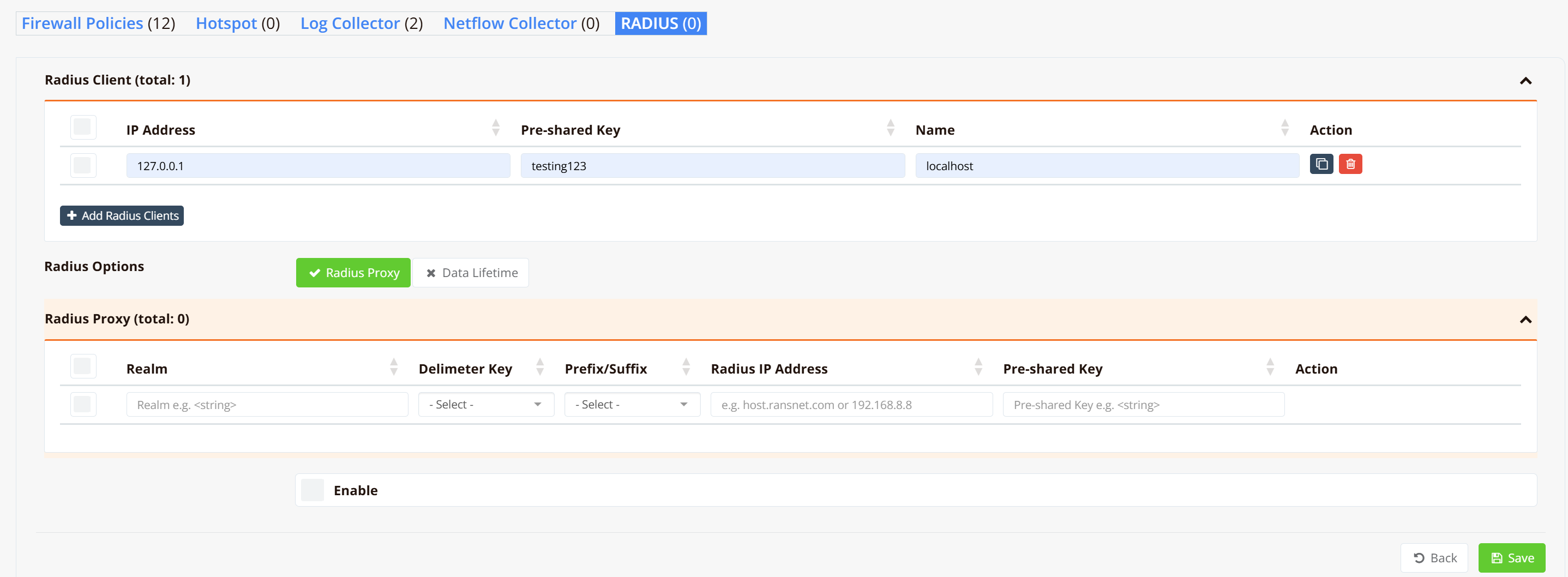
RADIUS Client Configuration:
A RADIUS client (also called NAS — Network Access Server) is any device or service that sends authentication requests to HSG RADIUS. Examples include:
- HSG’s own hotspot access controller (internal)
- Third-party wireless controllers (WPA2-EAP, EAP-SIM)
- Network switches (802.1x port-based access)
For external clients, ensure they can reach HSG RADIUS on UDP ports 1812 (authentication) and 1813 (accounting).
RADIUS Proxy Configuration:
If HSG RADIUS proxies to upstream servers, click RADIUS Proxy to add:
- Realms (e.g.,
starhub.com,m1net.com.sg,singtel) - Upstream RADIUS server IP
- Pre-shared key (must match upstream server’s RADIUS client configuration)
CLI Configuration
Navigate to the RADIUS configuration context:
Available Commands:
client
Register a RADIUS client (NAS):
Parameters:
<nas-ip>— IP address of the RADIUS client device<preshared-key>— Shared secret for RADIUS authentication<nas-name>— Descriptive name for this client
Example:
realm
Configure realm-based routing for RADIUS proxy:
Parameters:
<realm-name>— Realm domain (e.g.,starhub.com)<delimiter>— Character separating username from realm (usually@)<suffix|prefix>— Whether realm is suffix (xxx@realm) or prefix (realm\xxx)<strip|nostrip>— Whether to strip realm from username when proxying<upstream-ip>— IP of upstream RADIUS server<upstream-key>— Pre-shared key for upstream server
Example (multi-ISP scenario):
realm starhub.com @ suffix strip 192.168.100.1 starhub-secret
realm m1net.com.sg @ suffix strip 192.168.100.2 m1-secret
realm singtel @ @ suffix strip 192.168.100.3 singtel-secret
When a user logs in as user@starhub.com, HSG proxies to StarHub RADIUS; user@m1net.com.sg goes to M1, and so on.
data-lifetime
Retain accounting data for N days:
HSG automatically purges data older than the configured duration each night. If not configured, HSG auto-optimizes based on storage (keeps up to 80% disk capacity used).
data-reset
Reset RADIUS database to factory defaults:
Important: HSG must be online (connected to cloud) to download the latest default database schema. This is typically used when upgrading HSG or recovering from corruption.
start / stop
Start or stop the RADIUS service:
Important
After any configuration change (client, realm, data-lifetime), restart the service for changes to take effec.
Verification and Troubleshooting
show security radius-server
Display RADIUS server configuration and status:
Shows registered clients (NAS devices), proxy realms, data retention setting, and service state (running/stopped).
show security radius-log
Display RADIUS server logs:
Shows authentication requests, proxy forwards, and errors. Useful for debugging failed logins or proxy issues.
tcpdump (RADIUS traffic capture)
Capture RADIUS traffic on the network interface:
Captures RADIUS authentication traffic (port 1812) or accounting traffic (port 1813) for packet-level analysis.