Quantum-Safe IPSec VPN with Post-Quantum Preshared Keys
RansNet routers support quantum-safe IPSec VPN tunnels using Post-quantum Preshared Keys (PPK), as standardised in IETF RFC 8784. Because PPK is an open IETF standard, RansNet routers can build quantum-safe tunnels not only with each other, but also with other vendors' IPSec gateways that support RFC 8784. This document explains why quantum computing is a risk to today's VPNs, how PPK protects IPSec tunnels against it, and how to configure a quantum-safe tunnel between two RansNet routers with a few CLI commands.
Overview
Why Quantum Computing Is a Risk to VPNs
Every IPSec tunnel relies on two kinds of cryptography:
- Public-key cryptography — the Diffie-Hellman (DH) key exchange in IKE, which lets two routers agree on secret keys over the Internet.
- Symmetric cryptography — AES encryption and SHA-2 integrity, which protect the actual data (ESP) with those keys.
A sufficiently powerful quantum computer running Shor's algorithm can break the mathematical problems behind Diffie-Hellman, elliptic-curve and RSA cryptography. An attacker who can break the key exchange can derive the session keys and decrypt the tunnel. Symmetric algorithms are far more resistant: the best known quantum attack (Grover's algorithm) only halves their effective strength, so AES-256 remains secure.
Large-scale quantum computers do not exist yet, but the threat is already real because of "harvest now, decrypt later" attacks: an adversary records encrypted VPN traffic today and stores it until a quantum computer can break the recorded key exchanges. Any data that must stay confidential for years — government, defence, financial, healthcare and critical-infrastructure data — is exposed to this risk now.
Governments have started the transition. NIST published its first post-quantum cryptography standards in 2024 (FIPS 203, 204 and 205), and its transition guidance plans to deprecate quantum-vulnerable public-key algorithms by 2030 and disallow them by 2035. Public-sector tenders increasingly ask for quantum-resistant VPNs.
How PPK Makes IPSec Quantum-Safe
RFC 8784 adds a Post-quantum Preshared Key (PPK) to IKEv2. Both routers hold the same high-entropy secret, configured out of band and never sent over the network. During tunnel setup, the routers confirm that they both support PPK and agree on which key to use (by its PPK ID). The PPK is then mixed into the IKEv2 key derivation, together with the normal Diffie-Hellman result.
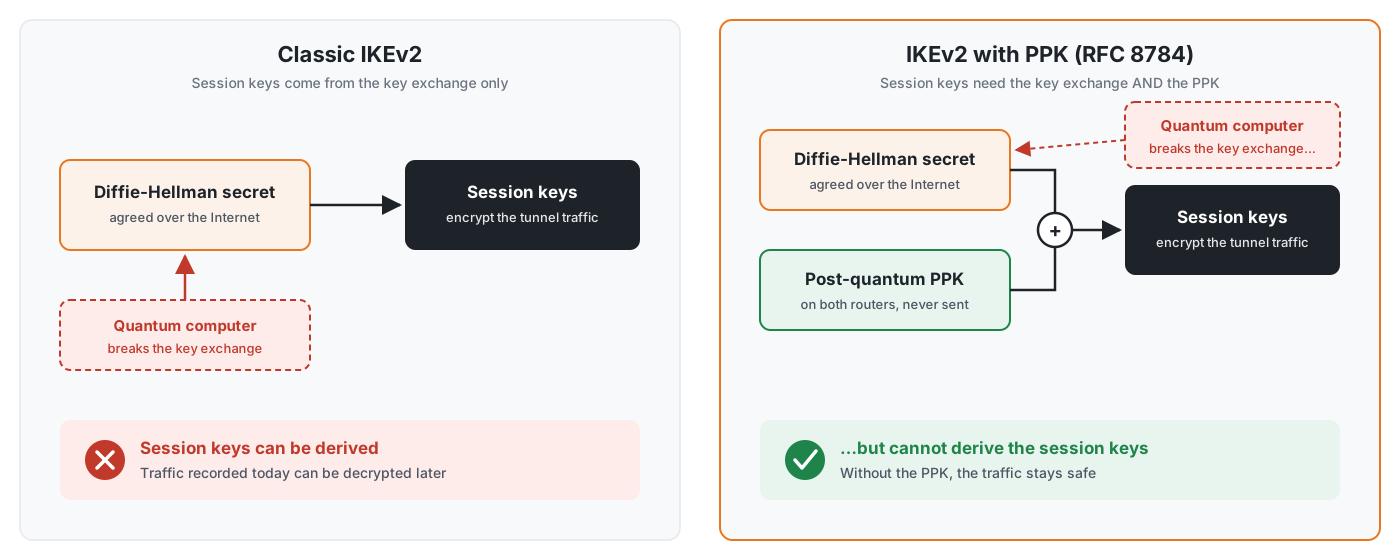
Because the session keys depend on both the DH result and the PPK, an attacker who breaks the DH exchange with a quantum computer still cannot derive the keys without the PPK. All tunnel traffic (ESP) and every later rekey are protected by keys derived from the PPK.
PPK is a hybrid approach: the classical key exchange is kept and strengthened, not replaced. It works with standard IKEv2 implementations, needs no new hardware, and runs on existing RansNet routers through a firmware upgrade.
| What is protected | Classic IPSec | IPSec with PPK |
|---|---|---|
| Tunnel data (ESP) against a future quantum computer | Vulnerable (key exchange can be broken) | Protected |
| Recorded traffic ("harvest now, decrypt later") | Vulnerable | Protected |
| Data encryption (AES-256) | Protected | Protected |
| Peer identities in the first IKE exchange | Classical protection only | Classical protection only |
Note
As defined in RFC 8784, the identities exchanged in the very first IKE_AUTH message are protected by the classical key exchange only. The tunnel traffic itself is fully protected by the PPK.
Benefits
- Protects data against future quantum attacks, including traffic recorded today.
- Standards-based and interoperable (IETF RFC 8784, IKEv2): builds quantum-safe tunnels with other vendors' IPSec gateways that support PPK — no proprietary protocol and no vendor lock-in, so existing third-party firewalls at headquarters or partner sites can stay in place.
- No new hardware: supported on existing RansNet routers through a firmware upgrade.
- Hybrid security: if either the classical key exchange or the PPK holds, the tunnel stays secure.
- Negligible performance impact: the PPK only changes the key derivation at tunnel setup and rekey; data encryption speed is unchanged.
- Fail-closed by default: a tunnel configured for PPK does not come up without it, so it can never silently fall back to a quantum-vulnerable tunnel.
Use Cases
| Scenario | Why Quantum-Safe IPSec fits |
|---|---|
| Government and defence networks | Tenders and security frameworks increasingly require quantum-resistant VPNs; data must stay confidential for decades |
| Financial institutions | Customer and transaction data has a long confidentiality lifetime and is a prime harvest-now-decrypt-later target |
| Healthcare | Patient records must remain private for the lifetime of the patient |
| Critical infrastructure (utilities, transport, telecom) | Control-network traffic between sites must not be decryptable in the future |
| Inter-agency and partner VPNs | Standards-based PPK works with third-party IPSec gateways that support RFC 8784 |
| Quantum Key Distribution (QKD) links | The PPK can be supplied from a QKD system, which delivers keys that are themselves quantum-safe |
Requirements
| Requirement | Details |
|---|---|
| Router models | All RansNet gateways and routers. |
| Firmware | A firmware release with IPSec PPK support. The required strongSwan components are bundled in the firmware and installed automatically during the upgrade, without Internet access. |
| IKE version | IKEv2 (PPK is not defined for IKEv1) |
| Authentication | Pre-shared key (authentication psk) |
| PPK | The same PPK ID and key on both peers: 0x followed by at least 64 hex digits (256 bits, recommended), or a string of at least 32 characters |
| Network | UDP 500 and 4500 reachable from the initiating peer to the responding peer |
| Remote peer | A RansNet router, or a third-party IPSec gateway that supports RFC 8784 |
Topology
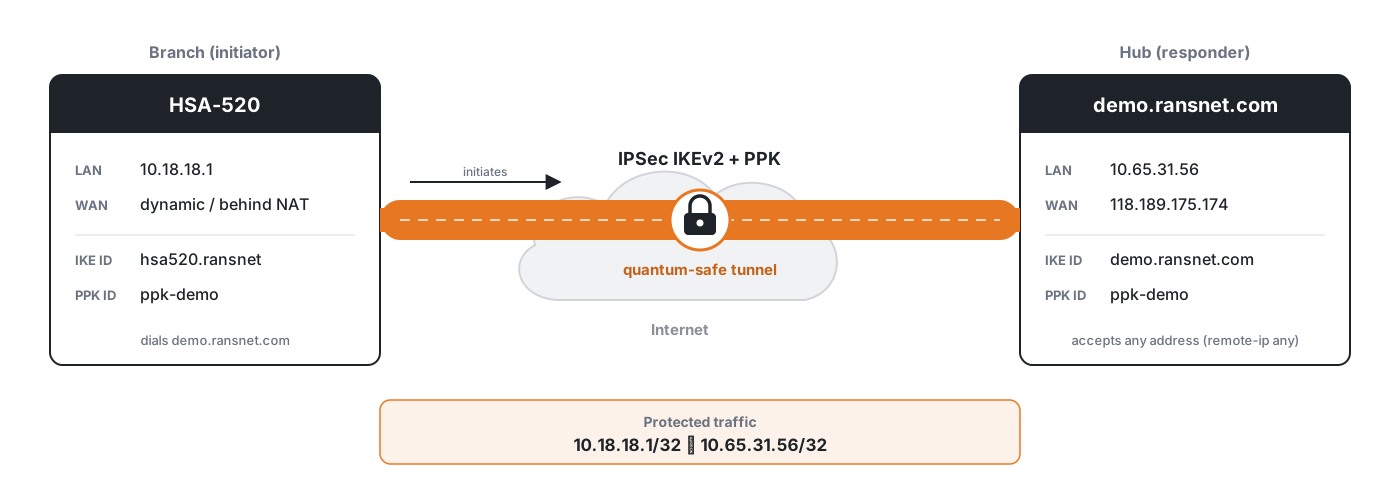
Topology Summary:
The branch router (HSA-520) has a dynamic WAN address and initiates the tunnel to the hub at demo.ransnet.com. The hub accepts the branch from any address (remote-ip any) and identifies it by its IKE identity. Both routers use the same IKE/ESP policy, pre-shared key and PPK. The tunnel protects traffic between 10.18.18.1 (branch) and 10.65.31.56 (hub). In a production deployment, use the branch and hub LAN subnets instead (e.g. 10.18.18.0/24).
| Device | Role | WAN | Protected network | IKE identity |
|---|---|---|---|---|
| HSA-520 branch | Initiator | Dynamic (behind NAT) | 10.18.18.1/32 |
hsa520.ransnet |
| demo.ransnet.com | Responder (hub) | 118.189.175.174 |
10.65.31.56/32 |
demo.ransnet.com |
Configuration
Quantum-Safe IPSec is a standard RansNet IPSec peer with one additional command, ppk. All other IPSec settings stay the same.
Step 1: Generate the PPK
Both routers need the same PPK ID, which names the key (for example ppk-demo), and the same PPK, a random secret of 256 bits or more.
- Peers managed by mfusion: mfusion automatically generates a unique, random 256-bit PPK for each pair of peers and pushes it securely to both routers. No manual key handling is needed.
- Manually configured peers: generate a random 256-bit key on a trusted computer and enter it on both routers as
0xfollowed by 64 hex digits, as in the examples below. You are responsible for protecting the key: distribute it to the other site out of band (never in the same channel as the router configuration), keep it in a secure place, and use a different key for each pair of peers.
Step 2: Configure the Branch Router (Initiator)
Configure the branch router with the PPK ID and PPK from Step 1:
!
ipsec ike-policy 10
 authentication psk
 version 2
 policy AES-256 SHA-256 14
!
ipsec esp-policy 10
 policy AES-256 SHA-256 14
!
ipsec peer demo.ransnet.com
 local-net 10.18.18.1/32
 remote-net 10.65.31.56/32
 local-id hsa520.ransnet
 remote-id demo.ransnet.com
 policy ike 10 esp 10
 psk SIl3OnI87r4bS7dt8jtpxeMY
 ppk ppk-demo 0x1082d9a155e8f8ace6f606f0ef99667c43752f628b258927199c25839a8c4e26
!
The peer name demo.ransnet.com is also the address the branch dials. local-id and remote-id identify the two routers in IKE, so the hub can recognise the branch even though the branch's WAN address is dynamic.
Use your own keys
The keys in this document are examples only. Never reuse them in a production network. Use a different PPK for each pair of peers, and distribute it out of band (never in the same channel as the configuration it protects).
Step 3: Configure the Hub Router (Responder)
!
ipsec ike-policy 10
 authentication psk
 version 2
 policy AES-256 SHA-256 14
!
ipsec esp-policy 10
 policy AES-256 SHA-256 14
!
ipsec peer hsa520-branch
 remote-ip any
 local-net 10.65.31.56/32
 remote-net 10.18.18.1/32
 local-id demo.ransnet.com
 remote-id hsa520.ransnet
 policy ike 10 esp 10
 psk SIl3OnI87r4bS7dt8jtpxeMY
 ppk ppk-demo 0x1082d9a155e8f8ace6f606f0ef99667c43752f628b258927199c25839a8c4e26
!
remote-ip any makes the hub a responder: it waits for the branch to connect from any address, and authenticates it by its identity, pre-shared key and PPK.
Save the configuration on both routers with write. The tunnel comes up automatically within about a minute.
PPK Command Reference
Configured under ipsec peer <name>:
| Command | Description |
|---|---|
ppk <ppk-id> <key> |
Enable PPK for this peer. The tunnel only comes up when the remote peer uses the same PPK (required mode, recommended). |
ppk <ppk-id> <key> optional |
Use PPK when the remote peer supports it, otherwise fall back to a classical tunnel. Use only temporarily, e.g. while migrating peers one by one. |
no ppk <ppk-id> <key> |
Remove PPK; the peer returns to a classical IPSec tunnel. |
| Parameter | Example | Description |
|---|---|---|
ppk-id |
ppk-demo |
Name of the key; must be identical on both peers. Letters, digits and . _ @ : - only. |
key |
0x1082d9a1...8c4e26 |
The PPK: 0x followed by at least 64 hex digits (256 bits), or a string of at least 32 characters. Shorter keys are rejected. |
Note
PPK requires an IKEv2 policy with pre-shared key authentication. A peer whose IKE policy uses rsa-sig authentication is not brought up with PPK, and the CLI shows a warning.
Interoperating with Other Vendors
RansNet implements PPK exactly as specified in IETF RFC 8784, so the remote peer can be any IPSec gateway or firewall that supports RFC 8784. Configure the third-party gateway following its vendor's PPK documentation, and make sure these settings match the RansNet side:
| Setting | Must match |
|---|---|
| IKE version | IKEv2 on both peers |
| Authentication | The same pre-shared key on both peers |
| PPK ID | Exactly the same identifier on both peers (for example ppk-demo) |
| PPK | Exactly the same key on both peers |
| PPK mode | PPK required on both peers for production; use optional mode only while migrating |
| IKE / ESP proposals | The same encryption, integrity and DH group (for example AES-256, SHA-256, DH group 14) |
| IKE identities and protected networks | local-id / remote-id and local-net / remote-net mirrored on the other gateway |
Note
PPK support and its configuration differ between vendors and firmware versions. Check that the third-party gateway's firmware supports RFC 8784 PPK before planning a mixed-vendor deployment.
Verification
| Items to Test | Command | Expected Outcome |
|---|---|---|
| Tunnel status | show ipsec status |
State ESTABLISHED, IKE(Auth) column shows IKEv2(PSK+PPK) |
| PPK negotiated | swanctl --list-sas (shell, root) |
The IKE proposal line ends with /PPK |
| Traffic through the tunnel | ping 10.65.31.56 source 10.18.18.1 (branch) |
0% packet loss; Tx/Rx counters increase in show ipsec status |
| PPK is enforced | Change the PPK on one side only | Tunnel goes DOWN and no traffic passes; restoring the matching key brings it back automatically |
| Running configuration | show running-config |
The ppk line appears under the ipsec peer |
On the branch router:
mbox-branch# show ipsec status
================================================================================
 IPSec Status
 Uptime  : 39 seconds, since Nov 03 14:37:09 2026
 Local   : 10.18.18.1 (hsa520.ransnet)
 Peers   : 1 established, 0 connecting
================================================================================

Peer                                State          Local Net         Remote Net             Tx       Rx  Uptime      IKE(Auth)       ESP
---------------------------------------------------------------------------------------------------------------------------------------------------
demo.ransnet.com (118.189.175.174)  ESTABLISHED    10.18.18.1/32     10.65.31.56/32       756B     756B  39 seconds  IKEv2(PSK+PPK)  AES-256/SHA256
On the hub router:
demo# show ipsec status
Peer                                State          Local Net         Remote Net             Tx       Rx  Uptime      IKE(Auth)       ESP
---------------------------------------------------------------------------------------------------------------------------------------------------
hsa520-branch (203.0.113.25)        ESTABLISHED    10.65.31.56/32    10.18.18.1/32        756B     756B  41 seconds  IKEv2(PSK+PPK)  AES-256/SHA256
IKEv2(PSK+PPK) confirms that the PPK is in use on the established tunnel. A peer configured with ppk ... optional that connected without PPK shows IKEv2(PSK) instead.
Troubleshooting
| Symptom | Likely Cause | Solution |
|---|---|---|
Tunnel stays DOWN, the initiator logs AUTHENTICATION_FAILED |
PPK, PPK ID or pre-shared key differs between the peers | Re-enter the same ppk (ID and key) and psk on both peers. The tunnel recovers automatically once they match. |
Tunnel stays DOWN, the remote peer does not support PPK |
Remote gateway has no RFC 8784 support, or PPK is not enabled on it | Enable PPK on the remote gateway. For a temporary migration only, use ppk <id> <key> optional on the RansNet side. |
Tunnel is up but shows IKEv2(PSK) instead of IKEv2(PSK+PPK) |
optional is set and the remote peer connected without PPK |
Configure PPK on the remote peer, then remove optional so the tunnel requires PPK. |
CLI rejects the ppk command |
Key too short or PPK ID contains invalid characters | Use 0x + at least 64 hex digits (a random 256-bit key) and a PPK ID made of letters, digits and . _ @ : -. |
| CLI warns that PPK needs pre-shared key authentication | The IKE policy uses rsa-sig |
Set authentication psk and version 2 in the IKE policy used by the peer. |
| Tunnel does not establish at all | UDP 500/4500 blocked, or proposal mismatch | Confirm the responder is reachable on UDP 500/4500 and that both peers use the same IKE/ESP policy. |
Best Practices
Key Management
- Use random keys: a PPK must be a random 256-bit (or longer) value, never a password or a word.
- One key per peer pair: never share a PPK between different tunnels.
- Distribute out of band: exchange the PPK through a different channel from the one that carries the router configuration.
- Rotate periodically: change the PPK on both peers during a maintenance window. Update both sides close together; the tunnel is down while the keys differ.
- Protect configuration backups: the PPK is stored in the router configuration, the same as the pre-shared key. Restrict access to configuration files and backups.
Security Settings
- Use required mode (no
optional) for production tunnels, so a tunnel can never fall back to a quantum-vulnerable key exchange. - Use AES-256 for both IKE and ESP: AES-256 keeps 128-bit strength against quantum attacks, while AES-128 drops to 64 bits.
- Use DH group 14 or higher. PPK protects the tunnel even if DH is broken, but a strong DH group remains the first line of defence against classical attacks.
Performance
PPK adds no measurable overhead: it changes only the key derivation during tunnel setup and rekey. Data throughput is the same as a classical IPSec tunnel with the same ESP policy.
Related Features
- VPN Protocols — IPSec parameters and supported algorithms
- IPSec to Cisco, IPSec to Fortinet, IPSec to Meraki — interoperability with third-party gateways
- Tracking — automatic tunnel health checks and recovery
- VPN Topology — hub-and-spoke and other overlay designs