Layer-2 SD-WAN (Spoke to Spoke)
Overview
This guide covers the Spoke-to-Spoke topology for L2VPN over SD-WAN. For background on L2VPN concepts, use cases, and benefits, see Layer-2 SD-WAN (Hub and Spoke).
In spoke-to-spoke topology, all branch routers participate in the same Layer-2 broadcast domain and can communicate with each other directly — not just with the hub. This is achieved by adding MP-BGP EVPN as a control plane above the encrypted underlay: each branch VTEP advertises its MAC/IP bindings to the gateway (acting as route-reflector), which redistributes them to all other branches. Branches then build direct VXLAN forwarding entries to remote VTEPs without relying on flood-and-learn.
Key Technologies
| Layer | Technology | Role |
|---|---|---|
| Data plane | Multipoint VXLAN | Encapsulates Ethernet frames (including broadcast and multicast) for transport across the overlay |
| Control plane | MP-BGP EVPN | Distributes MAC/IP bindings (type-2) and BUM replication lists (type-3) between VTEPs; eliminates flood-and-learn |
| Overlay routing | GRE | Provides a routable multipoint mesh (10.1.172.x/22) that VXLAN runs over; maps overlay addresses to underlay endpoints |
| Underlay encryption | WireGuard (default) or IPSec | Encrypts the outer IP tunnel between sites |
Note
The configuration examples in this guide use WireGuard as the encryption protocol. WireGuard is the recommended default for spoke-to-spoke deployments — it has lower overhead than IPSec and simplifies key distribution via mfusion. For IPSec-based deployments, see Alternative: IPSec Encryption.
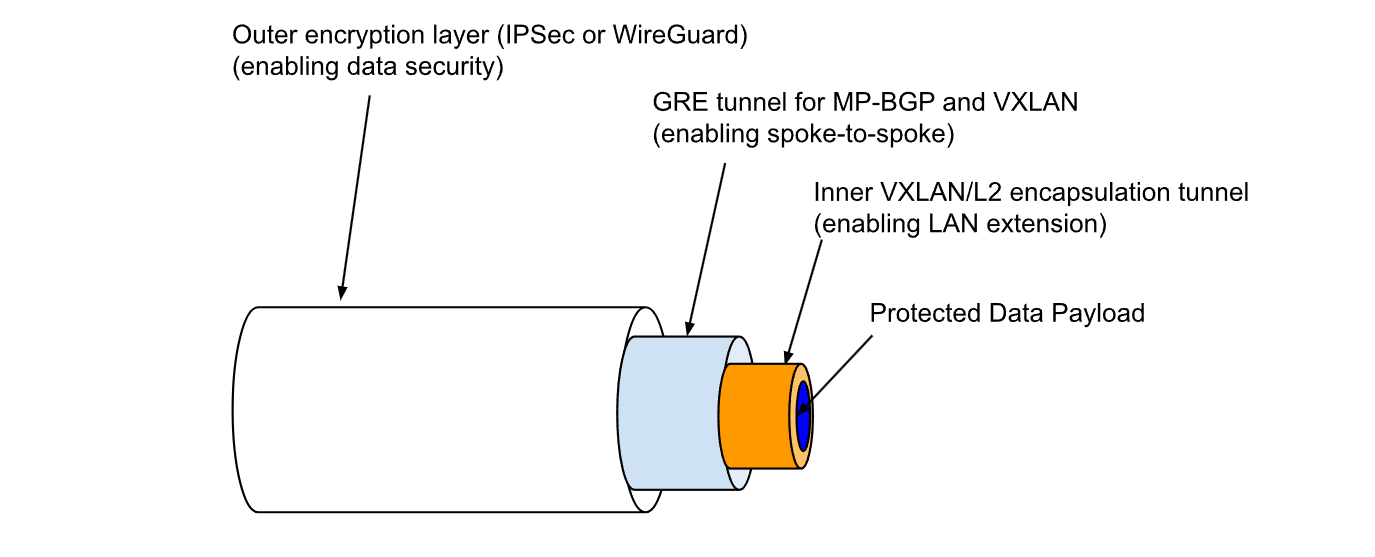
Below is an illustration of how the various layers fit together.
Configuration on Gateway
Most configuration is performed on the gateway via mfusion. The resulting configuration is automatically compiled and pushed to assigned branch routers.
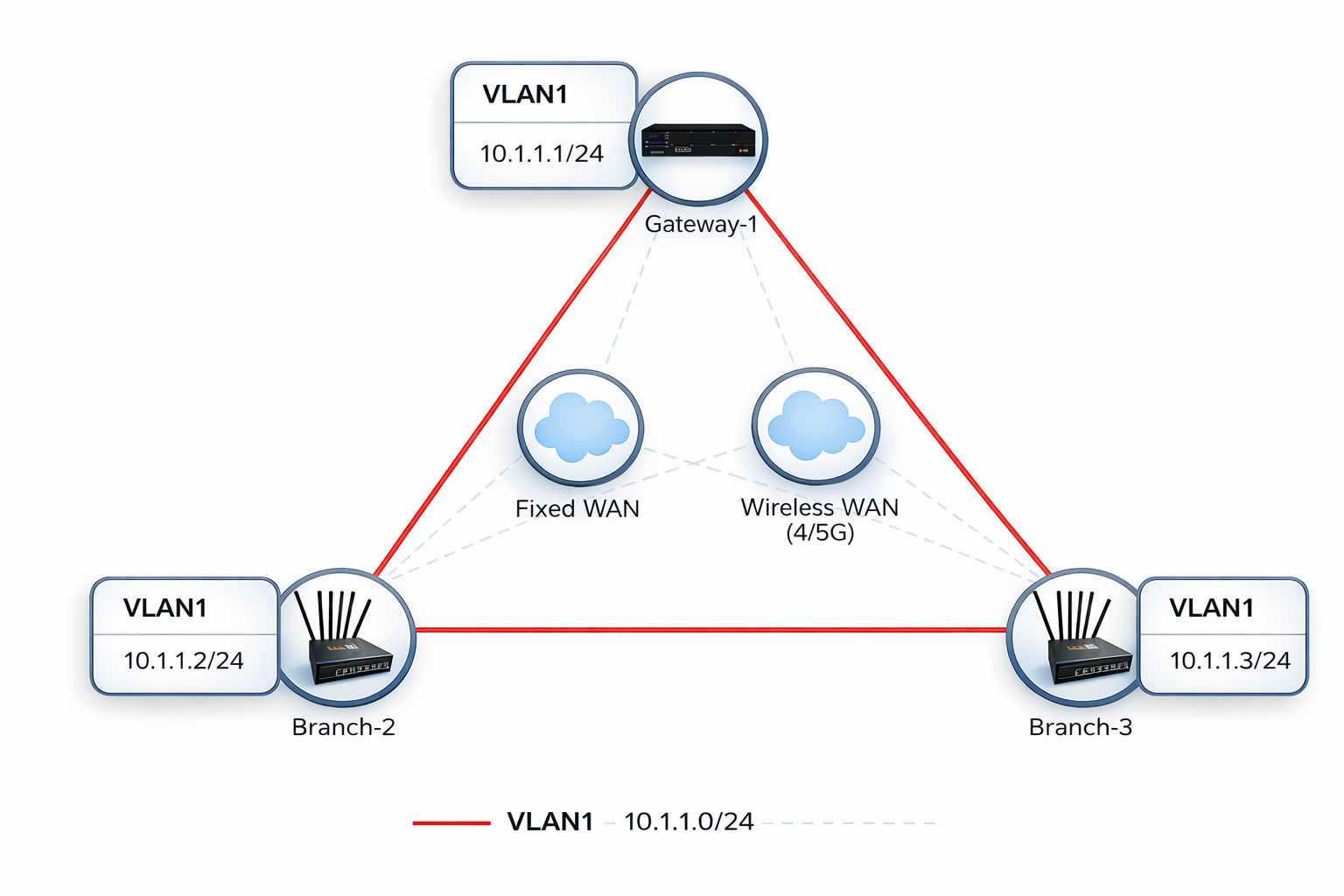
This guide walks through the Spoke-to-Spoke topology. In this topology:
- The system default routing table (underlay) is used to establish L2VPN tunnels over available WAN links. Configure WAN failover between links if redundancy is required.
- The VXLAN tunnel interface is bridged to the LAN interface, creating a flat Layer-2 network across all locations — a single broadcast domain spanning every site.
- MP-BGP EVPN runs between the gateway (as route-reflector) and all branches, distributing MAC reachability so spokes can forward frames directly to each other.
Step 1 — Configure LAN Interfaces
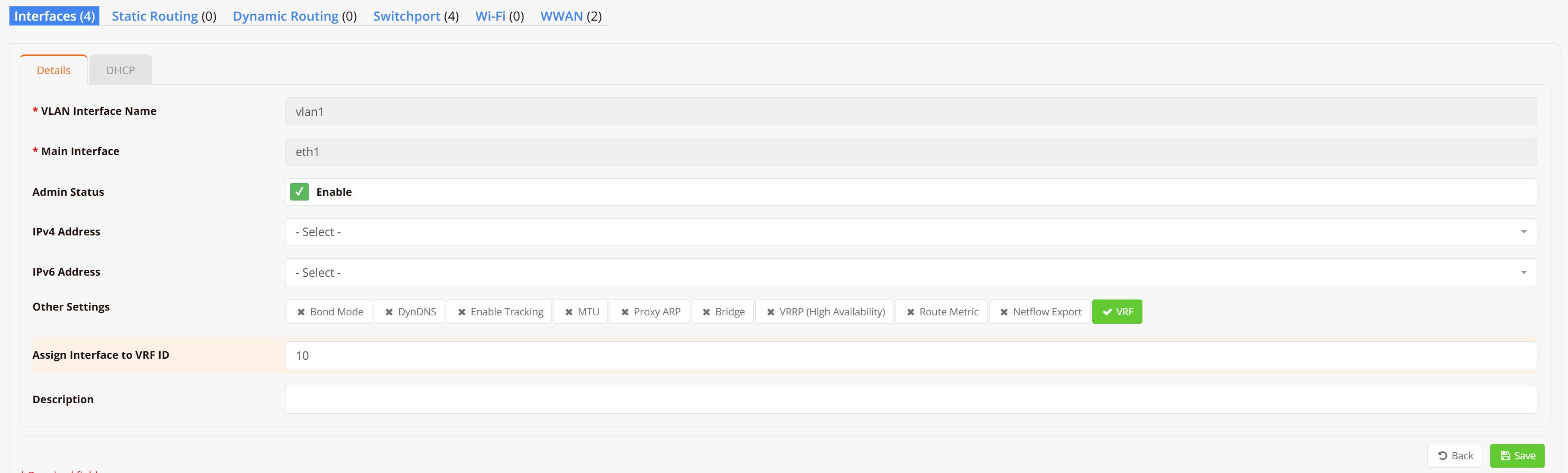
On both the gateway and each branch router, configure VLAN 1 as a Layer-2 interface (substitute VLAN 1 with your actual LAN or VLAN interface).
Note
No IP address is required on the LAN/VLAN interface — it will be bridged into the VXLAN tunnel in the next step.
Navigate to Device → Interfaces → VLAN and create VLAN 1 without assigning an IP address.
Step 2 — Configure SD-WAN VPN Instance
On the gateway, navigate to SD-WAN → VPN → Add VPN Instance. Select the VPN topology and encryption protocol.
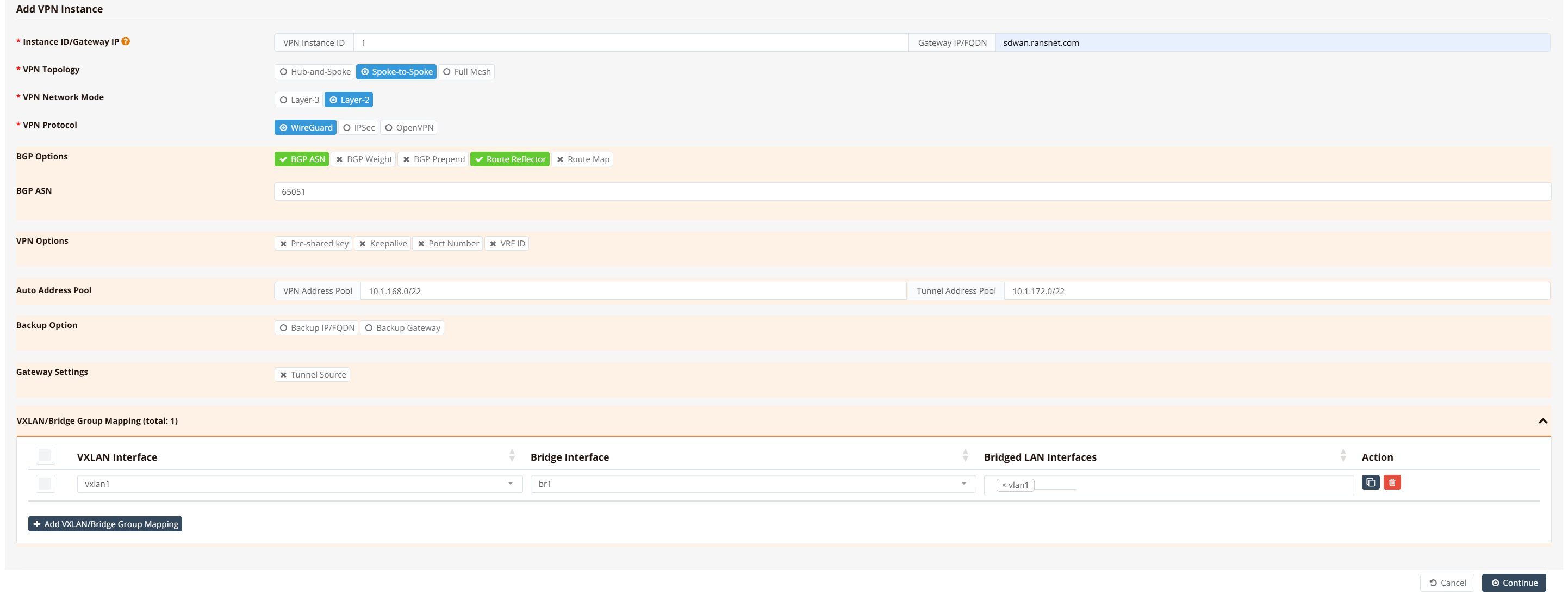
Select Spoke-to-Spoke topology, Layer-2 network mode, and WireGuard as the encryption protocol.
Note
Spoke-to-Spoke permits Layer-2 traffic directly between branch VTEPs. Because all branches share a single broadcast domain, ensure broadcast storm control is configured for large deployments. For deployments where branches do not need to communicate directly, Hub-and-Spoke is the simpler and safer choice.
Then click Save and Apply Config.
After the configuration is pushed, a br1 bridge and vxlan1 tunnel interface are automatically created on the gateway.
Tip
For testing and verification, assign an IP address to the br1 interface to ping across the bridge and validate LAN-to-LAN reachability. In production this is optional — LAN devices only need to be in the same subnet and will communicate as if attached to a single virtual Layer-2 switch.
Step 3 — Assign Branch Routers to VPN Instance
Scroll down in the VPN instance configuration, go to VPN Branches → Add VPN Branch, and select the branch routers to include. Repeat for all branch routers.

mfusion compiles and pushes the VLAN, bridge, VXLAN, WireGuard, and BGP EVPN configuration to each branch automatically. Branch routers receive their VTEP address, tunnel endpoint configuration, and the gateway's overlay IP as the iBGP route-reflector peer. No further manual configuration is required on branch devices.
CLI Reference (Gateway — WireGuard)
Note
SD-WAN configuration is generated automatically by mfusion. The CLI snippets below are provided for reference and troubleshooting only.
!
interface eth0
 description "Default connection to WAN"
 enable
 ip address dhcp
!
interface wg1
 enable
 ip address 10.1.168.1/32
 wg-peer b0-bb-8b-00-e7-a8
  remote-net 10.1.168.2/32
 wg-peer b0-bb-8b-00-ea-20
  remote-net 10.1.168.3/32
!
interface gre1
 tunnel local 10.1.168.1
 enable
 ip address 10.1.172.1/22
 ip neigh 10.1.172.2 10.1.168.2
 ip neigh 10.1.172.3 10.1.168.3
!
interface vxlan1
 vx-local 10.1.172.1
 enable
 bridge-group 1
!
interface vlan 1 1
 enable
 bridge-group 1
!
interface bridge br1
 description "Auto Interface from VPN (1)"
 enable
 ip address 10.1.1.1/24
!
router bgp 65051
 bgp timer 5 15
 neighbor 0168_RansNet_SSL2WG_1 as-peer
 neighbor 0168_RansNet_SSL2WG_1 as-remote 65051
 neighbor 0168_RansNet_SSL2WG_1 next-hop-self
 neighbor 0168_RansNet_SSL2WG_1 route-reflector-client
 neighbor 0168_RansNet_SSL2WG_1 soft-reconfiguration
 neighbor 0168_RansNet_SSL2WG_1 weight 0
 neighbor range 10.1.172.0/22 as-peer 0168_RansNet_SSL2WG_1
 address-family-l2vpn
  advertise-all-vni
  neighbor 0168_RansNet_SSL2WG_1 activate
  neighbor 0168_RansNet_SSL2WG_1 route-reflector-client
  neighbor 0168_RansNet_SSL2WG_1 soft-reconfiguration
!
Key points:
- WireGuard (
wg1) encrypts the underlay using loopback IPs (10.1.168.x/32). Each branch is a WireGuard peer identified by its MAC address. - GRE (
gre1) builds a multipoint overlay on top of WireGuard using10.1.172.x/22addresses. The gateway usesip neighto map each branch's overlay IP to its WireGuard endpoint. - VXLAN runs over the GRE overlay (
vx-local 10.1.172.1), encapsulating Layer-2 frames for transport between VTEPs. - BGP EVPN runs within the
10.1.172.x/22overlay. The gateway acts as the route-reflector (route-reflector-client), redistributing MAC/IP routes from each branch to all others. Dynamic neighbors are accepted from the10.1.172.0/22range. bridge-group 1on bothvxlan1andvlan 1 1places them intobr1, creating the Layer-2 domain.
Configuration on Branch Routers
GUI Configuration
Branch router GUI configuration follows Step 1 — configure VLAN 1 as a Layer-2 interface without assigning an IP address. mfusion automatically generates and pushes all remaining VXLAN, WireGuard, and BGP EVPN configuration to each assigned branch.
CLI Reference (Branch — WireGuard)
Note
Branch router configuration is auto-generated by mfusion. The CLI snippets below are provided for reference and troubleshooting only.
!
interface eth0
 description "Connection to WAN"
 enable
 ip address dhcp
!
interface wg1
 enable
 ip address 10.1.168.2/32
 wg-peer 00-60-e0-a3-59-f7
  remote-ip sdwan.ransnet.com
  remote-net 10.1.168.1/32
!
interface gre1
 tunnel local 10.1.168.2 remote 10.1.168.1
 enable
 ip address 10.1.172.2/22
!
interface vxlan1
 vx-local 10.1.172.2
 enable
 bridge-group 1
!
interface vlan 1 1
 description "Default VLAN for all LAN ports"
 enable
 bridge-group 1
!
interface bridge br1
 description "Auto Interface from VPN (1)"
 bridge
 enable
!
router bgp 65051
 bgp timer 5 15
 neighbor 0168_RansNet_SSL2WG_1 as-peer
 neighbor 0168_RansNet_SSL2WG_1 as-remote 65051
 neighbor 0168_RansNet_SSL2WG_1 next-hop-self
 neighbor 0168_RansNet_SSL2WG_1 soft-reconfiguration
 neighbor 0168_RansNet_SSL2WG_1 weight 0
 neighbor 10.1.172.1 as-peer 0168_RansNet_SSL2WG_1
 address-family-l2vpn
  advertise-all-vni
  neighbor 0168_RansNet_SSL2WG_1 activate
  neighbor 0168_RansNet_SSL2WG_1 soft-reconfiguration
!
Key points:
- The branch WireGuard peer points to the gateway's public address (
remote-ip sdwan.ransnet.com) with its loopback (10.1.168.1/32) as the allowed network. - GRE is point-to-point from each branch to the gateway (
remote 10.1.168.1). The gateway GRE then routes overlay frames onward to other branches via itsip neightable. - VXLAN is
vx-local 10.1.172.2— the branch's GRE overlay IP. BGP EVPN distributes these VTEP addresses so all branches learn each other's reachability. - The branch BGP peer is the gateway's overlay IP (
10.1.172.1), which acts as the iBGP route-reflector. - No IP address is configured on
br1on the branch — the branch acts as a transparent L2 switch. The gatewaybr1holds the subnet's default gateway address.
Verification
Gateway
Check bridge membership:
Verify that both vxlan1 and vlan1 appear as members of br1. This confirms that the VTEP and LAN segment are correctly bridged.
Check BGP EVPN session:
Gateway-1# show ip bgp summary

IPv4 Unicast Summary (VRF default):
BGP router identifier 10.18.18.194, local AS number 65051 vrf-id 0
BGP table version 0
RIB entries 0, using 0 bytes of memory
Peers 2, using 1448 KiB of memory
Peer groups 1, using 64 bytes of memory

Neighbor        V         AS   MsgRcvd   MsgSent   TblVer  InQ OutQ  Up/Down State/PfxRcd   PfxSnt Desc
*10.1.172.2     4      65051      2845      2845        0    0    0 03:55:55            0        0 N/A
*10.1.172.3     4      65051       536       536        0    0    0 00:43:52            0        0 N/A

Total number of neighbors 2
* - dynamic neighbor
2 dynamic neighbor(s), limit 2000
Gateway-1#
Both branch overlay IPs (10.1.172.2, 10.1.172.3) should show an established iBGP session. The gateway acts as the BGP route-reflector, redistributing EVPN routes between all VTEPs. Dynamic neighbors (*) indicate branches registered from the 10.1.172.0/22 range.
Check EVPN MAC and VTEP routes:
Gateway-1# show bgp l2vpn
BGP table version is 58, local router ID is 10.18.18.194
Status codes: s suppressed, d damped, h history, * valid, > best, i - internal
Origin codes: i - IGP, e - EGP, ? - incomplete
EVPN type-2 prefix: [2]:[EthTag]:[MAClen]:[MAC]:[IPlen]:[IP]
EVPN type-3 prefix: [3]:[EthTag]:[IPlen]:[OrigIP]

   Network          Next Hop            Metric LocPrf Weight Path
Route Distinguisher: 10.18.18.169:2
*>i[2]:[0]:[48]:[00:40:9d:23:e9:cb]
                    10.1.172.2                    100      0 i
                    RT:65051:1 ET:8
*>i[2]:[0]:[48]:[00:90:0b:44:a6:73]
                    10.1.172.2                    100      0 i
                    RT:65051:1 ET:8
*>i[2]:[0]:[48]:[30:65:ec:6a:e7:55]
                    10.1.172.2                    100      0 i
                    RT:65051:1 ET:8
*>i[2]:[0]:[48]:[88:dc:96:87:3a:e2]
                    10.1.172.2                    100      0 i
                    RT:65051:1 ET:8
*>i[2]:[0]:[48]:[88:dc:96:87:3a:f6]
                    10.1.172.2                    100      0 i
                    RT:65051:1 ET:8
*>i[3]:[0]:[32]:[10.1.172.2]
                    10.1.172.2                    100      0 i
                    RT:65051:1 ET:8
Route Distinguisher: 10.18.18.194:2
*> [3]:[0]:[32]:[10.1.172.1]
                    10.1.172.1                         32768 i
                    ET:8 RT:65051:1
Route Distinguisher: 10.18.18.251:2
*>i[3]:[0]:[32]:[10.1.172.3]
                    10.1.172.3                    100      0 i
                    RT:65051:1 ET:8

Displayed 8 out of 8 total prefixes
Gateway-1#
EVPN type-2 routes ([2]) carry MAC/IP bindings learned from each branch VTEP, confirming that remote MAC addresses are distributed via the control plane. EVPN type-3 routes ([3]) advertise each VTEP as a BUM (Broadcast, Unknown-unicast, Multicast) replication endpoint — one per site in a spoke-to-spoke topology.
Test end-to-end Layer-2 reachability:
Gateway-1# ping 10.1.1.2 source 10.1.1.1
PING 10.1.1.2 (10.1.1.2) from 10.1.1.1 : 56(84) bytes of data.
64 bytes from 10.1.1.2: icmp_seq=1 ttl=64 time=1.36 ms
64 bytes from 10.1.1.2: icmp_seq=2 ttl=64 time=1.26 ms
64 bytes from 10.1.1.2: icmp_seq=3 ttl=64 time=1.21 ms
64 bytes from 10.1.1.2: icmp_seq=4 ttl=64 time=1.17 ms
64 bytes from 10.1.1.2: icmp_seq=5 ttl=64 time=1.26 ms

--- 10.1.1.2 ping statistics ---
5 packets transmitted, 5 received, 0% packet loss, time 4006ms
rtt min/avg/max/mdev = 1.168/1.251/1.362/0.065 ms
Gateway-1# ping 10.1.1.3 source 10.1.1.1
PING 10.1.1.3 (10.1.1.3) from 10.1.1.1 : 56(84) bytes of data.
64 bytes from 10.1.1.3: icmp_seq=1 ttl=64 time=1.35 ms
64 bytes from 10.1.1.3: icmp_seq=2 ttl=64 time=1.13 ms
64 bytes from 10.1.1.3: icmp_seq=3 ttl=64 time=1.19 ms
64 bytes from 10.1.1.3: icmp_seq=4 ttl=64 time=1.29 ms
64 bytes from 10.1.1.3: icmp_seq=5 ttl=64 time=1.15 ms

--- 10.1.1.3 ping statistics ---
5 packets transmitted, 5 received, 0% packet loss, time 4006ms
rtt min/avg/max/mdev = 1.125/1.222/1.351/0.086 ms
Confirm that MAC addresses from all remote branches appear in the gateway's ARP table:
Gateway-1# show arp
Address                  HWtype  HWaddress           Flags Mask            Iface
10.1.1.2                 ether   1e:cc:8b:49:fb:e7   C                     br1
10.1.1.3                 ether   4a:e4:80:5f:64:4f   C                     br1
Gateway-1#
Branch Routers
Check BGP EVPN session:
Branch-2# show ip bgp summary

IPv4 Unicast Summary (VRF default):
BGP router identifier 10.18.18.169, local AS number 65051 vrf-id 0
BGP table version 0
RIB entries 0, using 0 bytes of memory
Peers 1, using 712 KiB of memory
Peer groups 1, using 32 bytes of memory

Neighbor        V         AS   MsgRcvd   MsgSent   TblVer  InQ OutQ  Up/Down State/PfxRcd   PfxSnt Desc
10.1.172.1      4      65051      2972      2972        0    0    0 04:06:26            0        0 N/A

Total number of neighbors 1
Branch-2#
Branch routers peer only with the gateway (route-reflector). The single iBGP session to 10.1.172.1 carries all EVPN routes for the VPN instance.
Check EVPN routes:
Branch-2# show bgp l2vpn
BGP table version is 58, local router ID is 10.18.18.169
...
Route Distinguisher: 10.18.18.169:2
*> [2]:[0]:[48]:[00:40:9d:23:e9:cb]
                    10.1.172.2                         32768 i
                    ET:8 RT:65051:1
...
*> [3]:[0]:[32]:[10.1.172.2]
                    10.1.172.2                         32768 i
                    ET:8 RT:65051:1
Route Distinguisher: 10.18.18.194:2
*>i[3]:[0]:[32]:[10.1.172.1]
                    10.1.172.1                    100      0 i
                    RT:65051:1 ET:8
Route Distinguisher: 10.18.18.251:2
*>i[3]:[0]:[32]:[10.1.172.3]
                    10.1.172.3               0    100      0 i
                    RT:65051:1 ET:8

Displayed 8 out of 8 total prefixes
Branch-2#
Each branch should see type-3 IMET routes for all other VTEPs (10.1.172.1, 10.1.172.3). Type-2 MAC routes from remote branches confirm that MAC distribution is working and spoke-to-spoke forwarding is active.
Test spoke-to-spoke connectivity:
Branch-2# ping 10.1.1.1 source 10.1.1.2
PING 10.1.1.1 (10.1.1.1) from 10.1.1.2: 56 data bytes
64 bytes from 10.1.1.1: seq=0 ttl=64 time=1.486 ms
64 bytes from 10.1.1.1: seq=1 ttl=64 time=1.466 ms
64 bytes from 10.1.1.1: seq=2 ttl=64 time=1.300 ms
64 bytes from 10.1.1.1: seq=3 ttl=64 time=1.451 ms
64 bytes from 10.1.1.1: seq=4 ttl=64 time=1.314 ms

--- 10.1.1.1 ping statistics ---
5 packets transmitted, 5 packets received, 0% packet loss
round-trip min/avg/max = 1.300/1.403/1.486 ms
Branch-2# ping 10.1.1.3 source 10.1.1.2
PING 10.1.1.3 (10.1.1.3) from 10.1.1.2: 56 data bytes
64 bytes from 10.1.1.3: seq=0 ttl=64 time=2.813 ms
64 bytes from 10.1.1.3: seq=1 ttl=64 time=2.249 ms
64 bytes from 10.1.1.3: seq=2 ttl=64 time=2.587 ms
64 bytes from 10.1.1.3: seq=3 ttl=64 time=2.234 ms
64 bytes from 10.1.1.3: seq=4 ttl=64 time=2.479 ms

--- 10.1.1.3 ping statistics ---
5 packets transmitted, 5 packets received, 0% packet loss
round-trip min/avg/max = 2.234/2.472/2.813 ms
Branch-2# show arp
IP address       HW type     Flags       HW address            Mask     Device
10.1.1.1         0x1         0x2         7a:09:1e:a3:d1:a0     *        br-br1
10.1.1.3         0x1         0x2         4a:e4:80:5f:64:4f     *        br-br1
Branch-2#
Ping 10.1.1.3 (another branch) from Branch-2 to confirm spoke-to-spoke Layer-2 reachability. Both gateway (10.1.1.1) and remote branches (10.1.1.3) should appear in the ARP table via br-br1.
Alternative: IPSec Encryption
Some deployments require IPSec as the encryption protocol for regulatory or compliance reasons. Select IPSec as the VPN protocol in Step 2; mfusion will automatically generate IPSec IKE/ESP policies and peer configuration in place of WireGuard.
The architecture remains the same — WireGuard is replaced by IPSec, while GRE, VXLAN, and BGP EVPN layers are unchanged.
CLI Reference (Gateway — IPSec)
!
interface eth0
 description "Default connection to WAN"
 enable
 ip address dhcp
!
interface lo
 enable
 ip address 10.1.168.1/32
!
interface gre1
 tunnel local 10.1.168.1
 enable
 ip address 10.1.172.1/22
 ip map 10.1.172.2 10.1.168.2
 ip map 10.1.172.3 10.1.168.3
!
interface vxlan1
 description "Auto Interface from VPN (1)"
 vx-local 10.1.172.1
 enable
 bridge-group 1
!
interface vlan 1 1
 enable
 bridge-group 1
!
interface bridge br1
 description "Auto Interface from IPSec VPN (1)"
 enable
!
ipsec ike-policy 1
 authentication psk
 policy AES SHA 5
!
ipsec esp-policy 1
 policy AES SHA 5
!
ipsec peer b0-bb-8b-00-e7-a8
 local-net 10.1.168.1/32
 remote-id b0-bb-8b-00-e7-a8
 remote-ip any
 remote-net 10.1.168.2/32
 policy ike 1 esp 1
 psk xxx
!
ipsec peer b0-bb-8b-00-ea-20
 local-net 10.1.168.1/32
 remote-id b0-bb-8b-00-ea-20
 remote-ip any
 remote-net 10.1.168.3/32
 policy ike 1 esp 1
 psk xxx
!
router bgp 65051
 bgp timer 5 15
 neighbor 0168_RansNet_SSL2IPSEC_1 as-peer
 neighbor 0168_RansNet_SSL2IPSEC_1 as-remote 65051
 neighbor 0168_RansNet_SSL2IPSEC_1 next-hop-self
 neighbor 0168_RansNet_SSL2IPSEC_1 route-reflector-client
 neighbor 0168_RansNet_SSL2IPSEC_1 soft-reconfiguration
 neighbor 0168_RansNet_SSL2IPSEC_1 weight 0
 neighbor range 10.1.172.0/22 as-peer 0168_RansNet_SSL2IPSEC_1
 address-family-l2vpn
  advertise-all-vni
  neighbor 0168_RansNet_SSL2IPSEC_1 activate
  neighbor 0168_RansNet_SSL2IPSEC_1 route-reflector-client
  neighbor 0168_RansNet_SSL2IPSEC_1 soft-reconfiguration
!
CLI Reference (Branch — IPSec)
!
interface lo
 enable
 ip address 10.1.168.2/32
!
interface gre1
 tunnel local 10.1.168.2 remote 10.1.168.1
 enable
 ip address 10.1.172.2/22
!
interface vxlan1
 description "Auto Interface from VPN (1)"
 vx-local 10.1.172.2
 enable
 bridge-group 1
!
interface vlan 1 1
 description "Default VLAN for all LAN ports"
 enable
 bridge-group 1
!
interface bridge br1
 description "Auto Interface from IPSec VPN (1)"
 bridge
 enable
!
ipsec ike-policy 1
 authentication psk
 policy AES SHA 5
!
ipsec esp-policy 1
 policy AES SHA 5
!
ipsec peer 10.18.18.194
 local-id b0-bb-8b-00-e7-a8
 local-net 10.1.168.2/32
 remote-net 10.1.168.1/32
 policy ike 1 esp 1
 psk xxx
!
router bgp 65051
 bgp timer 5 15
 neighbor 0168_RansNet_SSL2IPSEC_1 as-peer
 neighbor 0168_RansNet_SSL2IPSEC_1 as-remote 65051
 neighbor 0168_RansNet_SSL2IPSEC_1 next-hop-self
 neighbor 0168_RansNet_SSL2IPSEC_1 soft-reconfiguration
 neighbor 0168_RansNet_SSL2IPSEC_1 weight 0
 neighbor 10.1.172.1 as-peer 0168_RansNet_SSL2IPSEC_1
 address-family-l2vpn
  advertise-all-vni
  neighbor 0168_RansNet_SSL2IPSEC_1 activate
  neighbor 0168_RansNet_SSL2IPSEC_1 soft-reconfiguration
!