Cloud SD-WAN (SD-WAN as a Service)
RansNet SD-WAN can be deployed in two models: on-premise and cloud-based. In an on-premise deployment, the customer installs and manages a RansNet CMG gateway at their own HQ or data centre — this model suits organisations with compliance requirements, private application hosting, or an existing fibre-connected data centre. In a Cloud SD-WAN deployment, RansNet hosts and manages the gateway in the cloud: branches connect outbound to a RansNet-operated cloud gateway with no static IP, no head-end hardware, and no gateway maintenance required on the customer's side.
This page covers the Cloud SD-WAN model.
On-Premise vs Cloud SD-WAN
| On-Premise SD-WAN | Cloud SD-WAN (as a Service) | |
|---|---|---|
| SD-WAN Gateway | CMG appliance at HQ/DC, customer-owned | Hosted and managed by RansNet |
| Static IP at head-end | Required — fixed broadband or fibre | Provided by RansNet — none required at customer sites |
| Branch WAN type | Any — broadband, 4G/5G, fixed | Any — broadband, 4G/5G, fixed, dynamic |
| Initial deployment | Gateway hardware procurement + installation + configuration | Branch routers only — cloud gateway is pre-provisioned |
| Capital expense | CMG appliance + installation | Branch routers only + Cloud SD-WAN subscription |
| Gateway maintenance | Inhouse or managed service | Managed by RansNet |
| Traffic isolation | Customer-managed VRF or dedicated infrastructure | Per-customer VRF on RansNet cloud |
| Remote access | Customer-configured | Included — VPN client, port forwarding, and site-to-site peering options |
| Best suited for | Compliance-driven deployments, private application hosting, existing DC | Distributed sites with no DC, fast rollout, all-cellular branches |
How It Works
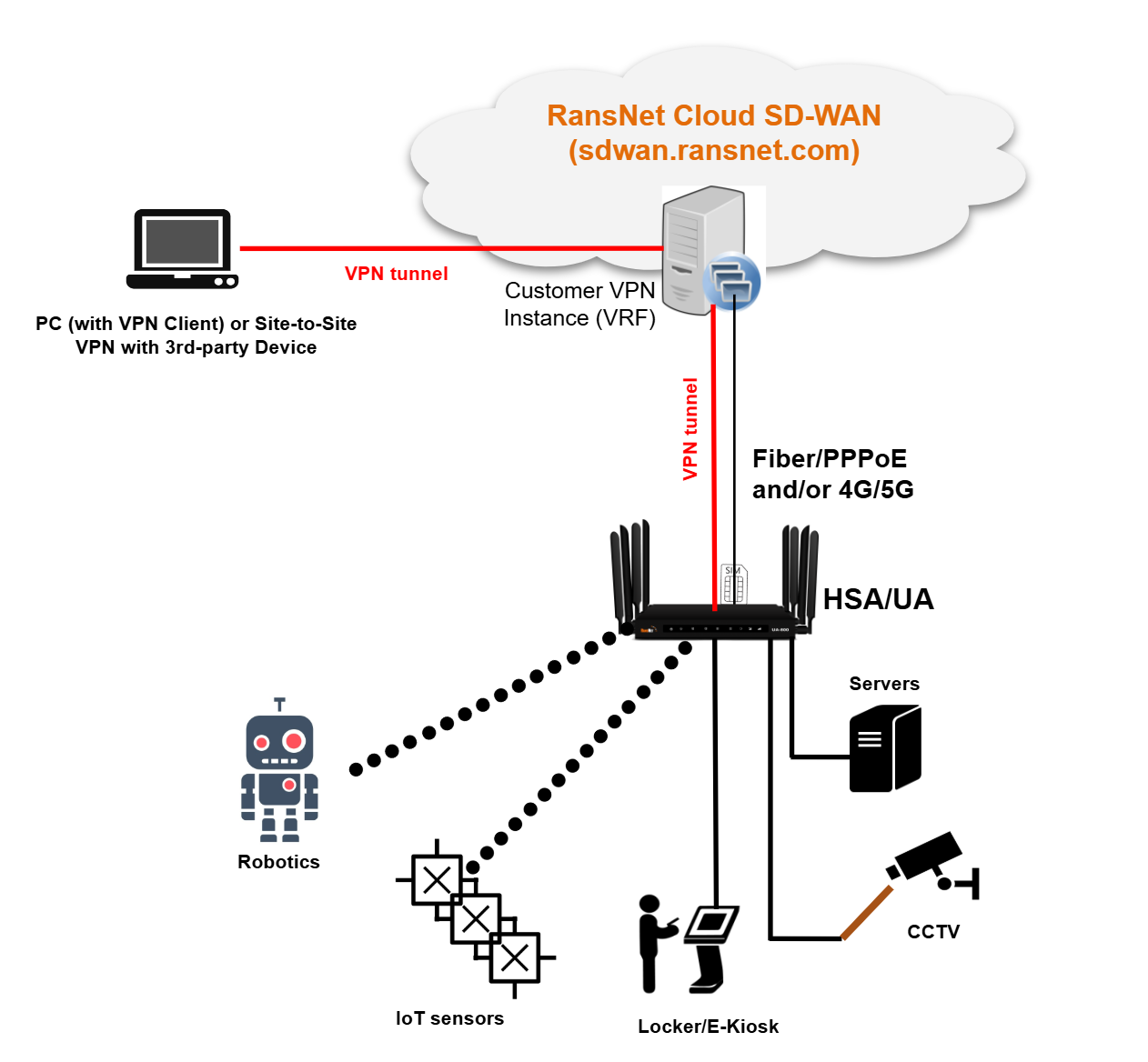
Each branch deploys a RansNet router (HSA-520, UA-520, UA-800, or XE-300 series) and connects to the internet — over fibre, 4G, or 5G; static or dynamic IP. Every branch router establishes an encrypted VPN tunnel outbound to the RansNet cloud gateway. No inbound port-forwarding or static IP is required at the branch.
On the RansNet cloud side, each customer is allocated a dedicated VRF (Virtual Routing and Forwarding) instance. All branch tunnels for that customer terminate into this private VRF, isolating their traffic and routing tables completely from other customers sharing the same cloud infrastructure.
From the customer's perspective, the cloud gateway behaves identically to an on-premise CMG — branches can reach each other, applications can be hosted at any site, and remote users can connect directly to internal devices.
Tip
Service providers and MSPs can also use RansNet Cloud SD-WAN as the platform for their own managed connectivity offerings — delivering private overlay networking to end customers under their own branding.
Solution Components
| Component | Description |
|---|---|
| Branch routers | One RansNet router per location — HSA-520, UA-520, UA-800, or XE-300 series |
| Branch internet | Any ISP connection — fibre broadband, 4G LTE, or 5G NR; static or dynamic IP |
| Cloud SD-WAN subscription | Per-router subscription to the RansNet Cloud SD-WAN service — includes the hosted gateway, VRF, remote access, and support |
No on-premise gateway hardware is required.
Key Benefits
- No head-end infrastructure — eliminates the need for a dedicated SD-WAN gateway appliance at HQ or a data centre, and the fibre connection to support it.
- Any WAN, any IP — branches connect over whatever internet is available — broadband, 4G, or 5G, with static or dynamic IP addresses. Cellular-only branches are fully supported.
- Fast deployment — with the cloud gateway pre-provisioned by RansNet, deployment is reduced to installing branch routers and subscribing to the service.
- Secure inter-site connectivity — all branch-to-branch and branch-to-internet traffic routes through encrypted WireGuard or IPsec tunnels. Each customer's traffic is isolated in a private VRF.
- Built-in remote access — multiple remote access options are available without additional infrastructure (see Remote Access Options below).
- Managed service — RansNet monitors and maintains the cloud gateway. Branch router health is visible through the mfusion Orchestrator.
- Scalable — add new branches by installing a router and enrolling it in the cloud VPN instance. No gateway reconfiguration required.
Remote Access Options
Once branches are connected to the cloud SD-WAN, remote users and external systems can reach devices on the internal network through three access methods:
1. Software VPN Client
Users install a VPN client on their PC or mobile device and connect to the same private VPN instance as the branch routers. Once connected, the user can reach any branch device by its LAN IP directly — as if they were on-site. This is the most flexible option and is ideal for IT administrators, remote workers, or support staff who need full network-level access.
2. Port Forwarding via RansNet Cloud IP
RansNet maps a specific TCP/UDP port on the cloud gateway's static public IP to an internal device at a branch. Users access the device via a public URL:
No VPN client is required — any browser or TCP application can connect. This is suited for camera NVRs, device management interfaces, industrial PLCs, and any web-based service running on branch equipment that needs to be reachable from the internet without a full VPN connection.
3. Site-to-Site VPN Peering
The RansNet cloud gateway establishes a site-to-site IPsec or WireGuard tunnel with a third-party VPN gateway — a corporate firewall, cloud provider VPN (AWS, Azure, GCP), or partner network. Traffic between the customer's SD-WAN network and the external network routes through the RansNet cloud static IP, providing secure inter-domain connectivity without requiring any static IP on the branch side.
This is useful for organisations that need to interconnect their branch network with a cloud-hosted application environment or a partner's private network.
Deployment
Branch Router Setup
Follow the standard device setup guides to prepare each branch router before enrolling it in the cloud SD-WAN:
- Bootstrap and provision the device — see Device Bootstrapping and Provisioning.
- Onboard to mfusion — see Device Onboarding.
- Configure WAN interfaces — set up the branch WAN (fibre Ethernet, WWAN, or both). See Ethernet Interfaces and WWAN.
- Configure LAN and DHCP — define the branch LAN subnet and DHCP pool for local devices. See DHCP.
- Verify internet connectivity — confirm the branch can reach the internet over its WAN before proceeding. For multi-WAN failover, see WAN Failover.
SD-WAN Service Provisioning
Cloud SD-WAN is a managed service — the VPN instance, VRF, and cloud gateway configuration are provisioned and maintained by the RansNet support team. You do not need to configure the SD-WAN overlay manually.
During deployment, the RansNet team will work with you to gather:
- Site names, LAN subnets, and WAN connection types for each location
- VPN topology and protocol requirements — see VPN Topology and VPN Protocols
- Remote access requirements (VPN client users, port forwarding targets, or site-to-site peering)
- Any traffic steering, QoS, or security policy requirements
Once provisioned, RansNet will provide access to the mfusion Orchestrator where you can monitor branch status, view the network topology, and manage device settings.
Getting Started
Cloud SD-WAN is licensed on a per-router, per-month subscription basis. Contact the RansNet sales team to discuss your deployment requirements and receive a quote:
- Website: ransnet.com/home/contact
- Email: sales@ransnet.com
For technical support on an existing Cloud SD-WAN deployment, contact support@ransnet.com with your site details and mfusion entity name.